

If you're looking for an indoor security camera that takes advantage of Apple's HomeKit Secure Video functionality, the Eve Cam from smart home maker Eve is worth taking a look at.
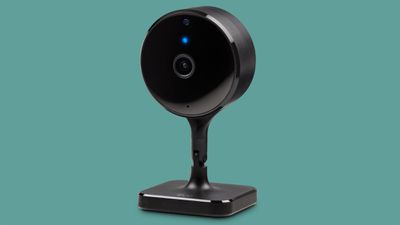
Priced at $150, the Eve Cam has been updated over the years with a handful of features that make it better than the original 2020 model. The Eve Cam features 1080p video recording, which hasn't changed, but the camera's built-in night vision functionality has improved somewhat.
When you're watching footage captured at night, it's a little clearer with more detail, though it has the same 16 foot range. The first version of the Eve Cam that came out in 2020 offered decent night vision, but I'm able to see small details better than before with the newer model. It's definitely not perfect, but most affordable home security cameras have questionable nighttime function.
Daytime video remains the same, and though it's 1080p, it's decent video quality even in low lighting conditions. I do wish that Eve was able to update the resolution, but there is apparently an Apple-mandated restriction that limits HomeKit Secure Video to 1080p resolution.
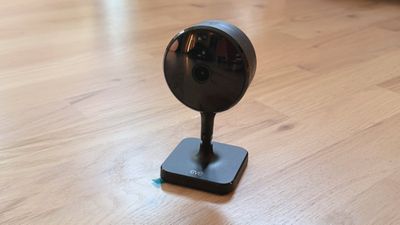
The Eve Cam has a 150 degree field of view, which is wide enough to capture a sizable portion of my office. I've been using it to keep an eye on my cat when I'm away, and it's enough range to see most of his favorite spots. If mounted up high, it would offer a good bird's eye view of a room, so it is ideal for indoor security as well as pet monitoring.
You can only get the Eve Cam in black, and it has a simple design. There's no mistaking it for anything other than a camera, but it does kind of blend into the background of where it's placed. The magnetic base has a 360 degree swivel and it is able to tilt, so it can be maneuvered into different positions.
Eve revamped motion detection with the updated model, and it uses image processing now, a different detection mechanism than before. With the change, you can stick it in a window to watch outdoors, and it is able to pick up motion. With the prior model, if you put it in a window, it wouldn't detect motion outside. Using it in a window is a good use case if you're in a situation where you can't have a true outdoor camera, like in an apartment.
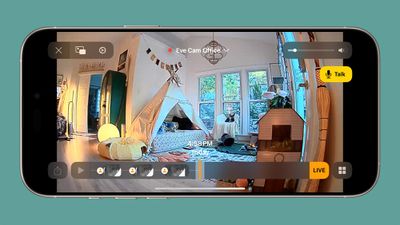
Eve Cam has a built-in microphone and speaker, so it records audio, plus you can talk to someone through it if you want. Just press the Talk button in the Home app when viewing the feed to do so.
There is a distinct benefit to cameras that use HomeKit, and that's privacy. If you're concerned with cameras recording you while you're home or uploading data to a cloud server somewhere, HomeKit Secure Video is what you want to be using. Video from the cameras is stored in iCloud, and it's not accessible to the company that made the camera. So Eve has no access to any footage recorded with an Eve Cam, nor does Apple, because it's essentially stored in your iCloud account. At any time, you can go to the camera's settings to erase all recordings.
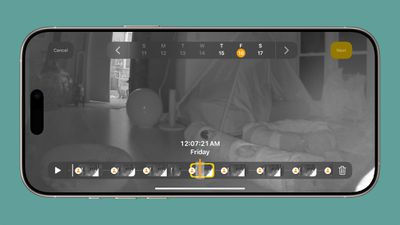
HomeKit Secure Video is end-to-end encrypted, and motion analysis is done on-device using a home hub. Video is accessed through the Home app, and you can see the last 10 days of footage. While the Home app isn't the most feature-rich interface for viewing camera footage, it's functional enough for most needs. There's a timeline, and you can see footage organized by day and time. Footage is recorded when motion is detected, so there isn't an option for continuous recording.
You do have the option to set different camera statuses for when people are home and for when no one is home. You can, for example, opt to have the camera off entirely when people are in the house, and have it stream and record when everyone is gone. Options include Off, Detect Activity (sends notifications, but nothing is recorded and no one can stream the video), Stream (no recording), or Stream and Allow Recording (records and saves footage when motion is detected).
The Eve Cam can be set to record and send alerts when any motion is detected, or when specific motion is detected, and that includes people, animals, vehicles, and packages.
What I don't like about Eve Cam and HomeKit Secure Video in general is that I can't change access based on each person in the house. Anyone that has access to a home has access to the camera feed, so if I have a camera in my office to watch my cat, my partner is also able to see the feed. There's no way for me to tweak the camera settings so that only I can see the footage from the camera in my personal space.
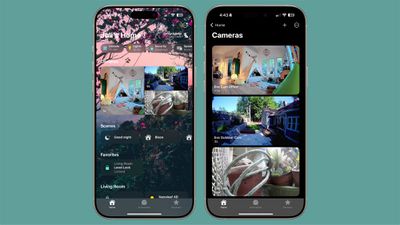
Other HomeKit Secure Video features include the option to select specific activity zones for motion detection, facial recognition based on people in your contacts, and options to toggle on or off notifications for movement. You can opt to receive a notification whenever motion is detected, complete with a snapshot.
What's also nice about Eve Cam and other HomeKit enabled cameras is the option to tie them in to automations and link them with other HomeKit devices. I can set up an automation that turns my HomeKit lights on when the camera detects motion, or have the lights go off when there's no motion in the room.
You need an iCloud+ account to use HomeKit Secure video. The $0.99 plan with 50GB of storage lets you set up one camera, while the 200GB plan supports up to five. If you want more than five cameras with HomeKit Secure Video, you need the 2TB plan.
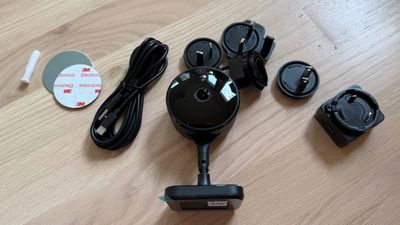
The Eve Cam does not work over battery, and it needs a constant connection. The prior model was microUSB, but the more recent model has USB-C, so it connects to power with a USB-C cable. It's a small change, but it's always nice to get rid of another microUSB cable.
When the Eve Cam is recording, there is a status light, but you can turn it off. You can also turn off the red night vision light when it's dark if it's in a room where the light is distracting.
Since Eve Cam is a HomeKit camera and footage is viewed in the Home app, you can access it on any of your Apple devices. That includes the iPhone, iPad, Mac, and Apple TV.
Bottom Line
If you want the privacy and peace of mind of HomeKit Secure Video, the Eve Cam is worth checking out. It's a good camera, but it's limited to 1080p footage and it is more expensive than some of the other HomeKit Secure Camera options on the market.
There's a lot more competition now than there was when Eve Cam first came out, and while it's nice to see features added over time, I'd like to see even more from Eve.
How to Buy
Eve Cam can be purchased from the Eve Website or from Apple for $150. Amazon also has the Eve Cam for a slight discount.
Note: Eve provided MacRumors with an Eve Cam for the purpose of this review. No other compensation was received.



















Top Rated Comments
If you have a HomeKit camera that records at 2k, it was recording to a SD card. Not HKSV.