

Elgato's Eve lineup of smart home devices is one of the largest contributors to the HomeKit ecosystem, with a variety of sensors and switches for inside and out, including five more products announced a couple of months ago.
We reviewed a set of the early Eve products two years ago, when we found a solid set of sensors that were hampered by bugs in the early days of HomeKit. HomeKit has come a long way since that time, making it much more stable and useful, so many of our early qualms have been resolved and we were impressed by the new Eve Degree temperature monitor released earlier this year.
Two of the other products in the Eve lineup are the Eve Light Switch, a rather typical smart light switch, and Eve Motion, a battery-operated motion sensor. I've been using both of these for a few months, and I've found them to be quite useful in automating my home.
Eve Light Switch
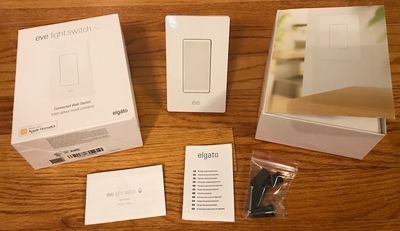
There are a number of HomeKit-compatible smart switches on the market, including one from iDevices that I looked at earlier this year. The Eve Light Switch was, however, the first entrant into this category late last year, and it remains a worthy competitor.
Installation and Setup
If you've ever swapped out a light switch, it's a pretty straightforward process, and installing the Eve Light Switch isn't much different. As always, make sure you turn off power at the circuit breaker for safety before getting inside the junction box.
The Eve Light Switch is a lot bulkier than a traditional switch in order to accommodate all of the electronics, so you'll need to make sure you have enough room in your junction box, and you'll also need to have a neutral wire present at the switch location in order to provide continuous power to the switch. If you don't have one, you'll have to run some new wiring to the switch (which may not be a do-it-yourself job) or else select another location.
Unlike the iDevices Wall Switch, the Eve Light Switch can only be used in single-pole configurations. So if you've got a three-way circuit where a single light is controlled from two different switches, for example, you won't be able to use the Eve Light Switch.
Once you've determined the switch you want to replace is an appropriate location for the Eve Light Switch, it's just a matter or removing the old switch, transferring the wires over to the Eve Light Switch using the included wire nuts, shoving everything back into the wall, and screwing it all together.
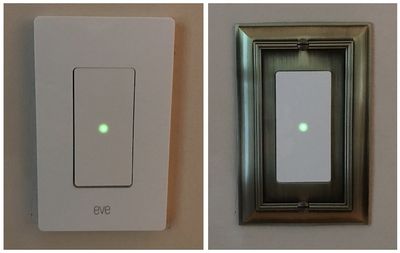
From there, you have a decision to make. Elgato includes a two-piece face plate for a clean look, which requires that you screw on a snap plate over the switch and then snap on the face plate. Alternatively, you can skip those two pieces and put your own face plate on. Metal face plates may decrease the Bluetooth range of the switch, but I haven't experienced any issues with mine.
With everything put back together, it's time to turn the circuit breaker back on and make sure tapping the switch properly turns your light on and off. From there, head to the Eve app to get finish setting up the switch and getting it registered with your HomeKit network.
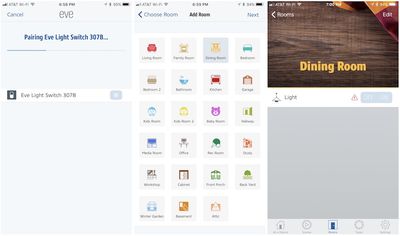
When you're done with setup on your device, you'll be all set to control the Eve Light Switch using the Eve app, the built-in Home app on iOS, or Siri. And as always, you can set up scenes to control the switch in conjunction with other HomeKit accessories, such as a "Good night" scene that turns off the lights, locks the doors, and adjusts the thermostat when heading to bed.
Usage
One thing my whole family loves about the Eve Light Switch is that the switch is actually just one big capacitive touch sensor. Tapping anywhere on the switch will turn the light on or off, and a green light in the center of the switch when it's off helps make it easy to find and hit in the dark.
The sensor makes for a big target, and it's easy to activate it when carrying things, even if you have to use an elbow. That's in contrast to the iDevices Wall Switch, which is a more traditional paddle design that requires you to physically press the top or bottom half of the switch to turn it on or off.
The Eve Motion communicates via Bluetooth, which conserves energy but somewhat limits its range. It can connect directly to your phone via Bluetooth, but if you have an Apple TV or iPad set up as a hub for your HomeKit setup, it'll ensure that all notifications and scenes function properly even when your phone isn't in range. Bluetooth range is much shorter than Wi-Fi, however, so you could run into some difficulty if your hub is located far from the switch.
Eve App
Once you've set up your light switch in the Eve app, you'll find that it's also a very full-featured HomeKit control app, showing all of your HomeKit devices around the house with options to set scenes, timers, rules (triggers), rooms, and zones (groups of rooms).
I won't go into too much detail on the app, as we've covered it fairly extensively in previous reviews such as the Eve Degree, but it's definitely a high-quality app for managing not just Eve products but a variety of HomeKit-compatible accessories.
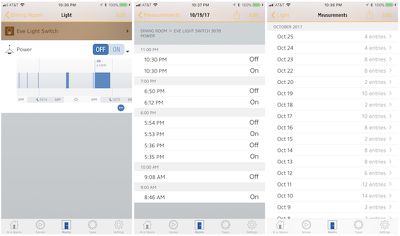
The Eve app keeps a log of events such as when the light switch is turned on and off, which you can view in graph or table form. The various rules and scenes also make it easy to set up products to work together in scenarios such as activating multiple products at once or using an event on one accessory to automatically trigger a change in the state of another one.
Eve Motion
The Eve Motion is a simple product designed to do only one thing: sense motion in a room. Its 120º field of view and 30-foot detection range help it recognize whenever someone enters a room, and the fact that it's powered by a pair of AA batteries means you can put it almost anywhere. The Eve Motion is also IPX3 water resistant, meaning it can withstand splashes and sprays, and with an operating temperature range of 0º to 130º F, it can be used outdoors as well as inside.
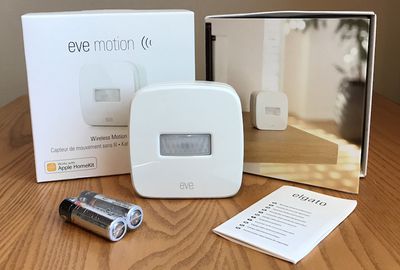
Setup is straightforward, and once you insert the batteries and set the Eve Motion in an appropriate location, the Eve app walks you through step-by-step to allow you to pair with the Eve Motion, set sensitivity for the motion sensing, and set a Siri name for the sensor. If you'd like to integrate with other Eve or HomeKit products, you can set up scenes by specifying triggers and conditions.
As with the Eve Light Switch, the Eve Motion connects to your iOS device over Bluetooth, and if you have an Apple TV or iPad set up as a HomeKit hub, it'll be able to integrate with all of your other smart home devices at all times.
On its own, the Eve Motion is rather limited, basically restricted to pushing notifications whenever motion is sensed. This can come in handy if you want to mount it on your front porch, inside your front door, or in a seldom-used room if you want to be alerted whenever anyone's presence is detected. Within the HomeKit ecosystem, you can restrict notifications to only certain times of the day or, using geofencing, to only times when you either are or are not home.
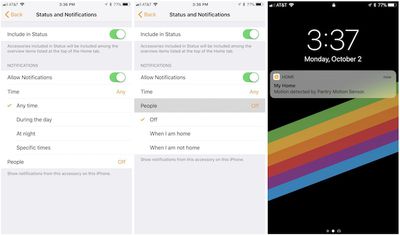
The real power of the Eve Motion, however, is its wireless connectivity that integrates with the rest of the Eve platform and HomeKit, which lets you use the Eve Motion to trigger actions by other smart home components. For example, you could automatically turn on a light when motion is detected. Rules can also use multiple criteria, so you could set up an "I'm home" scene that turns on lights if it detects motion at your front door but only if it's after sunset. Or you could arrange to have a fan turn on when you enter a room, but only if the temperature is above 72º F.
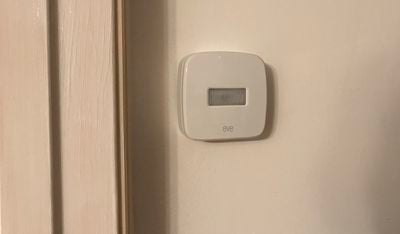
One of the setups I tried with the Eve Motion was inside a pantry in my kitchen, pairing it with an iDevices Switch to try to automatically turn on a light in the pantry when the door was opened. The setup worked, but it's not instantaneous, sometimes taking as much as five seconds for the Eve Motion to recognize the motion of the door opening and me moving around in front of it, passing the event to HomeKit for processing the trigger, and sending a signal to the iDevices Switch to turn the light on it.
It wasn't ideal, considering I am frequently spending less time popping my head into the pantry than it takes for the light to come on, but it was an interesting test to push the limits of how HomeKit products can work together.
(November 2017 Update: Elgato has released updated firmware for the Eve Motion and Eve Light Switch that greatly improves response time in automations like this by leveraging updated Bluetooth architecture for HomeKit that was introduced in iOS 11.)
Other less time-sensitive setups worked better, such as triggering lights to come on when motion was detected on my front porch. The slight lag in response for the scene to activate once motion is detected isn't really significant in these contexts.
Wrap-up
The Eve Light Switch carries a list price of $49.95, and a few third-party sellers at Amazon are even knocking a few dollars off of that, which makes for a pretty decent deal in the world of connected light switches where many are closer to $100. It's a lot more than the buck or two you can spend on a traditional toggle switch at the low end, but there's obviously a lot more technology packed in and it comes with much more functionality. Your cash outlay will add up quickly if you want to use any of these smart switches throughout your home, so at least for now most users will want to be fairly selective about where they choose to install them.
The Eve Motion is priced at $49.95, and it's available through a number of retailers including Amazon or directly from Elgato. As a simple motion sensor without any other Eve or HomeKit products, it's not really worth investing in, but as part of a larger smart home setup, it can be a handy addition to help your other accessories do more.
Note: Elgato provided the Eve Light Switch and Eve Motion to MacRumors free of charge for the purposes of this review. No other compensation was received. MacRumors is an affiliate partner with Amazon and may earn commissions on purchases made through links in this article.

















































Top Rated Comments
This Elgato system needs a neutral wire and at least here in Canada 95% of homes don’t have it in the box.
In my experience, Bluetooth-based HomeKit devices are slower to respond (iOS 11 and tvOS 11 improved things, but still slower than WiFi) and have more limited range (cannot be remedied with mesh WiFi routers, just additional iPad or Apple TV).
It's also a bit frustrating that Eve Light Switch does not support gesture of any kind. No dimmer control, for instance.