

In our ongoing iPad Air 2 keyboard review series, we've looked at the ClamCase Pro and the BrydgeAir. Today we've got a look at another popular iPad keyboard that MacRumors readers suggested we review, the Qode Ultimate Pro from Belkin.
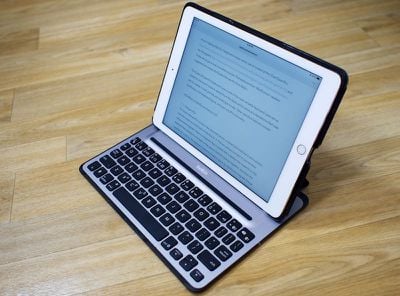
The Qode Ultimate Pro Keyboard Case is one of the more versatile keyboard cases we've looked at, because it's able to detach from the keyboard to serve as a standalone iPad case and it's usable in both portrait and landscape modes. Other standout features include backlit keys, a full keyboard layout, and auto on/off functionality.
What's in the Box and Setup
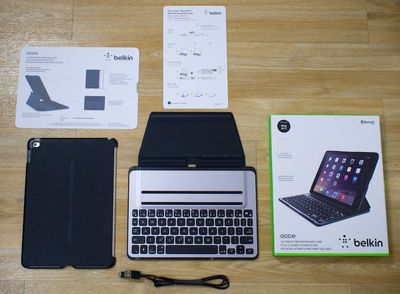
The box includes the two-piece keyboard, an accompanying micro-USB charger, and instructions on how to get it up and running. Setup is similar to any other Bluetooth device, with pairing done by pressing the Bluetooth button on the keyboard and selecting the keyboard in the Settings menu of the iPad.
We ran into some occasional difficulties with Bluetooth, where we had to remove the device completely from the list of known devices and re-pair, but for the most part, the Bluetooth connection was solid in our testing.
Design
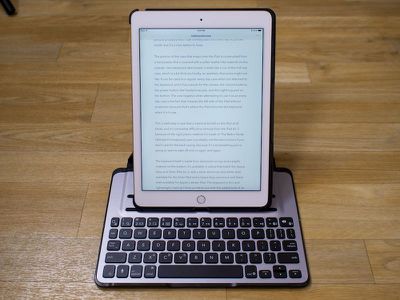
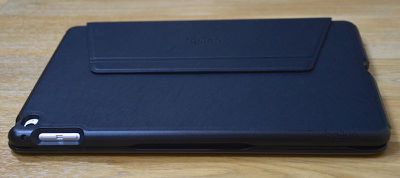
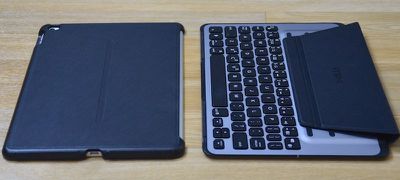
The Qode Ultimate Pro comes in two separate pieces: a detachable keyboard and a plastic case that snaps on to the back of the iPad Air 2. The two pieces connect to one another using several magnets. There's a magnetic flap covered with a leather-like material on the keyboard that attaches to the back of the case to hold the pieces together, and then the case fits into one of two slots on the keyboard where it is held in place by additional magnets (these magnets also control the automatic connection between your iPad and the keyboard). The two different slots allow for slightly different viewing angles.
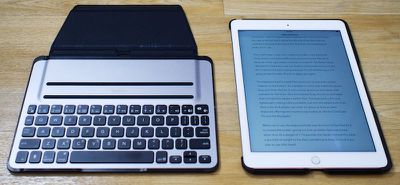
Using magnets to attach the two pieces of the case together allows the iPad to be used without the keyboard attached or with the keyboard folded back, providing several possible use cases not possible with other keyboard cases on the market.
There's a downside though -- the magnets used in the Belkin Qode system are not very strong, so if you tilt it wrong or pick it up in the wrong way, the two pieces can detach. If you picked the case up by the keyboard, for example, and tilted it forward just slightly as you might if you were moving it to a new location, there's a good chance your iPad could topple off the keyboard and hit the floor.
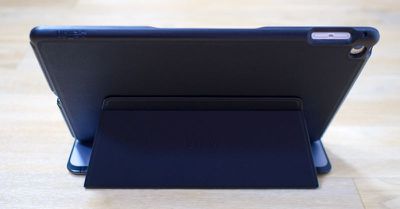
For that reason, you need to be careful when using this case, taking a few extra seconds to watch how you pick it up when it needs to be repositioned. When used in a lap, it's also possible for the iPad to fall backwards because it's so top heavy. The keyboard portion itself is too light to balance out the iPad and the magnets aren't able to fully handle the weight of the tablet when the keyboard is not placed on a flat surface. We had the iPad fall backwards and detach several times during testing on a lap. This is not an issue on a flat surface, however.
You can also use the Qode Ultimate Pro keyboard with the iPad attached in portrait mode, something that's not possible with many of the available keyboard cases on the market. In this position, it's a little more prone to falling backwards due to the weight. The magnets are a bit weak, but it's worth pointing out that this system is convenient -- it's easy to remove the iPad from the keyboard and it snaps right back into place when you want to use it again. Most people probably won't use the keyboard with the iPad in portrait mode, but it's a nice option to have.
The portion of the case that snaps onto the iPad is constructed from a hard plastic that's covered with a softer leather-like material on the outside. Sans keyboard attachment, it looks like a run of the mill rear case, which is a bit thick and bulky, an aesthetic that some might not like. It leaves access to all ports on the iPad open, from the Lightning port to the volume buttons and the power button.
It can be used as a regular every day case when not attached to the keyboard, and it has cutouts for the camera, the volume buttons, the power button, the headphone jack, and the Lightning port on the bottom. The one negative when attempting to use it as an every day case is the fact that it leaves the left side of the iPad without protection because that's where the iPad slots into the keyboard when it is in use.
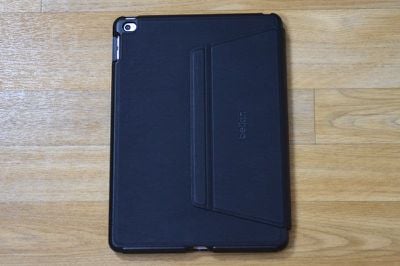
This is definitely a case that's meant to be left on the iPad at all times, and it's somewhat difficult to remove from the iPad Air 2 because of the rigid plastic material it's made of. The Belkin Qode Ultimate Pro keyboard case is probably not the best solution if you don't care for the back casing, because it's not something you're going to want to take off and on again and again.
The keyboard itself is made from aluminum on top and a plastic material on the bottom. It's available in colors that match the Space Gray and Silver iPad Air 2, with a silver aluminum and white shell available for the Silver iPad and a Space Gray aluminum and black shell available for Apple's darker iPad. The keyboard is thin and lightweight, making it fairly portable, but with the added bulk of an iPad in the thick plastic rear shell, it's about as thick as other keyboard offerings we've previously looked at, like the ClamCase Pro and the BrydgeAir.
When not in use, the keyboard folds over the front of the iPad Air 2 to protect the screen, giving it a nice, portable clamcase shape when shut. There's a rubber bumper at the edge of the keyboard that keeps the iPad's screen from hitting the keys when shut. At 1.13 pounds, the Qode Ultimate Pro adds some weight to the iPad, something to keep in mind if you plan to use it for travel, but it's not much heavier than other solutions on the market.
The Keys
Typing on the Qode keyboard does not feel as satisfying as typing on the keyboard of a MacBook Air or a MacBook Pro because key travel is shorter and actuation force (the amount of force necessary to press a key) isn't as great. Because of this, the keys don't feel substantial -- they're soft, squishy, and not as springy as the keys on a MacBook Air or Pro.
Compared to other iPad keyboards like the ClamCase Pro and the BrydgeAir, the Belkin's keys have an inferior feel. That said, it's not hard to adapt to using the Qode keyboard even though the keys feel different and it didn't have a significant impact on our typing speed. We did see some mistakes on the Qode due to the smaller key spacing compared to one of Apple's keyboards. The keys are closer together, which takes some time to adjust to.
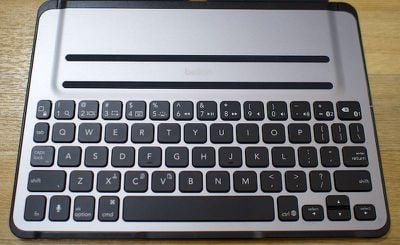
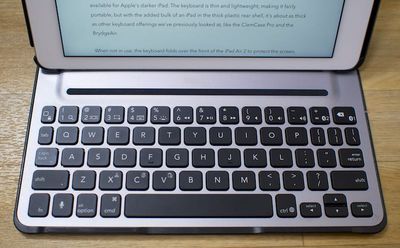
The Belkin Qode doesn't offer a desktop-style typing experience when it comes to key feel, but it does boast the same number of keys that are on a laptop keyboard. It has option, command, control, function and tab keys, plus a full row of function/number keys that offer useful iPad-specific commands. Cutting, copying, and pasting can be done using the command key as on a regular keyboard.
There's a key for accessing the home screen, which doubles as a way to lock the iPad when holding down the function key. There are also keys for initiating Siri, accessing search, switching to multitask view to see open apps, taking a screenshot, bringing up the on screen keyboard, controlling sound, and controlling media playback. The keys for accessing open apps (mimicking a double tap on the home button) and for taking a screenshot are unique and are not offered on all iPad keyboards.
For using the keyboard in the dark or in dimly lit rooms, there's a built-in backlight. There are three levels of brightness that can be selected by tapping the brightness key on the keyboard several times. Using the backlighting will drain the keyboard's battery faster.
Battery
The Qode has excellent built-in battery saving features that give it some of the longest battery life of any portable iPad keyboard available on the market. According to Belkin, it can last for up to a year on a single charge (with two hours of usage a day) if the keyboard backlighting isn't turned on.
Whenever the keyboard is attached to the iPad, the magnets automatically turn on Bluetooth, allowing the iPad to connect. When the iPad is removed, Bluetooth shuts off, saving battery. This automatic on and off feature works well -- the iPad connects within seconds when docked to the keyboard and shuts off quickly too. Bluetooth also shuts off after approximately 10 seconds of inactivity to save battery, a feature that can be interruptive if you pause in your writing for a moment or two because it causes the keyboard to turn off even when you're still using it.
The automatic feature means the keyboard only comes on when the iPad is docked, but it can be triggered to be on all the time by folding back the leather flap that connects the keyboard to the iPad case. When this flap is folded back, the magnet keeps the keyboard on so it can be used on a standalone basis with any Bluetooth device, including Macs and iPhones.
When the battery on the keyboard does run low, it can be charged via micro USB. There is no way to check the battery life on the keyboard, so it may be a good idea to charge every few months just to make sure it doesn't end up dead on a day when it's needed.
Other Features
The Qode has the ability to pair with two different devices at the same time and switching between those devices can be done by holding down the function key and tapping + or delete, also labled as Bluetooth keys. This is a useful feature that's not present on most iPad keyboards.
There's also a "Soundflow" design to boost the iPad Air 2's sound to be louder than what's available without a case, but we didn't notice a huge a difference in sound quality or volume with and without the case.
Who's It For?
Belkin's Qode Ultimate Pro is one of the more versatile keyboard cases on the market, and it's a good pick if you're looking for something that can be used in multiple ways -- as a standalone case, in landscape mode, in portrait mode, and with devices other than the iPad. If you appreciate the flexibility to use an accessory in many different ways, this may be the keyboard for you.
The keys are a bit soft and shallow compared to some other cases on the market, but it's still possible to type nearly as fast as a one can type on a standard MacBook Air or Pro keyboard. Built-in backlighting, a full set of keys, and a nice set of iPad actions make the keyboard appealing despite its less desirable key feel.
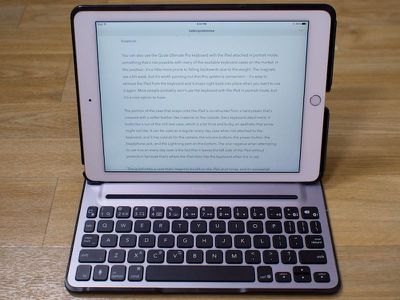
For those of you who want a keyboard that can be used in a lap or on a surface that's not solid and flat, the Qode Ultimate Pro is going to be frustrating because it's not able to support the weight of the iPad plus the plastic case when on an unstable surface. If you don't mind that aspect of the keyboard or the bulk that the case portion adds to the iPad, the Qode is a solid choice.
Pros:
- Full set of keys
- Backlighting
- Versatile, works in landscape and portrait mode
- Works with two devices
- Lots of built-in iPad shortcuts
- Long battery life
Cons:
- Magnets are weak and don't support iPad weight well
- Keys are soft and key feel isn't the best
- Can't be used reliably on unstable surfaces
- Case is bulky
- Bluetooth is sometimes unreliable
- No battery indicator, short sleep times can be inconvenient
How to Buy
The Belkin Qode Ultimate Pro Keyboard Case for the iPad Air 2 can be purchased from the Belkin website for $149.99 in black or white. It's also available from Amazon at the slightly lower price of $132.
















































Top Rated Comments
As a matter of fact, Apple has licensed the iPad design patents to Microsoft (link (https://www.macrumors.com/2012/08/13/apple-has-licensed-ios-design-patents-to-microsoft-agreement-bans-cloning/)).
Many believe that Apple will introduce their own keyboard smart cover when the iPad Pro launches. I believe that it may somehow involve the new butterfly key mechanism found in the new MacBook. Either way, Apple is still innovating, much less copying Microsoft in any way.
As for this keyboard, the dealbreaker for me is that the magnet doesn't seem to hold it well. It's neat that the case comes apart. I'd love to have a keyboard case that I don't have to bring the keyboard part with me if I don't need it. It's too bad that the Clamcase doesn't have a release mechanism or come with a black back material. My wife likes hers but I don't always want a keyboard on my iPad.
The caveat, for me, is that the bluetooth sleeps after just a cople of minutes of non-use. This is clearly a decision designed to save battery life (which is listed at a year). For me, though, it's a terrible choice. If I am using it to take notes (for example), there will be many periods when I pause to listen. Every time, the bluetooth will go to sleep. As a result, I spend an inordinate amount of time every day waking this thing up. I'd happily trade half of the battery life or more for bluetooth that doesn't constantly time out.