

Anker PowerPort Atom PD 2 Review - MacRumorsOpen MenuShow RoundupsShow Forums menuVisit ForumsOpen Sidebar
Skip to Content

Review: Anker's Compact PowerPort Atom PD 2 Offers Up to 60W of Power for Charging Your Devices

by

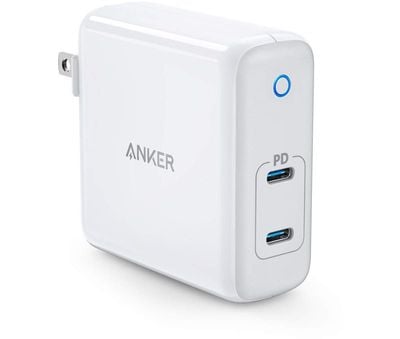
Anker in late April announced the launch of its latest power adapter for charging Apple devices, the PowerPort Atom PD 2. Anker's newest PowerPort offers two USB-C charging ports and up to 60W of power in an enclosure that's smaller than standard stock laptop chargers.

The PowerPort Atom PD 2 uses Gallium nitride or GaN, a new material that allows semiconductor components to be shrunk down, leading to smaller charging accessories. Anker has been updating its power adapter line with GaN, bringing more compact charging options that take up less space.
ankerpdport2
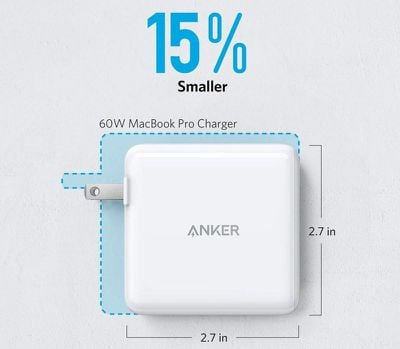
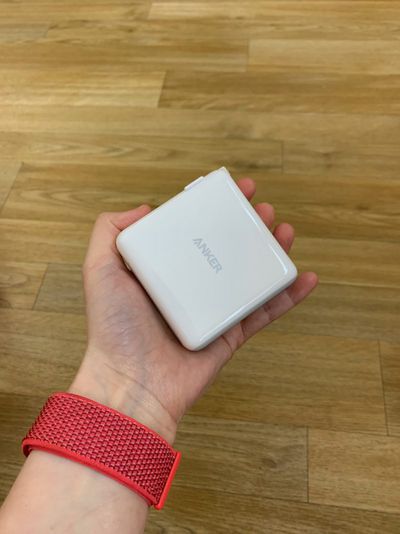
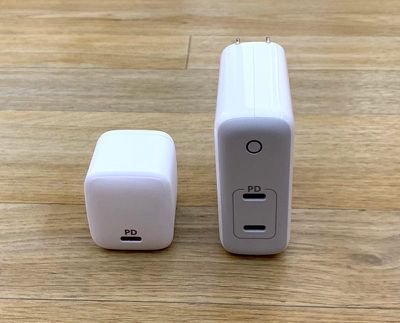
Design wise, the PowerPort Atom PD 2 is smaller than your standard 61W or 87W charger for the MacBook Pro, but it's not as small and compact as the lower power 30W PowerPort Atom PD 1. It measures in at 2.68 inches by 2.72 inches and it's just over an inch thick.

Comparatively, Apple's 61W USB-C Power Adapter is 2.85 by 2.85 inches, and it's about the same thickness, so you're not saving a lot of space with the PowerPort Atom PD 2, but as explained below, it's a lot more versatile.
ankervs60wmbp
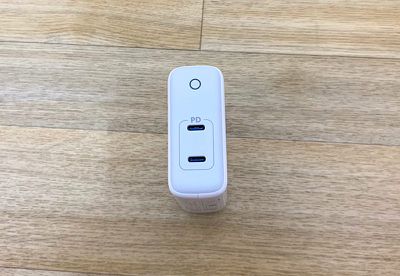
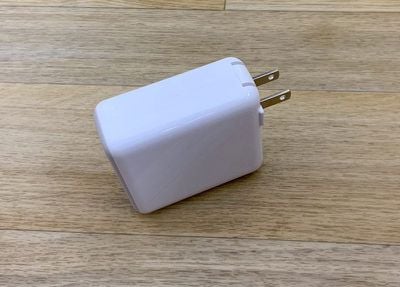
It's made from a shiny white plastic material with a gray face, an Anker logo at the side, and a charging indicator to let you know when it's in use. At the back, there's a set of retractable prongs that you can fold up when the power adapter isn't in use to make it easier to carrying around.

There are two USB-C ports built into the PowerPort Atom PD 2, which none of Apple's chargers can boast. With two USB-C ports, you're not limited to charging one USB-C device at a time. There are no cables included, so you're going to need to supply your own.
powerportpd2front
With the Atom PD 2, you can charge a MacBook and an iPad Pro at the same time at full speed using USB-C to USB-C cables, or charge a MacBook or ‌iPad Pro‌ and fast charge an iPhone using a USB-C to Lightning cable. There's a maximum of 60W of power available, so it can charge a 13-inch ‌MacBook Pro‌ at normal charging speed, just like the standard 61W power adapter from Apple.
ankerpowerportpd2prongs
You could also potentially use this to charge a 15-inch ‌MacBook Pro‌, though it would charge your machine more slowly than an 87W power adapter. Still, 60W is enough to keep your ‌MacBook Pro‌ going with a moderate work load.

When you're charging a higher watt device like the 13-inch ‌MacBook Pro‌, you're not going to want to have another device charging at the same time to make sure all 60 watts are going to the ‌MacBook Pro‌. If you plug in multiple devices, the power is split and managed between devices.
IMG 4212
I don't have a 13-inch ‌MacBook Pro‌, but the PowerPort Atom PD 2 was able to charge my MacBook at the appropriate speed and fast charge my iPhone XS Max at the same time, providing a 50 percent charge from near dead in approximately 30 minutes. It also worked well with my 15-inch ‌MacBook Pro‌ for my standard workload, which involves web usage, Photoshop and other image editing tools, writing apps, and other miscellaneous apps.
ankerpd1pd2
Like all Anker devices, the PowerPort Atom PD 2 uses high quality components and features UL certification to ensure its safety.

Bottom Line

Anker's charging $54.99 for the PowerPort Atom PD 2, while Apple charges $69 for its 61W USB-C Power Adapter, which makes the PowerPort Atom PD 2 the obvious choice if you need an extra power adapter. Not only is it more affordable, you also get two USB-C ports that can be used for charging a single device at the full 60W or two devices with the 60W of power split between them.

If you have multiple USB-C devices at this point or want to be able to fast charge your iPhone with a USB-C to Lightning cable, Anker's PowerPort Atom PD 2 is a good buy.

How to Buy

Anker's PowerPort Atom PD 2 can be purchased from Amazon for $54.99.

Note: Anker provided MacRumors with a PowerPort Atom PD 2 for the purpose of this review. No other compensation was received.


Tag: Anker

Top Rated Comments

98 months ago
I believe that Anker has a better reputation than Aukey or Rav in terms of safety.
Score: 2 Votes (Like | Disagree)
jclo Avatar
98 months ago
Not really an "obvious choice" if the two ports can't simultaneously charge a MacBook and an iOS device. Just plug the iOS device into the MacBook and save $55.
That should probably say the obvious choice if you need an extra power adapter, which I've now added. Probably not worth the extra money if you've already got a 61W charger and don't need extra USB-C ports. Some people like to have multiples for work and office, or for charging in different locations.

You can certainly simultaneously charge a MacBook and an iOS device. The MacBook will charge at the full 30W and the iPhone will fast charge. You're just not going to be able to charge a 13-inch MacBook Pro at its full speed while also charging another device at the same time. If your battery is pretty full, though, and you're not doing something system intensive, you probably don't need the full 60W of power all the time for a MacBook Pro.
Score: 2 Votes (Like | Disagree)
TheIntruder Avatar
98 months ago
Like all Anker devices, the PowerPort Atom PD 2 uses high quality components and features UL certification to ensure its safety.
Possible to clarify the statement, "...uses high quality components," please? Was there a tear down?
The few teardowns of Anker wall adapters I've come across have show that they're good quality, though no one is perfect.

But, before anyone takes that sentence to mean that all Anker adapters are UL-listed, don't.

This particular one may be, but most of them aren't. Some are TÜV certified. Not sure if any of them have ETL certification.


Unfortunately, the marketing of accessories like this can deceptively impliy that the more marks that are plastered on them, the safer they are.

But, each mark has specific, limited meaning. For something like the FCC mark, the only thing that covers is that it won't cause radio interference. It has jack to do with electrical safety. All the RoHS mark means is that it complies with the efforts to cut down on hazardous materials in its construction, like lead-free solder.

Some regional and country-specific marks may also appear, which may be compulsory for legal sale in those areas, but they're not necessarily the same as undergoing an optional certification process from a third-party, independent organization like the UL, especially when self-certification is involved (hello, 737MAX).
Score: 1 Votes (Like | Disagree)
H3LL5P4WN Avatar
98 months ago
Possible to clarify the statement, "...uses high quality components," please? Was there a tear down?
I mean you could float one iFixIt's way, but Anker's earned their reputation.
Score: 1 Votes (Like | Disagree)
az431 Avatar
98 months ago
Not really an "obvious choice" if the two ports can't simultaneously charge a MacBook and an iOS device. Just plug the iOS device into the MacBook and save $55.
Score: 1 Votes (Like | Disagree)

Popular Stories

iPhone Duo Display Cracking

Apple Alerts Stores to iPhone Duo's Display Cracking Issue

Friday October 30, 2026 3:20 pm PDT by
In a memo shared with Apple Stores and Apple Authorized Service Providers this week, and later obtained by MacRumors, Apple provided technicians with guidance on how to diagnose and address the iPhone Duo's inner display cracking issue. If a customer reports the issue, Apple advised technicians to inspect the iPhone Duo and repair or replace it in accordance with their standard procedures....
iPad mini OLED feature 1

Apple Executive Comments on New iPad Mini Lacking 120Hz Display

Thursday October 29, 2026 1:47 pm PDT by
While the new iPad mini has an OLED display, the device does not support ProMotion, meaning the display's refresh rate is limited to 60Hz instead of 120Hz. ProMotion support would have allowed for the iPad mini's refresh rate to automatically adjust from 10Hz to 120Hz depending on the content being displayed, but evidently Apple has kept the feature exclusive to the iPad Pro among iPad...
Pinched iPad Mini

Apple Avoids Showing Pinched Fingers on iPad Mini Page in South Korea

Thursday October 29, 2026 11:52 am PDT by
In the U.S. and most other countries, Apple's website shows the new iPad mini being held by pinched fingers, but this is not the case in South Korea. The new iPad mini shown with pinched fingers on Apple's website in the U.S. On its South Korean website, Apple simply shows an image of the iPad mini on its own. The new iPad mini shown without pinched fingers on Apple's website in South Korea ...
Latest Stories
Apple Watch Ultra 4 Hits All-Time Low Price With Amazon's $99 Discount
19 hours ago
Reminder: Apple's Big Discount on Beats 360 Ear Cushions Ends Today
19 hours ago
Here's a New Tour of Apple's HomeView Software
19 hours ago
Apple Reveals New iPad Mini's Battery Capacity
20 hours ago
Top Stories: Apple's Big MacBook Pro, iPad mini and iMac Updates
21 hours ago
'Pluribus' Season 2 Reportedly Starts Production Today
1 day ago
iPhone 18 Pro Sales Surge in China, Offsetting Decline in U.S. and Japan
1 day ago
HomeView Software 27.2: Wallpapers, Control Center, and More
1 day ago
Apple Alerts Stores to iPhone Duo's Display Cracking Issue
2 days ago
iOS 27.3 Will Enable These Apple Intelligence Features in China
2 days ago
Apple Says iOS 27.3 Beta Coming Next Week
2 days ago
Apple's Flash Storage Suppliers Are Finally 'Getting Their Revenge'
2 days ago
14 New Things Your iPhone Can Do in iOS 27.2
2 days ago
iPhone Duo Review: One Week Later
2 days ago
Samsung Mocks iPhone Duo Display Cracks in New Ad Campaign
2 days ago
The MacRumors Show: OLED MacBook Pro, iPad Mini 8, and More
2 days ago
MacBook Pro With Touch Display: 15 More Details Revealed
2 days ago
Russia Places Apple on State Surveillance Registry
2 days ago
Halloween Weekend Brings Discounts on Apple Accessories and Pre-Orders
2 days ago
Apple Has Released More Than 25 New Products in the Past Two Months
2 days ago
Local Code Launches as Free, Private AI Assistant Tool for Mac
2 days ago
Apple Acquires Ascend.io
2 days ago
HomePod Mini 2 Launches Today: All the New Features
2 days ago
AirTag 2 4-Pack Drops to New Low Price of $69.99
2 days ago
Rian Johnson's iPhone Camera App Goes Viral
2 days ago
Where Did All the iPhone Duos Go? Mostly to Apple's Stores
2 days ago
Apple's Touchscreen MacBook Pro Could Ship 1.5M Units in 2027
2 days ago
New Apple TV 4K and iPad Mini: RAM Amounts Revealed
2 days ago
Apple Executive Comments on New iPad Mini Lacking 120Hz Display
3 days ago
Here's a Hands-On Look at HomePod Mini 2's New Two-Tone Colors
3 days ago

🔗 Related Apple News & Rumors

Stay updated with the latest Apple ecosystem news and verified rumors









































