

With Qi2 chargers hitting the market in increasing numbers, I've recently spent some time testing out two similar "tree-style" 3-in-1 desktop chargers from Anker and Belkin. 3-in-1 chargers like these, which are capable of charging an iPhone, and Apple Watch, and another device such as AirPods, all wirelessly, have been my go-to bedside charger style ever since the introduction of MagSafe and are very popular with users in general, so I thought it would be worthwhile to see how a couple of the latest options perform.
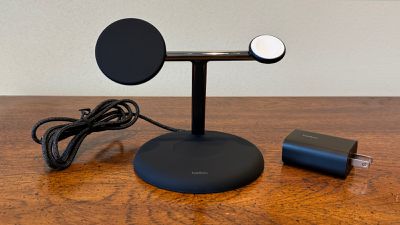
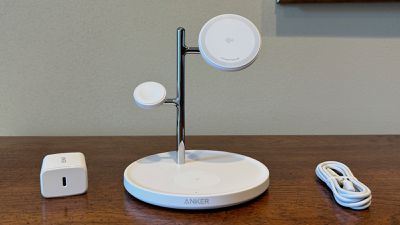
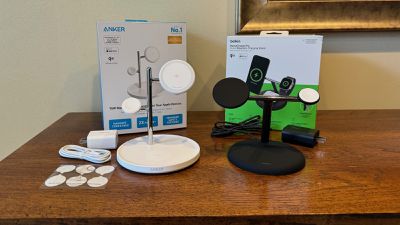
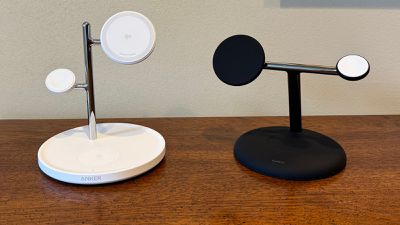 Anker (left) and Belkin (right) Qi2 3-in-1 chargers
Both the Anker MagGo Wireless Charging Station (3-in-1 Stand) and the Belkin BoostCharge Pro 3-in-1 Magnetic Wireless Charging Stand with Qi2 15W offer 15-watt Qi2 phone charging support that is equivalent to MagSafe without needing to license or source components from Apple, while official fast-charging pucks are used to ensure maximum Apple Watch charging performance. The base of each model includes a standard 5-watt Qi charging spot, which is plenty to charge up any AirPods model that includes a wireless charging case. Both the Anker and Belkin models are available in black or white with color-matched cables and power adapters. Anker uses a standard USB-C to USB-C cable while Belkin uses a fixed cable that ends in a USB-C connector, so that's potentially something to consider one way or the other for either aesthetics or product longevity.
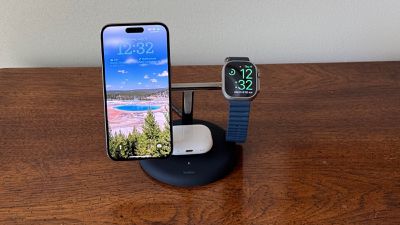
While both chargers utilize a relatively heavy base for stability and as an AirPods charging spot, their "trunk and branches" with elevated charging pads for an iPhone and an Apple Watch differ slightly in design, with the Belkin model using a forward-angled main support topped by a single horizontal bar with the phone charging pad at one end and the Apple Watch charger at the other, while the Anker model uses an offset vertical trunk with separate phone and Apple Watch charging pads at different heights. The Anker design results in a bit narrower overall profile with an iPhone and Apple Watch mounted on the chargers, but the Apple Watch can end up somewhat hidden behind the phone in certain configurations such as with the phone in landscape StandBy mode.
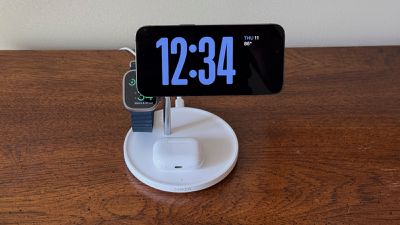
The base on the Belkin model is sort of a flat mound with a small depression to help guide your AirPods to the proper charging spot, while the Anker base is more dish-like with a small rim surrounding a flat top. The AirPods charging spot is a separate component embedded in the surface of the base and it's made of a slightly different material, so you can see the outline of the charger to help guide placement, plus there's a light gray Qi logo in the middle of the charging spot. Neither model offers magnets in this charging spot to help make proper placement even easier.
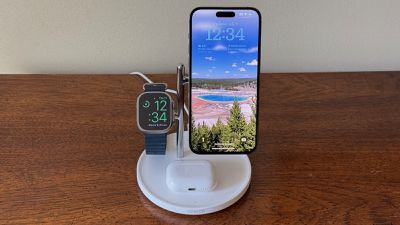
Overall, the Belkin design offers significantly more stability for a mounted phone in my experience, as tapping the phone or generating vibrations on the desk surface will cause the phone to wiggle a fair amount while on the Anker charger, but it remains nearly rock steady while on the Belkin charger. If you're planning to use one of these chargers on a desk or other situation where you'll be interacting with the phone while it's charging, this difference alone is enough to argue for the Belkin in my opinion, as the amount of wobble on the Anker charger is significant.
Looking at the Qi2 phone charging pad itself, the Belkin version has the advantage of an adjustable angle anywhere between fully vertical and fully horizontal, letting you position it however you prefer. The phone pad on the Anker model is at a fixed angle that should work for most people, but the option of adjustments on the Belkin model is a nice feature. The Belkin phone charger also has an understated look with a plain black or white surface matching the base, while the Anker Qi2 charging surface is white on both the black and white model and it has Qi2 branding and "Wireless Power IQ" text on it that makes for a less clean look.
Both chargers were able to take an iPhone 15 Pro Max from 30% to ~80% in about an hour, pretty much exactly in line with what I see from Apple's official MagSafe charger. The charging rate starts to slow significantly beyond that to prevent overheating and overcharging, with all three chargers bringing the phone to around 95% after 90 minutes.
When it comes to the Apple Watch charging puck, the Anker and Belkin units are essentially identical, which makes sense considering these parts are sourced from Apple. On both models, the puck itself is white on both black and white color options. I'd love to see some other puck color options from Apple to help third-party manufacturers offer more flexibility in their own color offerings.
Given that these are official Apple Watch modules, they both suffer from one of the common issues some users have complained about with Apple Watch chargers, and that's the fact that the watch has a tendency to rotate while on the charger. While the watch attaches to the charger magnetically, there's nothing offering any rotational stability, so the weight of the watch or band can result in the watch twisting a bit while on the charger.
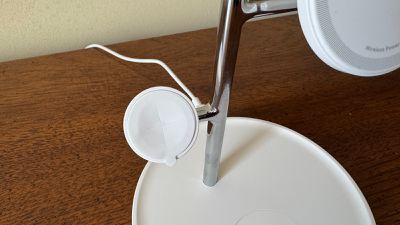
To its credit, Anker has tried to address this by including a sheet of round stickers that can be placed on the surface of the charging puck to increase friction and reduce the watch's tendency to rotate. This solution does work pretty well, but the sticker is a bit of an eyesore with a tab to facilitate removal hanging over the edge of the puck and a plus-shaped cut in the center of the sticker to allow it to conform to the slightly concave surface of the puck.
The tree-style designs of these chargers means neither one supports Nightstand Mode for the Apple Watch, as the support arms for the chargers get in the way of the band when trying to turn the watch horizontally, and even if they didn't, the weight of the band would cause the watch to rotate back to nearly vertical. This may not be a deal-breaker for many users, especially with the iPhone now offering its own landscape StandBy mode, but it's worth noting.
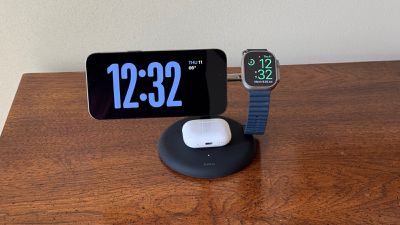
Both the Belkin and Anker models support Apple Watch fast charging, and I saw very similar charging speeds taking an Apple Watch Ultra 2 from 20% to 80% in under an hour, in line with what Apple's first-party fast charging cable delivers.
One significant factor in favor of the Anker MagGo Wireless Charging Station (3-in-1 Stand) (also available at Amazon) is pricing, with a regular price of $99.99 compared to the Belkin BoostCharge Pro 3-in-1 Magnetic Wireless Charging Stand with Qi2 15W (also available at Amazon) at a regular price of $149.99.
Both brands do occasionally offer sales, with Belkin running a Summer Travel Sale on its own site at the time of this writing that can save you some money. With a regular price of $149.99, the BoostCharge Pro qualifies for a $25 discount on its own, but if you throw in a cheap cable or other accessory to bump above the $150 level, you can save an additional $20 on your total purchase.
Both of these chargers are solid options for a desk or nightstand, as they allow you to charge multiple devices from Apple's ecosystem all in one spot with simple and convenient designs. I tend to prefer the overall design and functionality of the Belkin one, but the Anker one wins out on price, so it's definitely worth weighing those factors when making any purchasing decisions.
It's important to note that neither of these tree-style chargers folds up or disassembles, and as a result they both arrive in relatively large boxes, so these chargers are not very practical for travel. If it's important to be able to take your 3-in-1 charger with you, consider a more compact option such as the popular Anker 3-in-1 Cube or Anker Qi2 MagGo Foldable Charging Station.
Note: Anker and Belkin provided MacRumors with the Qi2 3-in-1 chargers for the purposes of this review. No other compensation was received. MacRumors is an affiliate partner with Anker, Belkin, and Amazon. When you click a link and make a purchase, we may receive a small payment, which helps us keep the site running.


















































Top Rated Comments
Meanwhile, a USB C/ Lightning cable which will charge your phone faster, and cooler, with much higher efficiency is $6.99….
After switching to MagSafe charging a few years ago now I changed everything back to wired. Together with “limit to 80%” setting my launch day iPhone 15 Pro Max still has 99% battery health now. At the same time last year with the infamous iPhone 14 Pro battery it was already 89%.
An official Apple MagSafe Charger is $39.99. (You need two, so $79.89.)
An official Apple Watch Charger is $29.99.
An official Apple 20w Power Adapter is $19.99. (You need three, so $59.97.)
So that would be a total of $169.85.
And, of course, that wouldn’t include the cost of a custom made stand to hold all the chargers and keep the wires discretely out of the way. But if you are handy at woodworking, metalworking or such, you can make a nice stand for just the cost of the materials.