

Anker PowerPort Atom PD 1 Review - MacRumorsOpen MenuShow RoundupsShow Forums menuVisit ForumsOpen Sidebar
Skip to Content

Review: Anker's 30W 'Atom' USB-C Charger is Tiny, Affordable, and Perfect for Charging iPhones, iPads, and MacBooks

by

With a new material called Gallium nitride (GaN), semiconductor components have been able to be shrunk down, leading to smaller than ever charging accessories. Several accessory makers have been taking advantage of GaN technology for new products, including Anker.

Anker recently debuted the PowerPort Atom PD 1, a 30W USB-C charger that's much smaller than the USB-C power adapters offered by Apple and, in fact, not much larger than an iPhone charger.
ankerpowerport1
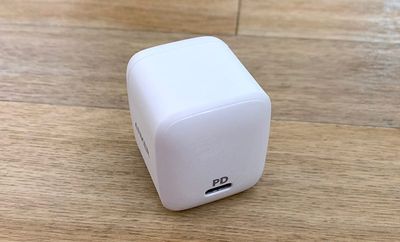
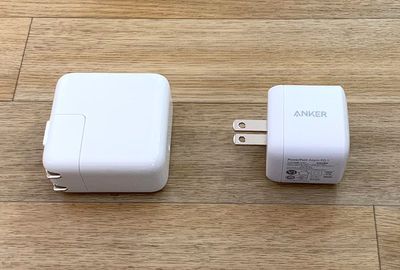
The Atom measures in at 1.4 inches wide and 1.5 inches tall, which is about 40 percent smaller than the similar 29/30W USB-C chargers that ship with the MacBook and MacBook Air.

Design wise, there's not a whole lot to say about the Atom. It's a small white charger that's almost cube shaped, with a shiny face and a single USB-C port that has "PD" written above it to denote its status as a USB-C PD power adapter. At the side, there's an Anker logo.
ankerpowerport2
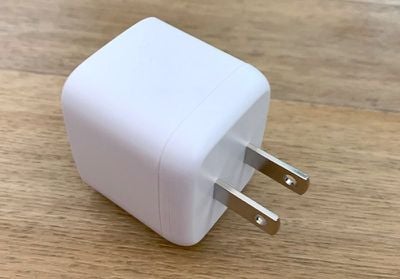
The plug at the back is not collapsible, likely due to its small size, which is one minor negative. It doesn't fold down, so the prongs are always going to be sticking out.

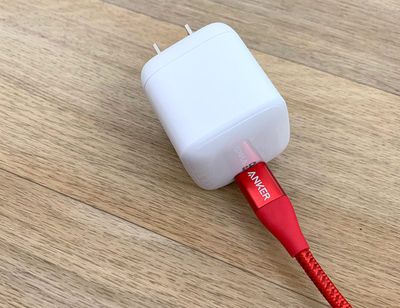
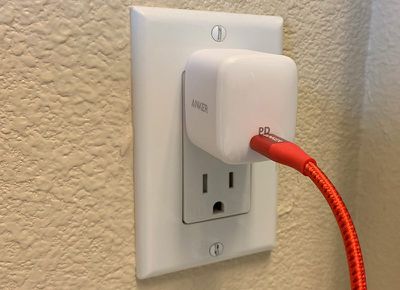
The small size of the Atom is convenient because when you plug it in to an outlet or a power strip, it doesn't take up unnecessary space. In my case, I have a power strip in a cable organizing box, and power adapter size can be a real concern in this kind of situation.
ankerpowerport3
A smaller power adapter doesn't take up more than one outlet, and it can be placed in either the top or bottom slots. It's also not in the way with a power strip, and it's more versatile than Apple's own power adapters.
powerportpluggedin
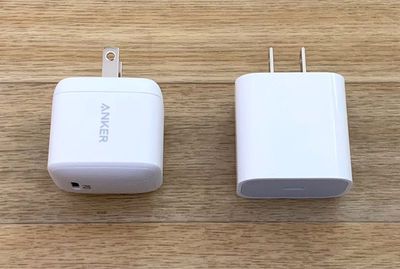
As a 30W USB-C power adapter, the Atom is ideal for charging the USB-C enabled iPad Pro models, the MacBook, and the ‌MacBook Air‌. It's not powerful enough for the 13 and 15-inch MacBook Pro models, but for all smaller devices, it's perfect.
powerportipadpro

Atom next to ‌iPad Pro‌ USB-C power adapter

It's also ideal for use with the iPhone for fast charging purposes. If you pair it with a Lightning to USB-C cable, it will charge an iPhone to 50 percent in a half an hour. You can also fast charge older ‌iPad Pro‌ models that use Lightning instead of USB-C with a Lightning to USB-C cable and Anker's Atom.
powerportmacbook

Atom next to 29W USB-C MacBook power adapter

On the 2018 USB-C ‌iPad Pro‌ models, you're going to see faster charging with a USB-C to USB-C cable than you do with Apple's standard 18W power adapter.

With the standard 18W USB-C power adapter that comes with the new ‌iPad Pro‌ models, my 11-inch ‌iPad Pro‌ charged to 45 percent in an hour. With Anker's 30W power adapter, it charged to 66 percent during the same time period. Testing was done both times charging from 1 percent in airplane mode.

Anker's USB-C to Lightning Cables

Apple recently began allowing third-party companies to develop Apple-certified "Made for iPhone" USB-C to Lightning cables, and Anker is set to launch its first USB-C to Lightning options in late February.

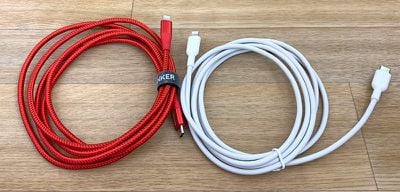
I was able to test out the cables, which will be available in two varieties -- the Powerline II and the Powerline+. Anker's cables will come in three and six-foot lengths.
ankerlightningcablesusbc
Powerline+ is the premium version of the cable, covered in a durable and attractive braided nylon material. The version I have on hand is red, and it's a nice looking cable. Pricing for this cable hasn't yet been announced, but the standard Powerline II will be priced at $15.99.

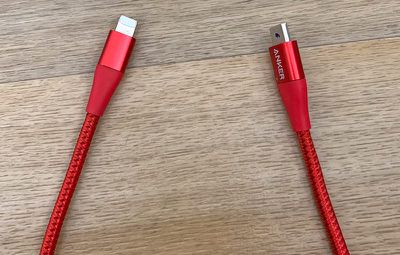
I haven't been able to use it for a long period of time to test durability, but Anker's cables are known for being well made. It certainly feels sturdy, and the USB-C and Lightning connectors at the ends are protected with a thick rubber material and an aluminum cap that prevents flexing at vulnerable points.
ankerlightningcables2

PowerLine+ Lightning to USB-C cable

It's usually the ends of cables where fraying happens, so the protection Anker has added should keep the Powerline+ from breaking with frequent use.

The Powerline II cable is similar to the Powerline+, but it doesn't have the nylon covering. It's made from the same material as any other standard Apple cable.
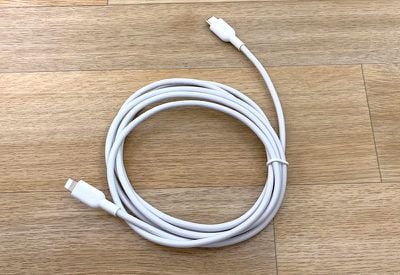
ankerlightningcable3

PowerLine II Lightning to USB-C cable

The connector ends are protected with a rubber material, but there's no aluminum end for added durability. Still, the thick rubber material that extends past the joint where the cable attaches to the connector is more protection than a standard Apple USB-C to Lightning cable offers, and it too should hold up well.

Pricing isn't available on Anker's USB-C to Lightning cables as of yet, but they're likely to be priced competitively. Apple's 1m (3ft) USB-C to Lightning cable is priced at $19.99.

Bottom Line

If you need a USB-C power adapter for the purpose of fast charging an iPhone or as a secondary charger for an ‌iPad Pro‌, MacBook, or ‌MacBook Air‌, the Atom is an ideal choice. It's small, compact, and affordable, priced $15 less than Apple's 30W Power Adapter.

Most USB-C PD chargers from established companies on Amazon are priced in the neighborhood of $25 to $30 anyway, so the Atom is competitively priced and shelling out a few extra dollars for portability and convenience seems well worth it.

Anker's upcoming USB-C to Lightning cables offer the durability that Anker customers have come to expect from Anker cables, and will be a solid choice for those who need a USB-C to Lightning cable.

How to Buy

You can purchase the PowerPort Atom PD 1 from Amazon for $30, and it is expected to be back in stock later today or tomorrow. The first of Anker's USB-C to Lightning cables will be launching in February, and the Powerline II is available for pre-order on Anker's site for $15.99.

Note: MacRumors is an affiliate partner Amazon. When you click a link and make a purchase, we may receive a small payment, which helps us keep the site running.


Tag: Anker

Top Rated Comments

101 months ago
Is fast charging an iPhone with this PowerPort Atom PD 1bad for the battery? Device looks good. I'm tempted.
The iPhone controls how fast it charges. It will throttle charging as it gets closer to full. From what I've heard listening to tech podcasts, you might shave a week or two off the battery life by fast charging and leaving it charge overnight, but that is about it.

An example I've heard was this: Imagine you and all your friends are going to cram into a car. The first 4 people can all jump in at the same time. The next few can get in pretty easy too. By the time you shove numbers 10, 11, and 12 in, it gets kind of hard. Your batteries are like that. When empty, they charge pretty quick. That last 5-10% you really have to cram in. That's why some suggestions are to run your battery down to 25%, then charge up to about 75%. Keeps it in the "fairly easy" range.
Score: 5 Votes (Like | Disagree)
101 months ago
Here’s hoping Apple catches up and starts making this standard in the 2018 iPhones.
Score: 3 Votes (Like | Disagree)
boshii Avatar
101 months ago
I have a Powerline+ USB C to USB C cable that I've been using for over a year and it still looks and works as new.

I don't expect these to be any different.
Score: 2 Votes (Like | Disagree)
iSayuSay Avatar
101 months ago
Lightning port really is the annoying problem in this situation, the Macbook and iPad Pro has been using the same cable, but this one particular iPhone requires me to bring another extra cable, just for the iPhone! Am I in the same ecosystem or what? LOL
Score: 2 Votes (Like | Disagree)
101 months ago
The iPhone controls how fast it charges. It will throttle charging as it gets closer to full. From what I've heard listening to tech podcasts, you might shave a week or two off the battery life by fast charging and leaving it charge overnight, but that is about it.

An example I've heard was this: Imagine you and all your friends are going to cram into a car. The first 4 people can all jump in at the same time. The next few can get in pretty easy too. By the time you shove numbers 10, 11, and 12 in, it gets kind of hard. Your batteries are like that. When empty, they charge pretty quick. That last 5-10% you really have to cram in. That's why some suggestions are to run your battery down to 25%, then charge up to about 75%. Keeps it in the "fairly easy" range.
Thanks -- clearest breakdown I've read yet on why this is so!
Score: 2 Votes (Like | Disagree)
101 months ago
Considering the prongs are not retractable, it doesn’t seem to save much space over the Apple chargers.
Yikes, good catch. Always-out prongs are just awful in your bag.

Score: 2 Votes (Like | Disagree)

Popular Stories

iPhone Duo Display Cracking

Apple Alerts Stores to iPhone Duo's Display Cracking Issue

Friday October 30, 2026 3:20 pm PDT by
In a memo shared with Apple Stores and Apple Authorized Service Providers this week, and later obtained by MacRumors, Apple provided technicians with guidance on how to diagnose and address the iPhone Duo's inner display cracking issue. If a customer reports the issue, Apple advised technicians to inspect the iPhone Duo and repair or replace it in accordance with their standard procedures....

iPad mini OLED feature 1

Apple Executive Comments on New iPad Mini Lacking 120Hz Display

Thursday October 29, 2026 1:47 pm PDT by
While the new iPad mini has an OLED display, the device does not support ProMotion, meaning the display's refresh rate is limited to 60Hz instead of 120Hz. ProMotion support would have allowed for the iPad mini's refresh rate to automatically adjust from 10Hz to 120Hz depending on the content being displayed, but evidently Apple has kept the feature exclusive to the iPad Pro among iPad...
Pinched iPad Mini

Apple Avoids Showing Pinched Fingers on iPad Mini Page in South Korea

Thursday October 29, 2026 11:52 am PDT by
In the U.S. and most other countries, Apple's website shows the new iPad mini being held by pinched fingers, but this is not the case in South Korea. The new iPad mini shown with pinched fingers on Apple's website in the U.S. On its South Korean website, Apple simply shows an image of the iPad mini on its own. The new iPad mini shown without pinched fingers on Apple's website in South Korea ...
Latest Stories
Apple Watch Ultra 4 Hits All-Time Low Price With Amazon's $99 Discount
18 hours ago
Reminder: Apple's Big Discount on Beats 360 Ear Cushions Ends Today
18 hours ago
Here's a New Tour of Apple's HomeView Software
19 hours ago
Apple Reveals New iPad Mini's Battery Capacity
20 hours ago
Top Stories: Apple's Big MacBook Pro, iPad mini and iMac Updates
21 hours ago
'Pluribus' Season 2 Reportedly Starts Production Today
1 day ago
iPhone 18 Pro Sales Surge in China, Offsetting Decline in U.S. and Japan
1 day ago
HomeView Software 27.2: Wallpapers, Control Center, and More
1 day ago
Apple Alerts Stores to iPhone Duo's Display Cracking Issue
2 days ago
iOS 27.3 Will Enable These Apple Intelligence Features in China
2 days ago
Apple Says iOS 27.3 Beta Coming Next Week
2 days ago
Apple's Flash Storage Suppliers Are Finally 'Getting Their Revenge'
2 days ago
14 New Things Your iPhone Can Do in iOS 27.2
2 days ago
iPhone Duo Review: One Week Later
2 days ago
Samsung Mocks iPhone Duo Display Cracks in New Ad Campaign
2 days ago
The MacRumors Show: OLED MacBook Pro, iPad Mini 8, and More
2 days ago
MacBook Pro With Touch Display: 15 More Details Revealed
2 days ago
Russia Places Apple on State Surveillance Registry
2 days ago
Halloween Weekend Brings Discounts on Apple Accessories and Pre-Orders
2 days ago
Apple Has Released More Than 25 New Products in the Past Two Months
2 days ago
Local Code Launches as Free, Private AI Assistant Tool for Mac
2 days ago
Apple Acquires Ascend.io
2 days ago
HomePod Mini 2 Launches Today: All the New Features
2 days ago
AirTag 2 4-Pack Drops to New Low Price of $69.99
2 days ago
Rian Johnson's iPhone Camera App Goes Viral
2 days ago
Where Did All the iPhone Duos Go? Mostly to Apple's Stores
2 days ago
Apple's Touchscreen MacBook Pro Could Ship 1.5M Units in 2027
2 days ago
New Apple TV 4K and iPad Mini: RAM Amounts Revealed
2 days ago
Apple Executive Comments on New iPad Mini Lacking 120Hz Display
3 days ago
Here's a Hands-On Look at HomePod Mini 2's New Two-Tone Colors
3 days ago

🔗 Related Apple News & Rumors

Stay updated with the latest Apple ecosystem news and verified rumors










































