

Subaru is experiencing growing popularity in the U.S., developing a strong reputation based on emphasizing safety, all-wheel drive operation, and technology. The redesigned 2019 Subaru Forester is no exception, offering standard all-wheel drive, a roomier cabin, and new DriverFocus technology that uses facial recognition and monitoring to not only save your driver presets but alert you if it detects drowsy or distracted driving.
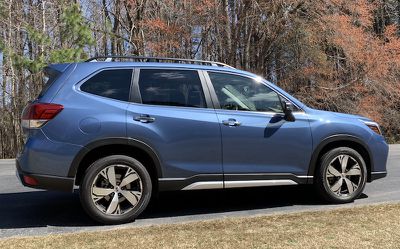
The 2019 Forester includes Subaru's STARLINK infotainment system with standard CarPlay support, with lower-level models coming with a 6.5-inch screen while higher-level trims are upgraded to an 8-inch screen.
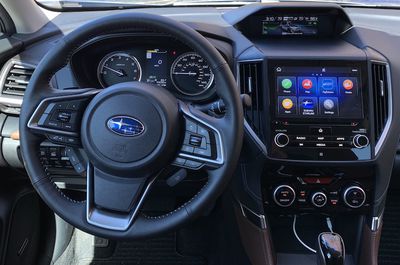
I've had a chance to spend some time with a top-of-the-line 2019 Forester Touring in Horizon Blue Pearl, so read on for details about how all of the technology comes together for iPhone users.
STARLINK Infotainment
Subaru's STARLINK Infotainment systems offer all of the functionality you'd expect, starting with AM/FM radio with HD support, SiriusXM, USB and Bluetooth media device support, hands-free phone connectivity, and a CD player. All trims also include support for CarPlay, Android Auto, and app integration with Pandora and Aha. They also support cloud apps like Yelp, iHeartRadio, Magellan, TomTom, and more.
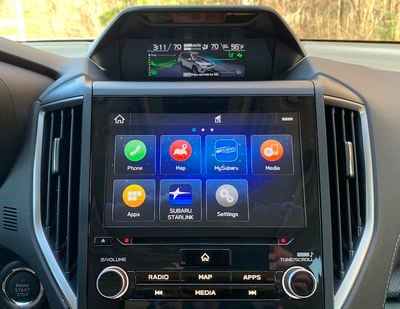
The base, Premium, and Sport trims all come with a 6.5-inch display, although the Sport trim can be upgraded to the larger 8-inch display. The Limited trim gets the 8-inch display standard with an optional upgrade to embedded navigation from TomTom, while the Touring trim gets the 8-inch screen and navigation standard.
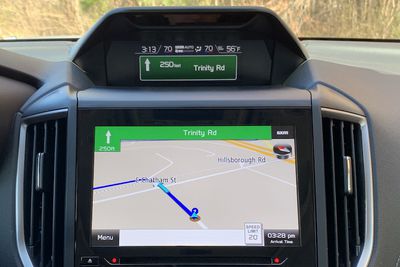
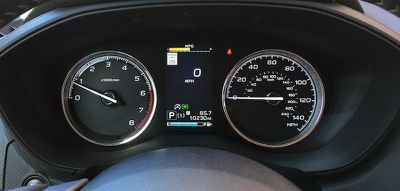
Subaru has gone all-in on displays in the Forester, with my Touring model featuring three separate screens. Aside from the spacious 8-inch main screen on the center stack, there's also a 4.2-inch digital display as part of the instrument cluster directly in front of the driver, which is standard on all trims. This display is customizable and is capable of showing a wide array of information from a digital speedometer to speed limit signs to fuel level to audio information and more. These instrument cluster displays are becoming increasingly common, and it's nice to see it included standard on the Forester.
What sets the Forester further apart from many other cars is the third display, located in a housing protruding from the dashboard at the top of the center stack. This housing also includes an array of sensors for features like DriverFocus that I'll talk about a bit later, but the 6.3-inch display included here on higher trims is a fantastic addition.
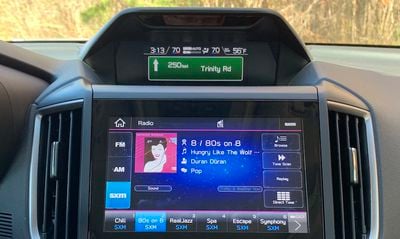
While the main infotainment display is taken over by CarPlay, built-in navigation, or other functions, the upper display can offer an always-on view of other systems with a dense array of information. By default it shows basic information like the time, outside temperature, and current climate control settings, but the main portion of the display can show one of several different screens based on user preference.
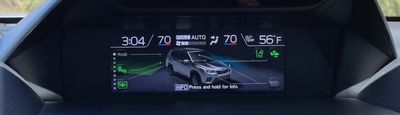
This display can show an overview of what vehicle safety systems are active, the current weather forecast, navigation information, audio information, a larger version of your climate settings and more. It will also intelligently change what it's showing based on what else is going on, such as temporarily showing navigation information when a turn is coming up.
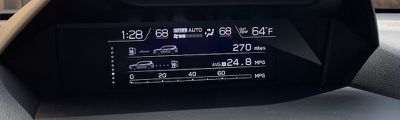
The color 6.3-inch display is standard on Sport and higher trims and an option on the Premium trim, but not available on the base trim. The base trim and the standard configuration of the Premium trim include a smaller display that offers more basic information about the vehicle.
Subaru has kept a full set of hardware climate controls, although the only visual feedback on the controls themselves are status lights for some of the buttons. Other visual indicators like temperature settings and fan speed are shown on the other screens higher on the center stack.
CarPlay
CarPlay, which requires a wired connection as in most vehicles, is a great experience on the large 8-inch display. It takes over the whole screen, but the extra multifunction display above still gives you access to other data from the vehicle. The screen is bright and colors are vivid, and touch responsiveness is great with no lag.
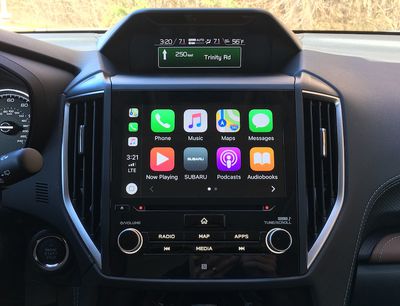
Subaru thankfully includes a variety of hardware controls below the screen, so you'll be able to make many adjustments largely by feel.
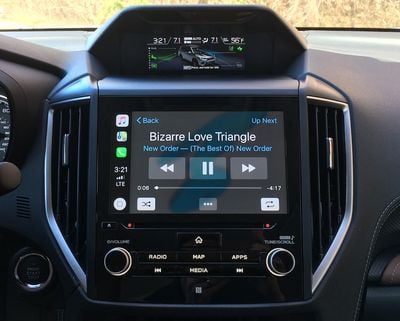
Large volume and tune/scroll knobs let you easily make those adjustments, while dedicated hardware buttons for various infotainment functions like radio, built-in navigation and audio track skipping let you quickly jump between functions. A prominent home button gets you back to the main Subaru screen from wherever you are.
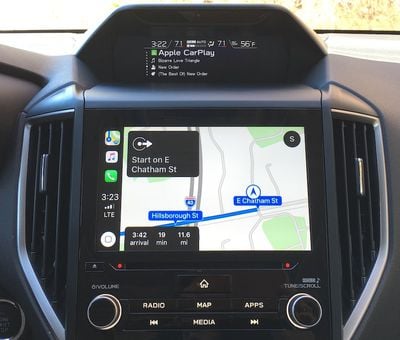
I really like the way the dual-screen setup gives you command of everything going on in the vehicle at a glance, minimizing the amount of time you need to take your eyes off the road. Apple Maps or Google Maps running in CarPlay can take over the large main display, while all of your other information including CarPlay audio track and album names can be seen simultaneously on the upper display.
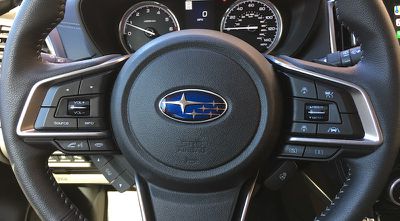
As usual, there is a voice control button on the steering wheel that lets you talk to the vehicle or Siri. When CarPlay is active, the steering wheel button can only activate Siri. But when you're out of CarPlay, you can activate Siri with a long press of the button or the Subaru system with a short press.
Ports and Connectivity
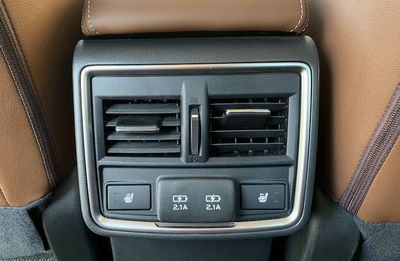
My Touring trim came with a number of USB-A ports for connectivity, including a pair up front adjacent to the smallish storage tray at the base of the center stack and two more on the rear of the center console for rear passengers. All four ports can deliver up to 2.1 amps, so they'll be able to charge even power-hungry devices like iPads fairly quickly.
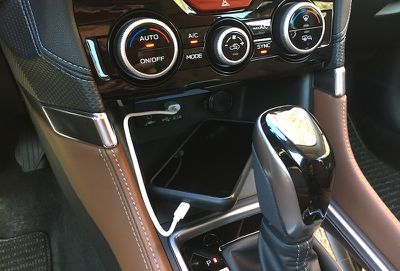
All Forester trims include the front USB ports, but the base and second-level Premium trims require a $178 option to add the rear ones. The remaining trims include the rear ports as standard equipment.
All but the base Forester trim offer in-car Wi-Fi hotspot support via LTE, which requires a separate plan through AT&T. Subaru does not offer a wireless phone charger as either standard or optional equipment on the Forester.
DriverFocus
For the past couple of years, Subaru has been pushing its EyeSight package of driver assistance technology features, which includes adaptive cruise control, pre-collision braking, lane departure and sway warnings, and lane-keeping assist. Those features are becoming increasingly popular across car manufacturers, and it's great that Subaru is now making its EyeSight package standard across all Forester trims.
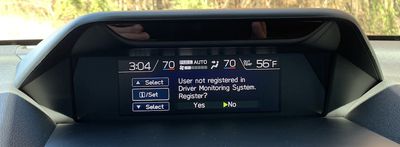
Subaru is also now taking things to the next level with DriverFocus, a feature currently available only on the highest-level Touring trim as a standard feature. DriverFocus uses facial recognition and monitoring to keep an eye on you while you're driving. If it detects drowsy or distracted driving, it will warn you with a chime and a pop-up message on the driver's display.
While some car manufacturers have focused on monitoring movements of the car to detect drowsy or distracted driving, whether it's drifting from your lane or making repeated sharp steering corrections, Subaru is trying to be even more proactive by actually watching to see if your eyes are open and on the road. It might sound a little Big Brother-ish, but your car isn't going to report you to the authorities or record your behavior, so it could prove to be a great safety feature and you can always turn it off.
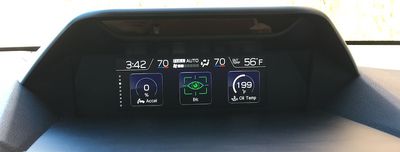
Subaru acknowledges that the system isn't perfect and it can generate some false positives, which I did find in my testing. One time the car warned me to take a break when it apparently thought my eyes were starting to droop, but I think I was just squinting a bit into a bright sun. A couple of other times it warned me to keep my eyes on the road, once when I had a hand up to my face rubbing one eye and once when I was on a sharply curving highway exit ramp when it apparently thought I was looking away from the road when I was in fact looking ahead along the curve. Quick glances down or to the side won't trigger a warning, but if you have reason to look somewhere other than fairly straight ahead for more than a couple of seconds, you might get an alert.
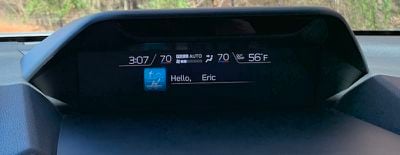
As a bonus, DriverFocus's facial tracking technology can also recognize you when you get in the car, greeting you by name onscreen and automatically setting your preferred seat and mirror positions and climate control options. Some cars make similar adjustments by associating preferences with a specific key fob being used, but Subaru is leveraging its DriverFocus technology to make automatic memory settings even more seamless.
Wrap-up
Subaru offers a solid infotainment system of its own, and the Forester really takes it to the next level with the dual-screen setup in the center stack. Layer the convenience of CarPlay on top of that and you've got some great options for entertainment, navigation, and more, all highly customizable.
I appreciated the abundance of high-powered USB ports in the front and rear, although the phone storage tray up front was rather small for my iPhone XS Max. Wireless charging would be a nice option to have as long as it works well and the price premium isn't too high, so hopefully that's something Subaru will add in the future. Other manufacturers have been hit-or-miss on this feature, but when done well it's a nice option to have.
The 2019 Subaru Forester starts at $24,295 plus destination, delivery, and other fees, with each successive trim level adding around $2,000 before the bigger jump to the top-of-the-line Touring model at $34,295. I do recommend bumping up to the 8-inch display if you can, as it's a great size for the main screen, but that'll push you up close to the $30,000 level on a Sport trim with option package.

















































Top Rated Comments
And I NEVER want my car to have facial recognition. Or anything other than my phone, for that matter.
Also, what up Cary, NC? The town with a road median to citizen ratio of 1:1.
But just having windows and locks I can control from buttons by my left hand was a bit astounding to me. I had never driven any other car in all those years, except for a failed attempt to make my husband’s beat up 2009-ish SUV work for me. When I’d pick kids up from school in my original car, I’d have to park and reach over and unlock doors. I’d have to remind kids to roll up their windows before exiting the car.
I look at this Subaru and my mind is blown. My current truck only boasts a sensor that sort of shocks me in the left or right butt cheek when I’m too close to obstacles.:confused: It took me awhile to switch from lifting my butt cheek up as a reflex and instead turn the steering wheel. :oops::rolleyes: It does also have a backup camera. It can display GPS navigation in a convoluted way. I don’t usually bother and just stick my iPhone in the cup holder and use Apple Maps that way. That’s about as sophisticated as my driving experience gets.
I’m liking this Subaru, but my husband made it pretty clear when he passed this truck over to me, it was going to be the next vehicle I drive for over 20 years. :p But looking is free and I really enjoyed this article.
As others said, this feels more like a car review than anything else.