How to Use Signal Messenger's Face Blurring Photo Feature - MacRumorsOpen MenuShow RoundupsShow Forums menuVisit ForumsOpen Sidebar
Skip to Content

How to Use Signal Messenger's Face Blurring Photo Feature

by

Encrypted messaging app Signal features a face-blurring feature that automatically locates and blurs faces in images shared over the chat platform.
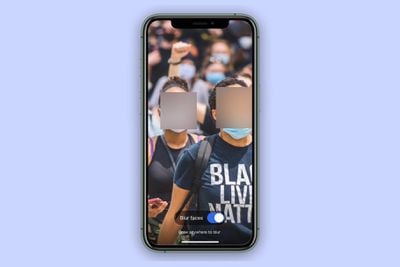
signal blur face
It's a neat tool to help protect the privacy of the people in the photos you share, and all processing involved in the blur feature happens locally on the device to maintain privacy.

Not only does it make it easy to give every face a hiding place, it can also be used to draw a fuzzy trace over something you want to erase. The following steps show you how to use it.

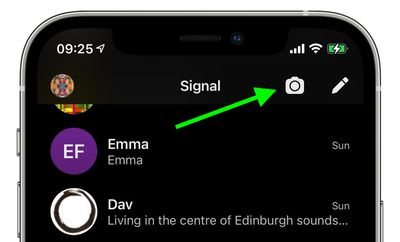
  1. Launch the Signal app on your iPhone or iPad, then from the main chat Home Screen or within in a chat thread, tap the Camera icon.
    how to signal face blur

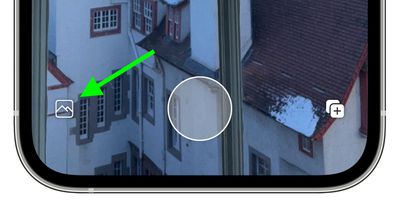
  2. Next, take a photo, or tap the photo album icon in the bottom-left corner of the screen.
    how to signal face blur 2

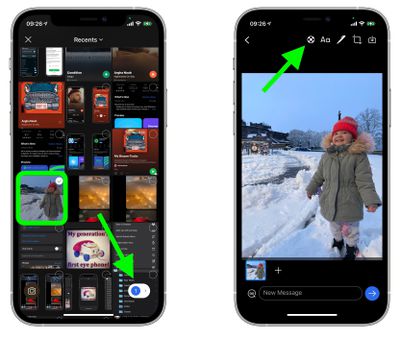
  3. If you opted to use an existing picture from your photo album, select it and tap the button in the bottom-right corner of the screen to view it, then you're in the photo editor screen, tap the Blur Tool icon at the top (it's a circle with a cross of small grey and white squares inside it).
    signal

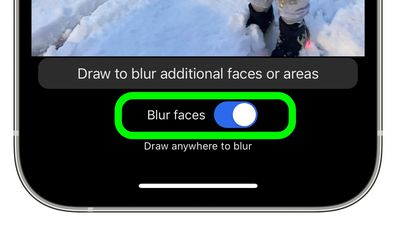
  4. To automatically blur faces in the image, toggle the Blue Faces switch that appears to the green ON position.
    how to signal blur faces 4

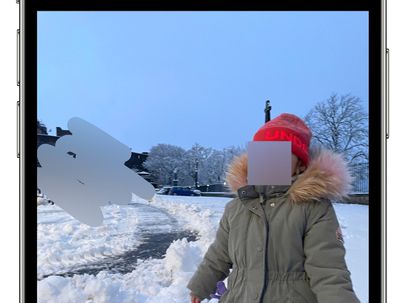
Bear in mind that the feature isn't perfect, and won't detect every face all of the time.
signal
To compensate for these flaws, Signal's image editor also includes an option to manually obscure faces and other areas of a photo with a blur brush.


Tag: Signal

Popular Stories

iOS 27 Next to iPhone

Here's When iOS 27 Rolls Out Today in Every Time Zone [Update: It's Out]

Sunday September 13, 2026 3:00 am PDT by
Update 10:04 a.m.: iOS 27 is rolling out now, though it may take a bit for all users to see it, so keep checking! Apple is about to release iOS 27, which will finally deliver more advanced Siri AI capabilities as well as a variety of other refinements, improvements, and new features to iPhones. It's Apple's biggest software update of the year, and Apple announced at Wednesday's iPhone event...

iOS 27 Icon iPhone

iOS 27 Available Now With These 8 New Features

Monday September 14, 2026 9:00 am PDT by
Update — 10 a.m. Pacific Time: Apple has released iOS 27. During its iPhone 18 Pro and iPhone Duo event last week, Apple announced that iOS 27 will be released widely on Monday, September 14. iOS 27 should be available around 10 a.m. Pacific Time / 1 p.m. Eastern Time today via the Settings app, under General → Software Update. Below, we have highlighted eight new features and...
Apple iCloud Plus expansion hero

iCloud+ Now Includes Apple TV, Apple Arcade, and Curated Apple Music Stations in Over 100 Countries

Tuesday September 15, 2026 1:43 am PDT by
Apple today announced a new subscription initiative that turns paid iCloud+ subscriptions into a broader services bundle in more than 100 countries. In select countries, Apple says every paid iCloud+ plan, including the cheapest 50GB tier, now includes Apple TV and Apple Arcade "at no additional cost," while family sharing extends the storage, TV and Arcade access to up to five people....

🔗 Related Apple News & Rumors

Stay updated with the latest Apple ecosystem news and verified rumors