

iOS 18: How to Use Safari's New Highlights Feature - MacRumorsOpen MenuShow RoundupsShow Forums menuVisit ForumsOpen Sidebar
Skip to Content

iOS 18: How to Use Safari's New Highlights Feature

by

Safari in iOS 18 introduces a new feature called Highlights, which is designed to enhance your browsing experience by intelligently surfacing key information from webpages. The tool uses machine learning to identify and extract the most relevant details, and present them to you in an easily accessible format.

safari icon blue banner
Think of Highlights as a kind of smart assistant within Safari, saving you time and effort by eliminating the need to manually search through lengthy web content. Whether you're looking up a restaurant, researching a historical figure, or checking out a new movie, Highlights can often quickly provide the essential information you need.

The feature is particularly useful for various types of content:

  • For businesses and locations, it can display address details, operating hours, and quick access to directions.
  • When browsing pages about people, it might show brief biographical information.
  • For entertainment content, it can offer direct links to play songs or summarize reviews for movies and TV shows.

Highlights aims to streamline your browsing by providing these bite-sized pieces of information right when you need them.
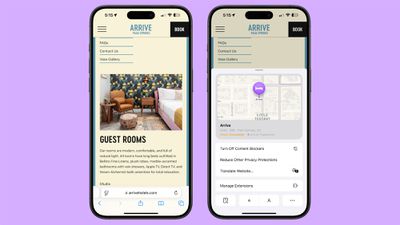
ios 18 safari highlights
Here's how to use the new feature in iOS 18:

  1. Open Safari and navigate to a supported webpage.
  2. Look for a purple sparkle over the tool icon in the browser bar. This indicates Highlights are available.
  3. Tap the sparkle to open the Highlights window.
  4. Review the summarized information presented in the Highlights window, and interact with the information you need, such as tapping on directions or playback links.

By keeping an eye out for the sparkle icon as you browse, you can take full advantage of this time-saving feature and quickly access the most pertinent information from websites. Note that Highlights is currently only available in the U.S. and only works for English websites.


Top Rated Comments

jz0309 Avatar
24 months ago
“Open Safari and navigate to a supported webpage”

How would one know that a webpage is supported???
Score: 12 Votes (Like | Disagree)
24 months ago
didn't work on this article
Score: 6 Votes (Like | Disagree)
24 months ago
I am not enabling this feature since I don’t want to share my browsing with Apple.
Score: 3 Votes (Like | Disagree)
NightFox Avatar
24 months ago
I always feel like these features are designed for the way people use the internet in adverts, and not how and why the internet gets used in real life. Maybe I'm just not using it right though.
Score: 3 Votes (Like | Disagree)
24 months ago
Some commenters seem to be confusing "summary" with highlight. This article is about highlights - from apple.com "Safari will automatically detect relevant information on a page and highlight it as you browse. Highlights display helpful information like directions and quick links to learn more about people, music, movies, and TV shows." The example given in the article does work. It "highlights" the location of the hotel. As you can see in the screen capture I just did on 15.1 beta4.

Attachment Image
Score: 2 Votes (Like | Disagree)
24 months ago

Now let’s use AI to extract from AI written webpages. What could go wrong?:)

This is client side, but yep it’s a valid concern! Hopefully there will be standardised tags/markup to signify server side AI content is machine generated. Without that the web will turn into some kind of self referencing nonsense soup, not that it isn’t close to that already.
Score: 2 Votes (Like | Disagree)

Popular Stories

Apple Event Logo

Apple Working on All-New Operating System

Wednesday July 29, 2026 11:39 am PDT by
Apple is developing an all-new operating system that is essentially a mix of tvOS, watchOS, and iOS, according to Bloomberg's Mark Gurman. In a report this week, he said the operating system will feature a grid of icons, widgets, and apps, along with customizable clock faces. The new software platform is intended for Apple's long-rumored smart home hub. With built-in facial recognition,...


imac video apple feature

Apple Made Its Second-Biggest Acquisition Ever This Year

Wednesday July 29, 2026 12:03 pm PDT by
Apple this year acquired Israeli startup Q.ai for close to $2 billion, according to the Financial Times. That would make this Apple's second-biggest acquisition ever, after it paid $3 billion for the popular headphone maker Beats in 2014. This is also the largest known Apple acquisition since the company purchased Intel's smartphone modem business and patents for $1 billion in 2019. Q.ai...
Dynamic Island iPhone 18 Pro Feature

iPhone 18 Pro: Twelve Changes Coming to Apple's Next Flagship

Thursday July 30, 2026 3:43 am PDT by
We're less than two months out from the launch of Apple's premium next-generation smartphone lineup, and while we're not expecting a dramatic change in terms of functionality, there are still several enhancements rumored to be coming to the iPhone 18 Pro and iPhone 18 Pro Max. One thing worth noting is that Apple is reportedly planning a major change to its iPhone release cycle this year,...

🔗 Related Apple News & Rumors

Stay updated with the latest Apple ecosystem news and verified rumors









































