How to Use Precision Finding to Locate AirPods Pro With Your iPhone - MacRumorsOpen MenuShow RoundupsShow Forums menuVisit ForumsOpen Sidebar
Skip to Content

How to Use Precision Finding to Locate AirPods Pro With Your iPhone

by

With AirPods Pro 2, Apple improved the Charging Case by adding a U1 chip for Precision Finding with Find My. With AirPods Pro 3, Apple added a U2 chip to improve the feature. This article explains how to use Precision Finding to locate your AirPods Pro if you've misplaced or lost them.
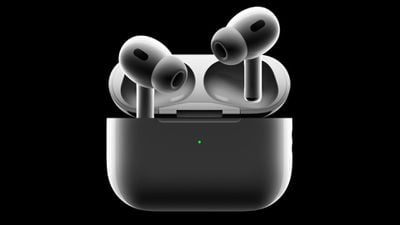
airpods pro 2
‌Find My‌‌ uses Bluetooth signals from lost AirPods to relay their location back to you. Apart from Bluetooth, however, the second-generation AirPods Pro Charging Case is also equipped with a U1 Ultra Wideband chip, and on iPhones that also have U1 chips, there's a Precision Finding feature that enables you to more accurately determine the distance and direction of your AirPods when they're in range, when compared to Bluetooth alone.

If you want to find lost AirPods Pro 2 and you have an ‌iPhone 11‌ or later model, Precision Finding will direct you to the exact location of your AirPods using input from the camera, accelerometer, and gyroscope, with guidance provided through sound, haptics, and visual feedback. Here's how to use it.

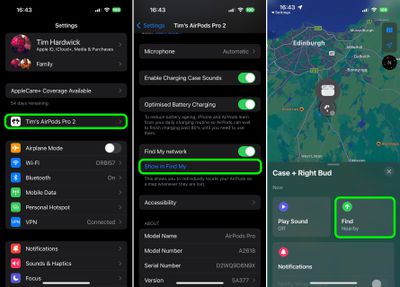
  1. If your AirPods are connected, open Settings and tap the AirPods tab just below your Apple ID, scroll down, then tap Show in Find My. If you've misplaced your AirPods earbuds along with the case, launch the Find My app and select your AirPods in the "Devices" list.
  2. Tap Find. It should say "Nearby" underneath if the Precision Finding feature is available.
    settings

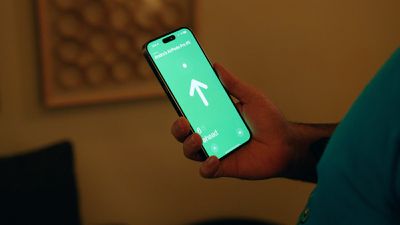
  3. Now start moving around to locate your AirPods and follow the onscreen instructions. You should see an arrow pointing in the direction of the AirPods, an approximate distance telling you how far away they are, and a note if they're located on a different floor.
As you approach the AirPods, you'll feel haptic feedback from your phone and there will be audio cues to let you know that you're approaching an item. The AirPods graphic on the ‌iPhone‌ will also shift as you get nearer to it. Precision Finding exits when you've successfully located your AirPods and your ‌iPhone‌ is in very close proximity.
airpods pro 2 precision finding
Note that Ultra Wideband isn't universally supported worldwide, therefore Precision Finding won't work in some countries. But bear in mind that the AirPods Pro 2 Charging Case comes with a built-in speaker, so you can also make it play a sound using ‌Find My‌ to more easily locate it.

Related Roundup: AirPods Pro 3
Tag: U1 Chip
Buyer's Guide: AirPods Pro (Neutral)
Related Forum: AirPods

Top Rated Comments

adamlbiscuit Avatar
54 months ago
My AirPods Pro (2nd Gen) don't show in FindMy, and that's even after resetting / unpairing them and updating the firmware to the newest version. I've tried restarting the iPhone, and also logging in on iCloud.com but there's nothing there either. Turning off the FindMy network and turning it back on doesn't work, so I'm at a loss. I'm running iOS 16.0.1 so I assume that can't be an issue either.

I think others on the forum are also having this issue though it's not happening to everyone. I just hope I don't lose them in the meantime.
Score: 9 Votes (Like | Disagree)
54 months ago

Are these cases compatible with 1st gen pros?
No.
New case + old headphones: orange led stays blinking in a loop.
Old case + new headphones: same “Mismatched AirPods” information

Attachment Image
Score: 5 Votes (Like | Disagree)
54 months ago

Urrrgh - I have the same issue. Got my AirPods Pro 2s today. Set them up in the normal way, and they sound great. Everything looks good apart from the fact that they don’t appear in Find My. Tried restarting the phone, unpairing and repairing the AirPods, but no luck.


I have my keys, wallet, and my car all visible in Find My (yup - I have an AirTag hidden in my car lol). But the AirPods are a no-show. Pah!

My AirPods Pro (2nd Gen) don't show in FindMy, and that's even after resetting / unpairing them and updating the firmware to the newest version. I've tried restarting the iPhone, and also logging in on iCloud.com but there's nothing there either. Turning off the FindMy network and turning it back on doesn't work, so I'm at a loss. I'm running iOS 16.0.1 so I assume that can't be an issue either.

I think others on the forum are also having this issue though it's not happening to everyone. I just hope I don't lose them in the meantime.
Hi all, I had the same issue, AirPods Pro 2 was not showing in Find My app no matter what I did, but I think found a fix. At least it worked for me.
[LIST=1]
* Remove AirPods Pro 2 from your device. Settings -> Bluetooth -> Forget this device.
* Disable and then enable Find My on your iPhone. Settings -> Apple ID -> Find My -> Find My iPhone.
* Reset your AirPods Pro 2 to factory settings. With the lid open, press and hold the setup button on the back of the case for about 30 seconds, until the status light on the front of the case flashes amber, then white.*
* Connect to your AirPods Pro 2 from Bluetooth settings.
* Your AirPods Pro 2 should now be visible in Find My app.
Score: 3 Votes (Like | Disagree)
RodThePlod Avatar
54 months ago

My AirPods Pro (2nd Gen) don't show in FindMy, and that's even after resetting / unpairing them and updating the firmware to the newest version. I've tried restarting the iPhone, and also logging in on iCloud.com but there's nothing there either.
Urrrgh - I have the same issue. Got my AirPods Pro 2s today. Set them up in the normal way, and they sound great. Everything looks good apart from the fact that they don’t appear in Find My. Tried restarting the phone, unpairing and repairing the AirPods, but no luck.

I have my keys, wallet, and my car all visible in Find My (yup - I have an AirTag hidden in my car lol). But the AirPods are a no-show. Pah!
Score: 2 Votes (Like | Disagree)
doggypiggy Avatar
54 months ago

Weird. Mine worked perfectly fine without doing anything at all. I just remembered it had the feature, went into the Find My app and it was right there.
I wish I were as lucky as you o_O
Score: 2 Votes (Like | Disagree)
53 months ago

FWIW - I decided to be too lazy to forget/reset/re-add and just tried doing step 2 and it worked. To recap, I only had to do step 2... disable and re-enable Find My on my iPhone. After doing that, my Airpods Pro 2 magically appeared correctly in the Find My app.
Hey apparently this worked but I did something else. So the method you posted of all the steps I did multiple times with no luck and it got frustrating. After debating, I finally decided to upgrade my iPhone to IOS 16 which I of course knew of some issues especially battery usage. Obviously they'll fix it down the line but upgrading and then turning off and on Find My, the airpods were able to show. Now I think its clear IOS 16 was probably what did it because for the newer airpods, they had certain features like the sound of the case beeping which was a new IOS 16 feature.
Score: 1 Votes (Like | Disagree)

Popular Stories

airpods pro 2 hearing aids

AirPods Pro Hearing Aid Feature Launching in These Canadian Provinces

Monday October 26, 2026 9:25 am PDT by
iOS 27.2 and iPadOS 27.2 enable Apple's clinical-grade Hearing Aid feature on the AirPods Pro 2 and AirPods Pro 3 in five Canadian provinces: Alberta, British Columbia, New Brunswick, Prince Edward Island, and Saskatchewan. The feature is still not available in any other provinces, but Ontario is reportedly set to hold a meeting to change a law that will pave the way for it to launch there,...
Apple MacBook Pro with PROLED XDR Display family lineup feature

Apple Announces OLED MacBook Pro With Touch Display

Wednesday October 28, 2026 10:11 am PDT by
Apple today announced a new high-end MacBook Pro, which is available in 14-inch and 16-inch sizes. The new device has a PROLED XDR display that supports touch gestures, and a glowing rear Apple logo. Pricing on the MacBook Pro starts at $2,899 for the 14-inch model and $3,399 for the 16-inch model. Apple says the MacBook Pro has the "world's best display in a pro laptop." The PROLED...
iPhone Duo Display Cracking

Apple Alerts Stores to iPhone Duo's Display Cracking Issue

Friday October 30, 2026 3:20 pm PDT by
In a memo shared with Apple Stores and Apple Authorized Service Providers this week, and later obtained by MacRumors, Apple provided technicians with guidance on how to diagnose and address the iPhone Duo's inner display cracking issue. If a customer reports the issue, Apple advised technicians to inspect the iPhone Duo and repair or replace it in accordance with their standard procedures....
Latest Stories
Apple Watch Ultra 4 Hits All-Time Low Price With Amazon's $99 Discount
7 hours ago
Reminder: Apple's Big Discount on Beats 360 Ear Cushions Ends Today
7 hours ago
Here's a New Tour of Apple's HomeView Software
8 hours ago
Apple Reveals New iPad Mini's Battery Capacity
9 hours ago
Top Stories: Apple's Big MacBook Pro, iPad mini and iMac Updates
10 hours ago
'Pluribus' Season 2 Reportedly Starts Production Today
17 hours ago
iPhone 18 Pro Sales Surge in China, Offsetting Decline in U.S. and Japan
17 hours ago
HomeView Software 27.2: Wallpapers, Control Center, and More
1 day ago
Apple Alerts Stores to iPhone Duo's Display Cracking Issue
1 day ago
iOS 27.3 Will Enable These Apple Intelligence Features in China
1 day ago
Apple Says iOS 27.3 Beta Coming Next Week
1 day ago
Apple's Flash Storage Suppliers Are Finally 'Getting Their Revenge'
1 day ago
14 New Things Your iPhone Can Do in iOS 27.2
1 day ago
iPhone Duo Review: One Week Later
1 day ago
Samsung Mocks iPhone Duo Display Cracks in New Ad Campaign
1 day ago
The MacRumors Show: OLED MacBook Pro, iPad Mini 8, and More
1 day ago
MacBook Pro With Touch Display: 15 More Details Revealed
1 day ago
Russia Places Apple on State Surveillance Registry
1 day ago
Halloween Weekend Brings Discounts on Apple Accessories and Pre-Orders
1 day ago
Apple Has Released More Than 25 New Products in the Past Two Months
1 day ago
Local Code Launches as Free, Private AI Assistant Tool for Mac
1 day ago
Apple Acquires Ascend.io
1 day ago
HomePod Mini 2 Launches Today: All the New Features
1 day ago
AirTag 2 4-Pack Drops to New Low Price of $69.99
1 day ago
Rian Johnson's iPhone Camera App Goes Viral
1 day ago
Where Did All the iPhone Duos Go? Mostly to Apple's Stores
2 days ago
Apple's Touchscreen MacBook Pro Could Ship 1.5M Units in 2027
2 days ago
New Apple TV 4K and iPad Mini: RAM Amounts Revealed
2 days ago
Apple Executive Comments on New iPad Mini Lacking 120Hz Display
2 days ago
Here's a Hands-On Look at HomePod Mini 2's New Two-Tone Colors
2 days ago

🔗 Related Apple News & Rumors

Stay updated with the latest Apple ecosystem news and verified rumors