How to Use the Magnifier Feature on iPhone and iPad - MacRumorsOpen MenuShow RoundupsShow Forums menuVisit ForumsOpen Sidebar
Skip to Content

How to Use the Magnifier Feature on iPhone and iPad

by

Apple includes an accessibility feature in iOS that's useful if you have a visual impairment, but can even come in handy if your eyes are simply tired or you're struggling to read something like small print, especially in poor light.


It's called the Magnifier, and has several advantages over just opening up the camera app and zooming in to get a better look at something.
magnifier ios save image
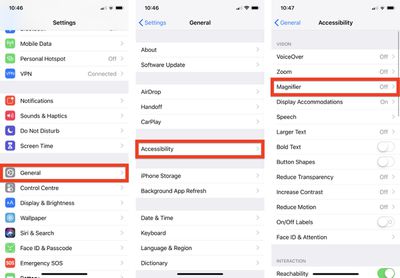
Enabling it is easy: Launch the Settings app on your iPhone or iPad, navigate to General -> Accessibility -> Magnifier, and toggle on the Magnifier switch.
magnifier ios accessibility
After that, all you need to do to use it is triple-click the Side button (or Home button, depending on your device). You can also add it to the Control Center by going to Settings -> Control Center -> Customize Controls, and tapping the green plus button next to Magnifier.

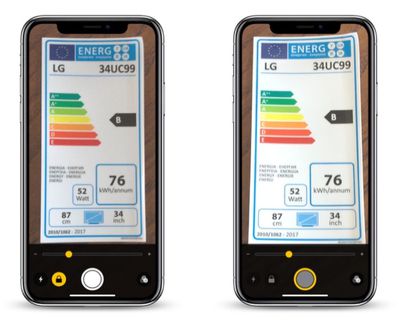
When you launch Magnifier, you'll see a camera-like interface at the bottom of the screen, but with some unique features. The slider controls the magnification of the scene in the lens frame, while the button at the bottom left turns on the flashlight so you can illuminate it. The padlock button next to that locks the focus.
magnifier ios
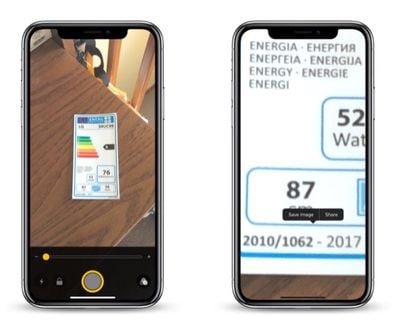
Tapping the big button in the center freezes the image (a frozen image is indicated by a yellow ring around the button), allowing you to move your phone around freely and still look at the image. You can also use the magnification slider to zoom in and out of the frozen image.

Note that when you freeze an image in the Magnifier, it isn't saved to your photo album. But if you want to save the entire image, you can.

Simply tap and hold on the frozen picture and select Save Image from the contextual popup menu. You'll find a Share option in there, too.
magnifier ios color schemes
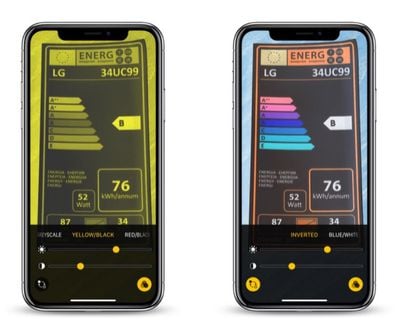
Over on the far right of the Magnifier interface is a button made up of three circles that provides access to additional sliders for adjusting brightness and contrast.

If you suffer from color blindness or another visual impairment, you can swipe through several color schemes in this extended menu and even invert the colors to find which combination works for you.

Top Rated Comments

ScooterComputer Avatar
104 months ago
This is one of the best, least-known-about features in iOS. I work with a LOT of older folks who are buying into the Apple ecosystem in DROVES… and this feature, ALONE, gets me more "happiness" from the folks that I show it to, configure it for, than any other. Just completely unable to put into words how much small accessibility features like this can really fundamentally change how users use their iPhones. You –KNOW– a feature is awesome when you see 70+ year olds you've enabled Magnifier for showing other 70+ year olds how to enable it months later; that's a success. I wish Apple wouldn't bury it so deeply, and I wish Apple would create an app for older users to walk them through some of the accessibility features that may be helpful to them; what I find, especially, is that older users tend not to like to think they need help, don't like the word "accessibility"—call it excessive pride, I dunno—but if you reframe the features as just "configuring your environment for you, for what you need and do", they're fine with it, acccept it. Perhaps the Tips app might be the place for Apple to showcase these kinds of features, but I find most users are not discovering them on their own. Which is a shame. Thanks, MacRumors, for putting it front and center!

EDIT: Oh, and perhaps I should also mention, I'm nowhere near 70 and I use Magnifier ALL THE TIME! It is great for reading serial numbers and MAC addresses off hard to reach devices, as I find the auto-focus system to be an improvement for such things over the standard Camera auto-focus. Reading fine print in ads. Etc. Just a handy handy feature.
Score: 8 Votes (Like | Disagree)
Analog Kid Avatar
104 months ago

(b) My experience has been that the triple-click launch method is EXTREMELY dodgy, very likely (30% or so) to lock the phone in some sort of strange state where it's not at all obvious how to get out of magnification mode. Maybe Apple has FINALLY fixed this with iOS 12.1?
For this reason, my preferred launch method is to put a launcher on the Control Center page.
As an accessibility function that could be very useful to the elderly, it would be nice to have this available from the lock screen alongside, or instead of, the flashlight or camera buttons...
Score: 1 Votes (Like | Disagree)
104 months ago
This is one of the best, least-known-about features in iOS. I work with a LOT of older folks who are buying into the Apple ecosystem in DROVES… and this feature, ALONE, gets me more "happiness" from the folks that I show it to, configure it for, than any other. Just completely unable to put into words how much small accessibility features like this can really fundamentally change how users use their iPhones. You –KNOW– a feature is awesome when you see 70+ year olds you've enabled Magnifier for showing other 70+ year olds how to enable it months later; that's a success. I wish Apple wouldn't bury it so deeply, and I wish Apple would create an app for older users to walk them through some of the accessibility features that may be helpful to them; what I find, especially, is that older users tend not to like to think they need help, don't like the word "accessibility"—call it excessive pride, I dunno—but if you reframe the features as just "configuring your environment for you, for what you need and do", they're fine with it, acccept it. Perhaps the Tips app might be the place for Apple to showcase these kinds of features, but I find most users are not discovering them on their own. Which is a shame. Thanks, MacRumors, for putting it front and center!

EDIT: Oh, and perhaps I should also mention, I'm nowhere near 70 and I use Magnifier ALL THE TIME! It is great for reading serial numbers and MAC addresses off hard to reach devices, as I find the auto-focus system to be an improvement for such things over the standard Camera auto-focus. Reading fine print in ads. Etc. Just a handy handy feature.
Absolutely! Let me add two comments.
(a) There are alternative magnification apps available. However the Apple solution seems to do a better job of locking onto focus fast, and then stabilizing the text against jitters. And this seems to have improved in more recent hardware. My iPhone XS seems to be quite a bit more visually stable than my iPhone 7 (OIS? or better processing?). So if this is something you care about and use a lot, it might be worth seeing how well it performs in a newer iPhone compared to what you have, and might make it worth the upgrade.

(b) My experience has been that the triple-click launch method is EXTREMELY dodgy, very likely (30% or so) to lock the phone in some sort of strange state where it's not at all obvious how to get out of magnification mode. Maybe Apple has FINALLY fixed this with iOS 12.1?
For this reason, my preferred launch method is to put a launcher on the Control Center page.
Score: 1 Votes (Like | Disagree)
104 months ago
This is well done. Bravo Apple!
Score: 1 Votes (Like | Disagree)

Popular Stories

iPhone Duo Display Cracking

Apple Alerts Stores to iPhone Duo's Display Cracking Issue

Friday October 30, 2026 3:20 pm PDT by
In a memo shared with Apple Stores and Apple Authorized Service Providers this week, and later obtained by MacRumors, Apple provided technicians with guidance on how to diagnose and address the iPhone Duo's inner display cracking issue. If a customer reports the issue, Apple advised technicians to inspect the iPhone Duo and repair or replace it in accordance with their standard procedures....

iPad mini OLED feature 1

Apple Executive Comments on New iPad Mini Lacking 120Hz Display

Thursday October 29, 2026 1:47 pm PDT by
While the new iPad mini has an OLED display, the device does not support ProMotion, meaning the display's refresh rate is limited to 60Hz instead of 120Hz. ProMotion support would have allowed for the iPad mini's refresh rate to automatically adjust from 10Hz to 120Hz depending on the content being displayed, but evidently Apple has kept the feature exclusive to the iPad Pro among iPad...

Pinched iPad Mini

Apple Avoids Showing Pinched Fingers on iPad Mini Page in South Korea

Thursday October 29, 2026 11:52 am PDT by
In the U.S. and most other countries, Apple's website shows the new iPad mini being held by pinched fingers, but this is not the case in South Korea. The new iPad mini shown with pinched fingers on Apple's website in the U.S. On its South Korean website, Apple simply shows an image of the iPad mini on its own. The new iPad mini shown without pinched fingers on Apple's website in South Korea ...

Latest Stories
Apple Watch Ultra 4 Hits All-Time Low Price With Amazon's $99 Discount
14 hours ago
Reminder: Apple's Big Discount on Beats 360 Ear Cushions Ends Today
14 hours ago
Here's a New Tour of Apple's HomeView Software
14 hours ago
Apple Reveals New iPad Mini's Battery Capacity
15 hours ago
Top Stories: Apple's Big MacBook Pro, iPad mini and iMac Updates
17 hours ago
'Pluribus' Season 2 Reportedly Starts Production Today
23 hours ago
iPhone 18 Pro Sales Surge in China, Offsetting Decline in U.S. and Japan

1 day ago
HomeView Software 27.2: Wallpapers, Control Center, and More
1 day ago
Apple Alerts Stores to iPhone Duo's Display Cracking Issue
1 day ago
iOS 27.3 Will Enable These Apple Intelligence Features in China
1 day ago
Apple Says iOS 27.3 Beta Coming Next Week
1 day ago
Apple's Flash Storage Suppliers Are Finally 'Getting Their Revenge'
1 day ago
14 New Things Your iPhone Can Do in iOS 27.2
1 day ago
iPhone Duo Review: One Week Later
1 day ago
Samsung Mocks iPhone Duo Display Cracks in New Ad Campaign
2 days ago
The MacRumors Show: OLED MacBook Pro, iPad Mini 8, and More
2 days ago
MacBook Pro With Touch Display: 15 More Details Revealed
2 days ago
Russia Places Apple on State Surveillance Registry
2 days ago
Halloween Weekend Brings Discounts on Apple Accessories and Pre-Orders
2 days ago
Apple Has Released More Than 25 New Products in the Past Two Months
2 days ago
Local Code Launches as Free, Private AI Assistant Tool for Mac
2 days ago
Apple Acquires Ascend.io
2 days ago
HomePod Mini 2 Launches Today: All the New Features
2 days ago
AirTag 2 4-Pack Drops to New Low Price of $69.99
2 days ago
Rian Johnson's iPhone Camera App Goes Viral
2 days ago
Where Did All the iPhone Duos Go? Mostly to Apple's Stores
2 days ago
Apple's Touchscreen MacBook Pro Could Ship 1.5M Units in 2027
2 days ago
New Apple TV 4K and iPad Mini: RAM Amounts Revealed
2 days ago
Apple Executive Comments on New iPad Mini Lacking 120Hz Display
2 days ago
Here's a Hands-On Look at HomePod Mini 2's New Two-Tone Colors
2 days ago

🔗 Related Apple News & Rumors

Stay updated with the latest Apple ecosystem news and verified rumors










































