

Gemini is Google's state-of-the-art AI model, designed to compete with other large language models such as OpenAI's ChatGPT-4. On iPhones, you can chat with Gemini right within the Google app. Keep reading to learn how it's done.

Apple recently announced a partnership with OpenAI to bring ChatGPT to iOS 18 later this year, and Apple has suggested that it is looking into partnerships with other AI companies to offer Apple device users more chat bot options, such as Google Gemini. But until that happens, you can access Google Gemini via the Google app for iOS.
Google Gemini has a range of practical applications that iPhone users might want to experiment with. In search queries, for example, Gemini enhances the accuracy and relevance of results by better understanding the context and nuances in queries. And when it comes to content creation, Gemini can generate and summarize text, create images, and assist with various creative tasks through the use of prompts.
Google Gemini requires a personal Google Account, or a Google Workspace account that can access the Google Search app. To get started with Gemini, download the Google app on your iPhone, then follow these steps.
- On your iPhone, open the Google app.
- Make sure that you're signed in to your Google Account.
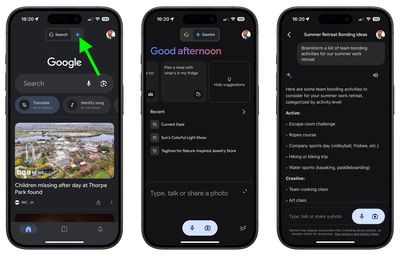
- If Gemini is available to you, a Gemini tab will be shown at the top of the Google app – switch to the Gemini tab and follow the on-screen instructions to get started.
- To chat with Gemini, tap a suggestion, or tap the Keyboard icon, then enter your prompt. To say your prompt, tap the Microphone icon, then start speaking. Alternatively, to add a photo to your prompt, tap the Image picker.
- When you're ready, tap Send.
Show or Hide the Gemini Tab
You can control whether the Gemini tab appears in the Google app by following these steps.
- In the Google app's Search screen, tap your profile picture.
- Tap Settings, then tap General.
- Toggle the switch next to Show Gemini to choose your preference.
As with other large-language models, Gemini can make mistakes. Google warns that Gemini can provide inaccurate information, or even make offensive statements. One way to double-check Gemini's responses is to use the Google button, which uses Google Search to find content that helps you assess and further research the information you get from Gemini.
The Google button is displayed below every response, alongside other options including Export to Docs, Draft in Gmail, Create a public link, select text, Modify response, and Other drafts.
















































