

 In iOS 13 and iPadOS, Apple combined the Find My Friends and Find My iPhone apps into a single app, called "Find My."
Find My works similarly to the two apps it replaces. In this article, we'll show you how to set up Find My iPhone on your iOS device so that you can use the Find My app to locate stolen, lost or misplaced Apple devices, including iPads, AirPods, Apple Watches, Macs, and of course, iPhones.
Before you do anything in the Find My app, you need to set up the iCloud-based service on all of your devices. The following steps show you how to set up Find My iPhone on iOS devices and Macs.
How to set up Find My iPhone on iOS
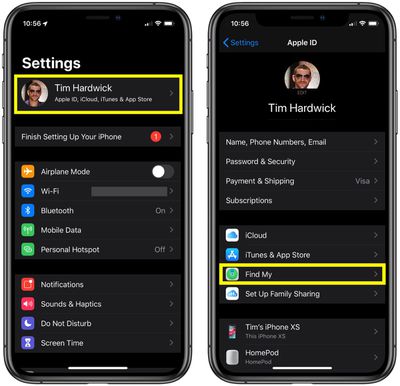
- Launch the Settings app on your iPhone or iPad.
- Tap the banner with your name in it at the top of the screen.

- Tap Find My.
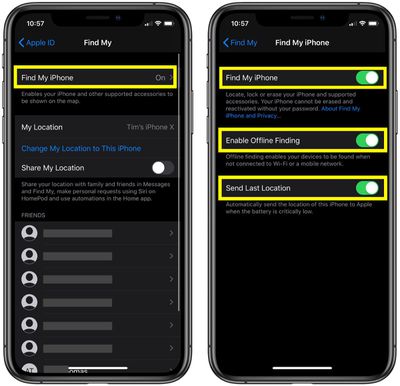
- Tap Find My iPhone.
- Tap the toggle switches to the ON position next to Find My iPhone, Enable Offline Finding, and Send Last Location.
How to set up Find My on Mac
- Click the Apple () symbol in the menu bar at the top-left corner of the screen and select System Preferences....
- Click the iCloud icon in the preference panel.
- Check the box next to Find My Mac.
If you see a Details button next to Find My Mac, select Details -> Open Security & Privacy -> Enable Location Services. If Enable Location Services is dimmed in Security & Privacy preferences, click and enter your administrator name and password.
Using Find My to Locate a Lost Device
When Apple replaced the old Find My iPhone app with Find My, it added a feature under the hood that allows you to locate lost devices that aren't connected to Wi-Fi or LTE by using the Bluetooth signal of your other nearby Apple devices.
When your lost device is offline but close to another device, it can connect to that device over Bluetooth and relay its location. The feature makes your devices more trackable than ever, and gives you a better chance of finding a device that's been lost.
The Find My app is available by default on all new iOS devices, but if you've deleted it, you need to download the free app from the App Store. Once it's installed, launch the Find My app and then sign in with the Apple ID you use for iCloud. (If the iOS device that you've lost or misplaced is the only one you own, you can log in to Find My on a Mac or PC instead.)
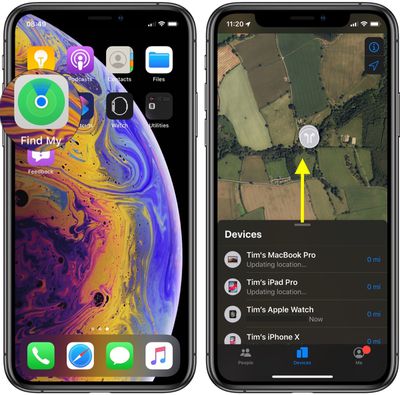
Once you've logged into the iOS app, you'll be presented with a map and a list of all the devices that are signed into your iCloud account. On the map, tapping the info icon (the circled 'i') in the top-right corner of the screen lets you change the map view to Satellite, Standard, or Hybrid, and set the distance to show as Miles or Kilometers. You can also tap the arrow icon in the top-right corner of the screen to center the map on the currently selected device.
Swipe up on the devices card to reveal the full list. Note that the line below each device tells you its last known location, while a padlock on a device's icon indicates that it's lost and has been manually locked. If you tap a device in the list, you'll gain access to additional device options.
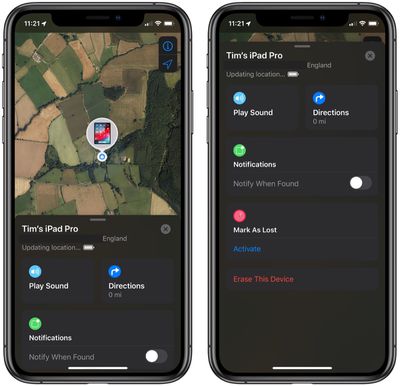
When you swipe up on the device actions card, the options available to you will depend on the type of device you're trying to locate, but you should always have the option to play a sound to locate a nearby device as long as it's powered on and within range.
If it's a Mac, iOS device or Apple Watch you're trying to locate, you can put it into Lost Mode (this ensures your passcode is required on the device before anyone can turn off Find My iPhone or erase it) or remotely erase it. If the Find My app knows where the device is located, you can also tap Directions, which will take you to navigation directions in the Apple Maps app.
If the selected device is out of range of network coverage or powered off, you can tap Notify When Found, and Apple will email you when the device is located. Any other options you choose in the device actions menu (Erase iPad, for example) will be performed the next time the device comes back online. Lastly, if the selected device has been irretrievably lost, you can choose to unlink it from your iCloud account by tapping Remove This Device at the bottom of the screen.




















