

When the iPhone 14 Pro models were announced in 2022, Apple surprised many with its innovative integration of software functions with the pill-shaped cutout at the top of the screen. Apple calls this area of the display the "Dynamic Island," and has since extended the feature to all iPhone 15 and newer models – including the iPhone Air. This article explains what Dynamic Island does, how it works, and how you can interact with it to perform actions.
What Is Dynamic Island and How Does It Work?
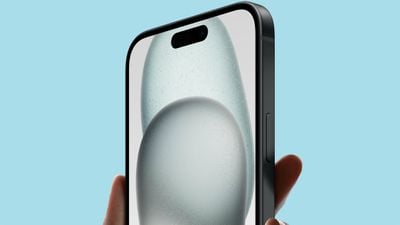
Apple's Dynamic Island is an alternative to the old notch first introduced on the iPhone X. The Dynamic Island incorporates a pill-shaped cutout and a hole punch cutout to house the TrueDepth camera hardware. These cutouts appear as one contiguous, longer pill shape when the iPhone is in use, and Apple integrates software functions around the pill.
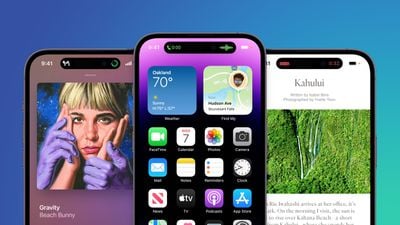
On newer iPhone models like the iPhone 17 and iPhone Air, display pixels around the Dynamic Island merge it into one pill-shaped area that changes size and shape to accommodate various types of alerts, notifications, and interactions, turning it into a kind of front-and-center information hub.
Which iPhone Models Feature Dynamic Island?
In the iPhone 14 series, the Dynamic Island is limited to the iPhone 14 Pro and iPhone 14 Pro Max, while the standard iPhone 14 models offer the same notch as the previous iPhone 13 models. All of Apple's flagship models beginning with the iPhone 15 series have a Dynamic Island, with the only exception being its entry-level iPhone 16e, which retains a notch.
What Can Dynamic Island Do?
Here's a breakdown of the many functions Dynamic Island can fulfill.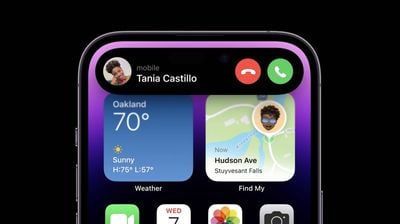
Dynamic Island: Display Outputs and Alerts
- Apple Pay transaction confirmations
- Privacy indicators when microphone or camera is in use
- AirDrop file transfers
- AirPods connection status and battery life
- iPhone charging status and battery life
- Low battery alerts
- Silent mode turned on or off
- Face ID unlocking
- Carkey locking/unlocking
- Apple Watch unlocking
- NFC interactions
- AirPlay connections
- Focus mode changes
- Shortcut actions
- Airplane mode/no data alerts
- SIM card alerts
- Accessories connect
- Find My alerts
- Flashlight on indicator
Dynamic Island: Background Activities
- Upcoming and turn-by-turn Maps directions
- Incoming phone call and duration of call
- Time remaining of playing song
- Active timers
- Live Activity sports scores
- SharePlay sessions
- Screen Recording
- Voice memo recordings
- Personal Hotspot connection
Can I Interact With Dynamic Island?
It's possible to interact with certain types of content displayed in the Dynamic Island. For example, if it's showing something related to an app's background activity, you can tap the Dynamic Island to switch straight into the associated app.
In certain circumstances, such as when media is playing, you can also long press the Dynamic Island to bring up a widget containing playback controls.
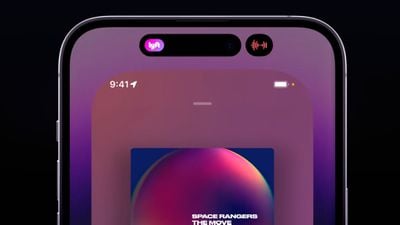
The Dynamic Island is also capable of displaying multiple background activities at once, such as when a timer is counting down and when you're listening to music. When that happens, the island splits into a larger pill-shaped area and a smaller circular area, so you can see and interact with both activities. You can swap between them and tap into them, just like you can with the standard Dynamic Island interface.
Can I Disable Dynamic Island Animations?
There's currently no way to outright disable Dynamic Island content, however if you're distracted by its animations you can dismiss them by swiping left or right across the Dynamic Island, without affecting any related background activity. This will return the pill-shape to its previous inert status.
Final Thoughts
Overall, the Dynamic Island on iPhone models is the type of impressive integration of software and hardware that Apple is known for, and the ability of third-party developers to tap into its potential means it is now more interactive than ever.
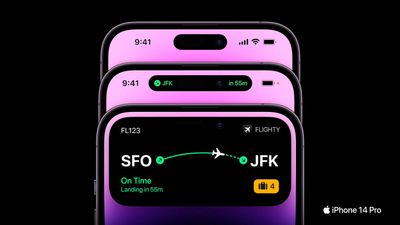
Note that Dynamic Island also works with Live Activities in third-party apps.




















Top Rated Comments
Most notifications dont need to expand to a fat dynamic notification. Ex: Shortcuts.
Fat dynamic notifications block time.
When you receive a phone call, sometimes you want to glance at the time, but its blocked.
Tap status bar to scroll back to the top is now a wonky mess.
Island now makes notification center and control center access even smaller and more difficult.
Face id doesnt need to be a popped out square, just give us a small animation inside dynamic island.
Island cuts in to youtube videos in portrait and landscape.
The status bar is just too big now.
If it going to be big and fat, let us add other stuff to status bar and customize.
Tap for widget, long press for app would be better.
Let us make something permanently stay in the island, like apple music player or podcast, for quick access to an app. Or some permanent info in there, day & date maybe. Anything really.
I get it’s early its implementation, but lets not eait 4 years until it’s fixed like everything else apple does.
We want day 1 full baked products, not half.