In iOS 16, Apple has added some major updates to the Messages app, introducing some features that rival third-party messaging platforms have had for years. One of these changes is the ability to unsend sent iMessages in iOS 16. Keep reading to learn how it works.
Have you ever sent a text message only to immediately wish that you hadn't? In previous versions of iOS, if you sent a message over Apple's iMessage service, there was nothing you could do in such an undesirable situation, but in iOS 16, it's possible to unsend an iMessage, or at least you can up to a point.
There are some limitations to the new Unsend feature that are worth taking into consideration. First, if you use the undo send feature on a message sent to someone running an earlier version of iOS, it will not work and the message will not be unsent.
In such cases, the person on the other end will not see that you unsent it, even though it disappears from your iPhone. If this happens, you'll see a message that says "You unsent a message. [Person] may still be able to see your message on devices running older versions of iOS."
Second, you can only opt to unsend an iMessage for up to two minutes after it's been delivered. If more than two minutes have elapsed since you sent the message, you can no longer unsend it (although you may still be able to edit the iMessage).
With the above caveats in mind, here's how you unsend a sent iMessage on an iPhone or iPad running iOS 16 or iPadOS 16.
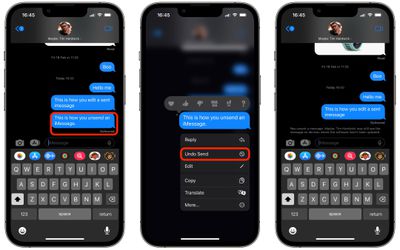
- In the Messages app, open the chat thread containing the sent message that you want to unsend.
- Long press the sent message that you want to fix.
- Tap Unsend from the pop-over menu. (If you don't see the option, at least two minutes have elapsed and you can no longer unsend it.)
- The message will disappear and be replaced by the text "You unsent a message."
That's all there is to it. Did you know that you can also edit iMessages in iOS 16? Check out our dedicated how-to to learn how.