

 Occasionally you might install an app on your Mac and later find that it's not for you, in which case you'll want to remove it. Likewise, if you've come up against the limits of your drive's storage capacity, you can uninstall non-essential apps to free up space.
Some third-party apps include an executable uninstaller in the app's folder that will completely remove the app from your system in just a couple of clicks. If the app doesn't have an uninstaller, the most straightforward way to uninstall an app in macOS is as follows:
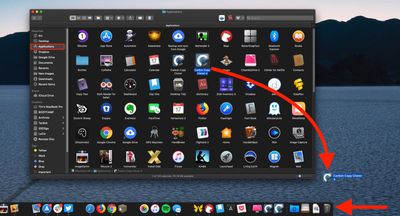
- Open a Finder window by clicking the Finder icon in the Dock.
- Click Applications in the Finder sidebar.

- Drag the app in question from the Applications folder to the Trash at the rightmost end of the Dock.
Uninstalling Apps Using Launchpad
If you've removed apps from an iPhone or iPad before, you'll find that the Launchpad can be used to uninstall Mac apps downloaded from the App Store in a similar way.
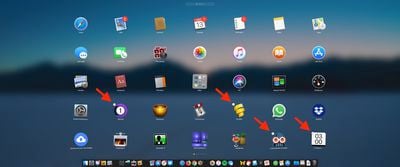
Simply click and hold an app icon until all the apps start to jiggle, then click the app's Delete button (the circled X next to its icon). Note that if an app doesn't have a Delete button, it can't be uninstalled in Launchpad.
Third-party Uninstallers
There are several third-party utilities available for Mac that specialize in removing other apps, such as App Cleaner & Uninstaller, AppZapper, CleanMyMac X, AppDelete, and Trash Me.
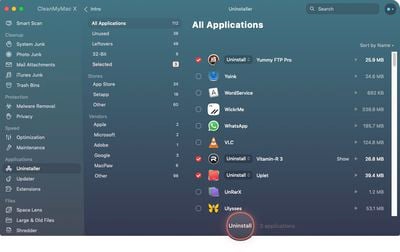 These utilities can be more efficient at weeding out redundant caches and preference files associated with the app that you want to remove, and often wipe away more app-related cruft than is possible by simply manually trashing apps.















































