

This article explains how to turn on closed captions and subtitles for the Deaf or Hard of Hearing on Apple devices. Keep reading to learn how it works.

The terms "closed captions" and "subtitles" are sometimes used interchangeably, but they’re actually designed for two different audiences. Subtitles offer a text alternative for spoken dialogue in video, while closed captions not only show text when someone's speaking, but also describe background noises and other audio cues that need describing.
In other words, subtitles are for viewers who can hear the audio, but need the dialogue provided in text form, whereas closed captions are for viewers who can't hear the audio at all and need a text description of everything that is audible in a video.
Meanwhile, subtitles for the Deaf or Hard of Hearing (SDH) combines both these features. SDH are intended for viewers who are both Deaf or Hard of Hearing and do not understand the language spoken in the video. So if a video is in another language that the viewer doesn't understand, SDH will translate the language while also including descriptions of other audible events.
How to Turn on Closed Captions or SDH on iPhone and iPad
- Launch the Settings app on your iOS device.
- Scroll down and tap Accessibility.
- Under the "Hearing" section, tap Subtitles & Captioning.
- Toggle the switch next to Closed Captions & SDH so that it's in the green ON position.

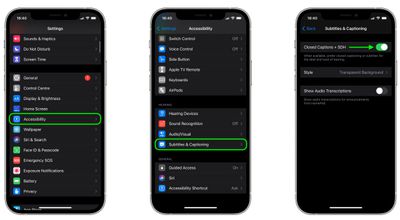
The last menu also includes options for you to customize captions and subtitles.
How to Turn on Closed Captions or SDH on Mac
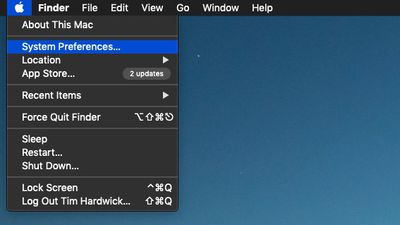
- On your Mac, click the Apple symbol in the menu bar, top-left corner of the screen, and select System Preferences....
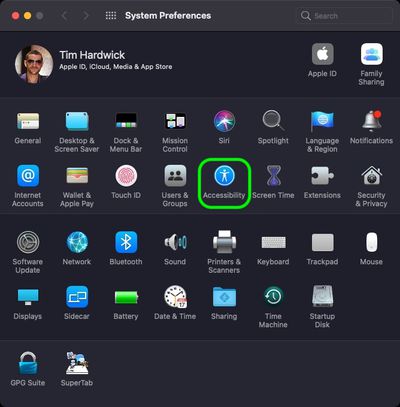
- Click the Accessibility preference pane.
- Scroll down the sidebar and click Captions, then click the checkbox next to Prefer closed captions and SDH.
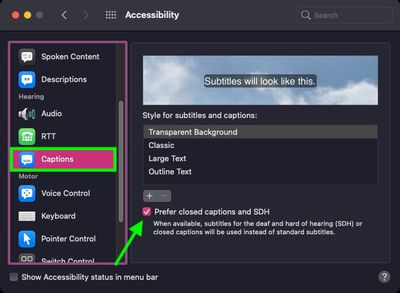
Note that you can customize captions and subtitles by choosing from the options shown on the last screen above.

















































