How to Turn on Automatic Software Updates on Your iPhone or iPad - MacRumorsOpen MenuShow RoundupsShow Forums menuVisit ForumsOpen Sidebar
Skip to Content

How to Turn on Automatic Software Updates on Your iPhone or iPad

by

If you don't want your iPhone or iPad to bug you about Apple's frequent software updates but want your software to stay up to date, there's an option on the iPhone or the iPad to enable automatic software updates. Apple first enabled this change in iOS 12.
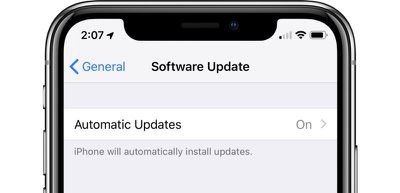
ios12automaticupdates
With this feature turned on, when a new version of iOS is released, your iPhone or iPad will be updated automatically

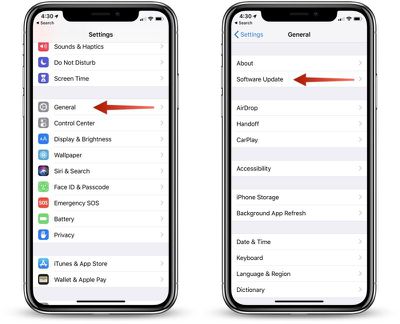
  1. Open the Settings app,
  2. Choose "General."
  3. Select "Software Update." ios12softwareupdate
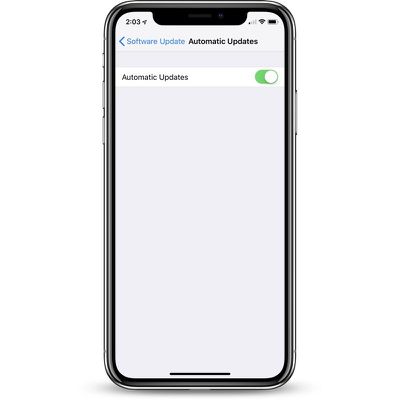
  4. Tap on "Automatic Updates."
  5. Toggle the option from off to on. automaticsoftwareupdates

Automatic updates are turned off by default, so the default behavior of software updates hasn't changed. Unless this is turned on, your iOS device will wait for you to manually tap the install button when an update is released, though it will continue to download new updates in the background.

To turn off automatic updates, follow the same steps, toggling the update from on to off.

Related Forum: iOS 12

Top Rated Comments

TMRJIJ Avatar
105 months ago
TLDR; Go to Software Update > Turn on Automatic Updates.

These tutorials are getting better..*facepalm*
Tutorial too confusing.... Got my phone stuck on the roof.....
Score: 6 Votes (Like | Disagree)
-BigMac- Avatar
105 months ago
TLDR; Go to Software Update > Turn on Automatic Updates.

These tutorials are getting better..*facepalm*
Score: 6 Votes (Like | Disagree)
Kaibelf Avatar
105 months ago
I want to turn it OFF: when I'm at my parents on vacation, I don't have Internet. So I bring my access Point which includes a 3G card. Overnight, as soon as our devices (2 iPads + 2 iPhones) see the WiFi, they start downloading several GB's of updates - and I reach my data cap in less than a week.

gees thanks! How difficult is it to be able to turn off updates depending on network ?
Or, just turn it off when you are experiencing your incredibly narrow use case instead of over complicating it for everyone else?
Score: 4 Votes (Like | Disagree)
105 months ago
I can’t agree more. All these ‘howto’s’ MR is posting seems to be an effort to simply add content, much of which is useless to anyone with half a brain.
I love them because my parents and some friends are really, really bad with technology so these articles break it down for them farther than I do.
Score: 3 Votes (Like | Disagree)
Juicy Box Avatar
105 months ago
If you don't want your iPhone or iPad to bug you about Apple's frequent software updates but want your software to stay up to date, there's a new option in iOS 12 to enable automatic software updates.
What if you want your iDevice to bug you about Apple's frequent software updates but want your software to stay where it is?

I can’t agree more. All these ‘howto’s’ MR is posting seems to be an effort to simply add content, much of which is useless to anyone with half a brain.
I don't mind these how-tos, it is not like you have to read them.

Over the past 5 years, the iOS has gotten a lot more complex and unintuitive when it comes to the settings. I am not saying that this how-to is complex, but many things that used to be really simple, are now moved, and hard to find.

I find myself having to do a something-search for where to find settings on Apple devices a lot more often than I used to. So, I appreciate how-tos like this one.
Score: 2 Votes (Like | Disagree)
jclo Avatar
105 months ago
I can’t agree more. All these ‘howto’s’ MR is posting seems to be an effort to simply add content, much of which is useless to anyone with half a brain.
Oftentimes with simpler how tos like these, the point is to serve as a reminder that a feature exists in the first place rather than as a walkthrough on how to do it. This is the case with automatic software updates. You might not even realize it's a thing, just because there's so much else going on in the beta.
Score: 2 Votes (Like | Disagree)

Popular Stories

Apple Event Logo

Apple Working on All-New Operating System

Wednesday July 29, 2026 11:39 am PDT by
Apple is developing an all-new operating system that is essentially a mix of tvOS, watchOS, and iOS, according to Bloomberg's Mark Gurman. In a report this week, he said the operating system will feature a grid of icons, widgets, and apps, along with customizable clock faces. The new software platform is intended for Apple's long-rumored smart home hub. With built-in facial recognition,...
imac video apple feature

Apple Made Its Second-Biggest Acquisition Ever This Year

Wednesday July 29, 2026 12:03 pm PDT by
Apple this year acquired Israeli startup Q.ai for close to $2 billion, according to the Financial Times. That would make this Apple's second-biggest acquisition ever, after it paid $3 billion for the popular headphone maker Beats in 2014. This is also the largest known Apple acquisition since the company purchased Intel's smartphone modem business and patents for $1 billion in 2019. Q.ai...
Dynamic Island iPhone 18 Pro Feature

iPhone 18 Pro: Twelve Changes Coming to Apple's Next Flagship

Thursday July 30, 2026 3:43 am PDT by
We're less than two months out from the launch of Apple's premium next-generation smartphone lineup, and while we're not expecting a dramatic change in terms of functionality, there are still several enhancements rumored to be coming to the iPhone 18 Pro and iPhone 18 Pro Max. One thing worth noting is that Apple is reportedly planning a major change to its iPhone release cycle this year,...

🔗 Related Apple News & Rumors

Stay updated with the latest Apple ecosystem news and verified rumors