iOS 15.4: How to Turn Off Notifications for Personal Automations in Shortcuts - MacRumorsOpen MenuShow RoundupsShow Forums menuVisit ForumsOpen Sidebar
Skip to Content

iOS 15.4: How to Turn Off Notifications for Personal Automations in Shortcuts

by

Apple's Shortcuts app is a great part of iOS because it includes tools that allow you to automate almost any action you can think of. But there is one aspect of it that has often annoyed users, and that's the lack of a setting that turns off notifications.
shortcuts automation
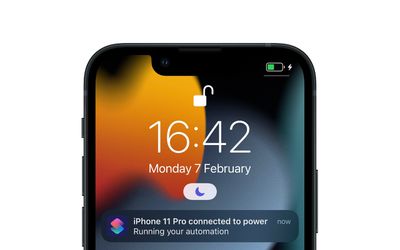
Whenever Shortcuts runs an automation (let's say, disable rotation lock when a particular app is opened) it does so in the background. Therefore it's likely that, from a security perspective, Apple initially felt it was good practice to send you a notification to indicate the action was being carried out. But if you regularly have familiar automations set up, the last thing you want your device to do is notify you every time it runs them.

In iOS 15.3, there was no easy way to disable these notifications. Fortunately, however, Apple has handily added a toggle in the latest iOS 15.4 update (currently in beta) that lets you turn notifications off for individual automations. The following steps show you how it's done.

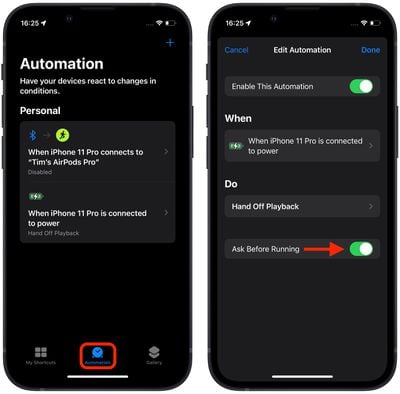
  1. Open the Shortcuts app.
  2. Tap the Automation tab at the bottom of the screen.
  3. Select the automation for which you want to disable notifications.
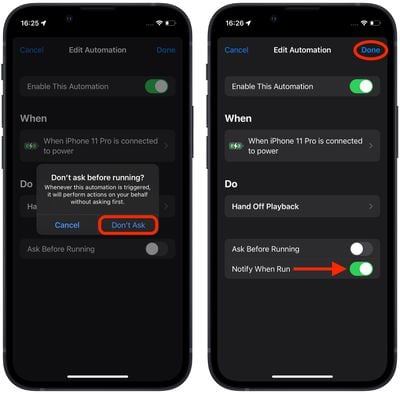
  4. In the Edit Automation screen, toggle off the switch next to Ask Before Running.
    shortcuts

  5. In the prompt that appears, tap Don't Ask.
  6. Now that Ask Before Running is disabled, you should see a new Notify When Run switch below it. To turn off notifications for this automation, toggle off this Notify When Run toggle.
  7. Tap Done in the top-right corner of the screen to save your changes.
    shortcuts

You will no longer receive a notification for the selected automation when it runs. Note that you'll need to manually repeat the above steps for each automation that you don't want to receive notifications for – there is currently no global setting turn off all notifications in Shortcuts.


Popular Stories

shortcuts ios 27

Apple Brings Natural Language Creation to Shortcuts App

Monday June 8, 2026 11:06 am PDT by
Apple today announced that users can now describe a shortcut in natural language, with Apple Intelligence automatically building the automation in the background. Previously, creating a Shortcuts automation required users to manually build workflows step by step, making the feature largely the preserve of more technically minded users. With the upcoming update, users can simply describe what ...


American Express Gold Apple Pay Feature

American Express Announces New Apple Pay Feature

Tuesday June 30, 2026 10:27 am PDT by
American Express today announced that you can now redeem Membership Rewards points when checking out with Apple Pay on the web and in apps on the iPhone and iPad. When checking out with Apple Pay on iOS 18 or iPadOS 18 or later, tap on your eligible American Express card (Platinum, Gold, Green, and others) and select the Membership Rewards points option. You can use points to cover all or...
Apple Acquires Award Winning App Play Feature

Apple Acquires Award-Winning App 'Play'

Monday June 29, 2026 7:39 am PDT by
In February, Apple notified the European Commission that it would be acquiring certain assets from and have the right to hire certain employees from Rabbit 3 Times, the company behind the award-winning app design tool Play. The notification was published on the European Commission's website this week, following a four-month waiting period. Play was a Mac and iPhone app that allowed designers ...

🔗 Related Apple News & Rumors

Stay updated with the latest Apple ecosystem news and verified rumors