

 Find My Mac is a macOS feature that enables you to locate your machine if it's lost or missing. When you sign in to iCloud.com or the Find My iPhone app in iOS, you can see your missing Mac on a map and play a sound to locate it if it's close by. It also has a Lost Mode to lock, track, or remotely erase all of your personal information from your machine.
For these reasons, Apple recommends that users keep Find my Mac enabled, but there are circumstances where you might want to turn it off. If you're selling your Mac or passing it on, for example, you should disable Find My Mac beforehand, because the new owner won't be able to disable it unless they have your Apple ID password. Similarly, if you're taking your Mac in to Apple for repairs, you may be asked to turn off Find My Mac. Whatever the reason, here's how it's done.
How to Turn Off Find my Mac
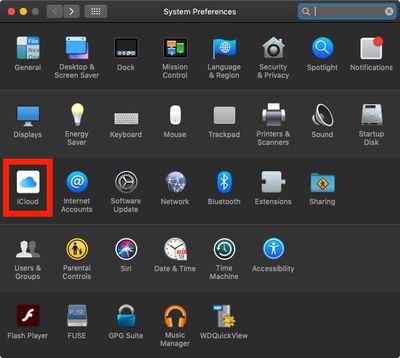
- Launch System Preferences from your Mac's Dock, from the Applications folder, or from the Apple menu bar ( -> System Preferences...).
- Click iCloud in the preferences panel.

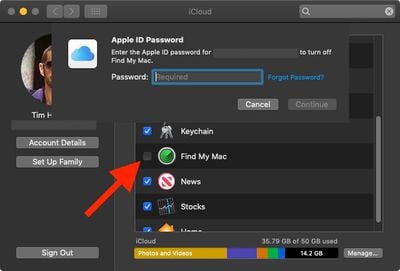
- Scroll down to Find My Mac and untick the checkbox next to it.
- Enter your Apple ID password when prompted.
- Click Continue.
- Click the red dot at the top left corner of the window to close the preference pane.
Note that you can also disable Find My Mac by signing your Mac out of iCloud completely. To do so, just click Sign Out in the iCloud preference pane. If you sign out, any mail, contacts, calendars, photos, notes, reminders, or other documents that are stored in iCloud will be removed from your Mac, but they will remain in the cloud.

















































