

Translate Speech With iPhone's Action Button - MacRumorsOpen MenuShow RoundupsShow Forums menuVisit ForumsOpen Sidebar
Skip to Content

Translate Speech With iPhone's Action Button

by

Overcome communication barriers with the new custom Translation option for the iPhone's Action button. Keep reading to learn how to use it.
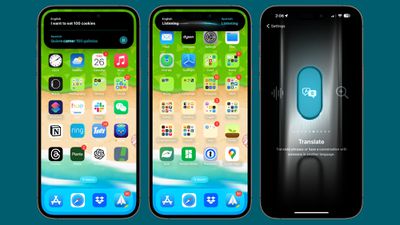
ios 17 translate
If you have an iPhone with an Action button (iPhone 15 Pro, iPhone 16 series, iPhone 17 series) Apple has a translation option for the button that allows you to translate live conversations into multiple languages.

According to Apple, the translation is not just accurate but also context-aware, ensuring that nuances and colloquialisms are captured effectively. The feature should be a boon for travelers, students, and anyone learning a language.

Before you use the Translate function, it's important to choose which language you want to translate. You can do this via Apple's built-in Translate app. On the app's main screen, use the chevrons next to the languages to make your selection.
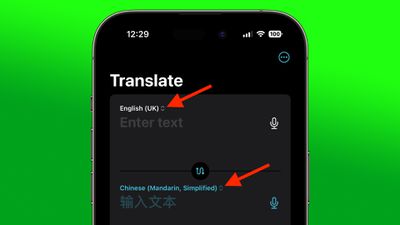
translate choose language

Assign Translate to Action Button

Once you have chosen your languages, you are ready to select the Translate option for the Action button.

  1. Open the Settings app on your iPhone.
  2. Tap Action Button.
  3. Swipe to the Translate option to enable it.
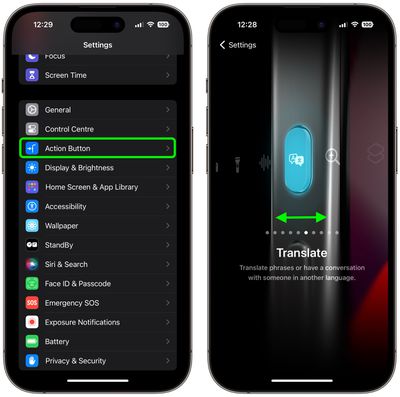
settings

Using the Translate Function

To Translate your speech to your chosen language, simply press and hold the Action button on your iPhone and begin speaking. Keep holding down the button for as long as you want to capture speech.
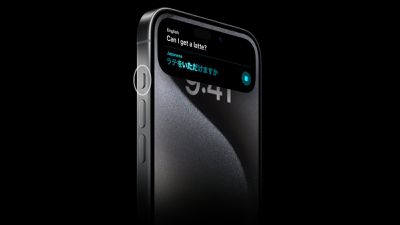
iPhone 15 Pro Action Button Translate
Your iPhone will transcribe what you said and display it in the Dynamic Island, and it will also provide a translation in the chosen language just beneath the transcription. Your iPhone will automatically read aloud the translation, and you can replay it by pressing the play button to the right of it.


Top Rated Comments

Attirex Avatar
34 months ago
Ah, yes, now obnoxious US tourists can shove their phones in locals' faces the world over!

"I SAID DO YOU HAVE COFFEE??? MY PHONE JUST SAID IT IN YOUR LANGUAGE. ARE YOU DEAF AND ALSO STUPID???"
Score: 6 Votes (Like | Disagree)
CausticSoda Avatar
34 months ago
This is woefully inadequate. As an expat and a frequent traveller, I was really looking forward to it. However:

[LIST=1]
* It only translates one way and does not listen for a reply.
* You cannot even press it again to reverse the translation direction. You have to enter the app.
* About 1/3 of the time it simply fails to work (it "listens" but does not respond). That is not due to the internet because I have the languages downloaded as well.
* The autoplay of the translation to sound never works the first time. After it "plays" it automatically, you then have to press repeat play manually, and only then you can hear it.

* There is no locked screen override, so if you press it on a locked screen it turns itself off after a few seconds, so you have to unlock the screen before use which is ridiculous.
* If you want to speak again after the first translation you have to enter the app or long press it off and then long press it back on again.

I am astounded this is the best they can do... If you devote an actual button to it, it should have more functionality and simply work better. I cannot believe whoever was responsible for this thinks it is good enough. Was it actually tested by people who have experience of needing/using translation aids in real life rather than a quick test be someone clueless in Cupertino? If they could make it work properly it would be great and an example of a really good use of the button. If you are in a stressful situation with live conversation, you don't want to be finding and opening the app. You want to be "on it" immediately. Doing it all from one button would be superb. Come on Apple - sort it out please!
Score: 4 Votes (Like | Disagree)
Dirty Mac Avatar
34 months ago

Ah, yes, now obnoxious US tourists can shove their phones in locals' faces the world over!

"I SAID DO YOU HAVE COFFEE??? MY PHONE JUST SAID IT IN YOUR LANGUAGE. ARE YOU DEAF AND ALSO STUPID???"
Maybe Apple will also add a "shouting mode" to the speech output for Americans? ;-)
Score: 3 Votes (Like | Disagree)
AppleFan91 Avatar
34 months ago
But most importantly…. Can I get that wallpaper lol
Score: 2 Votes (Like | Disagree)
CausticSoda Avatar
34 months ago

I was a bit confused by this when I first started playing with it too. However, it’s linked to whether you’re in silent mode or not: with silent mode turned off it’ll speak the translation the first time, without you needing to hit the play button.
I actually tried that and it didn't seem to make any difference, but I'll try again. Thanks for the reply.
Score: 1 Votes (Like | Disagree)
ric22 Avatar
34 months ago

This is woefully inadequate. As an expat and a frequent traveller, I was really looking forward to it. However:

[LIST=1]
* It only translates one way and does not listen for a reply.

* You cannot even press it again to reverse the translation direction. You have to enter the app.
* About 1/3 of the time it simply fails to work (it "listens" but does not respond). That is not due to the internet because I have the languages downloaded as well.
* The autoplay of the translation to sound never works the first time. After it "plays" it automatically, you then have to press repeat play manually, and only then you can hear it.
* There is no locked screen override, so if you press it on a locked screen it turns itself off after a few seconds, so you have to unlock the screen before use which is ridiculous.
* If you want to speak again after the first translation you have to enter the app or long press it off and then long press it back on again.

I am astounded this is the best they can do... If you devote an actual button to it, it should have more functionality and simply work better. I cannot believe whoever was responsible for this thinks it is good enough. Was it actually tested by people who have experience of needing/using translation aids in real life rather than a quick test be someone clueless in Cupertino? If they could make it work properly it would be great and an example of a really good use of the button. If you are in a stressful situation with live conversation, you don't want to be finding and opening the app. You want to be "on it" immediately. Doing it all from one button would be superb. Come on Apple - sort it out please!
Wow. Apple translate was poor in comparison to Google translate when I tried that, but recent updates have made Google translator on iOS more of a pain to use too...
Score: 1 Votes (Like | Disagree)

Popular Stories

Apple Event Logo

Apple Working on All-New Operating System

Wednesday July 29, 2026 11:39 am PDT by
Apple is developing an all-new operating system that is essentially a mix of tvOS, watchOS, and iOS, according to Bloomberg's Mark Gurman. In a report this week, he said the operating system will feature a grid of icons, widgets, and apps, along with customizable clock faces. The new software platform is intended for Apple's long-rumored smart home hub. With built-in facial recognition,...
imac video apple feature

Apple Made Its Second-Biggest Acquisition Ever This Year

Wednesday July 29, 2026 12:03 pm PDT by
Apple this year acquired Israeli startup Q.ai for close to $2 billion, according to the Financial Times. That would make this Apple's second-biggest acquisition ever, after it paid $3 billion for the popular headphone maker Beats in 2014. This is also the largest known Apple acquisition since the company purchased Intel's smartphone modem business and patents for $1 billion in 2019. Q.ai...
Dynamic Island iPhone 18 Pro Feature

iPhone 18 Pro: Twelve Changes Coming to Apple's Next Flagship

Thursday July 30, 2026 3:43 am PDT by
We're less than two months out from the launch of Apple's premium next-generation smartphone lineup, and while we're not expecting a dramatic change in terms of functionality, there are still several enhancements rumored to be coming to the iPhone 18 Pro and iPhone 18 Pro Max. One thing worth noting is that Apple is reportedly planning a major change to its iPhone release cycle this year,...

🔗 Related Apple News & Rumors

Stay updated with the latest Apple ecosystem news and verified rumors







































