

If you're looking for a quick and easy way to transfer your iCloud photos to Google Photos, look no further. Apple now offers a service that's designed to streamline the process of moving your photos and videos to Google's cloud platform. Keep reading to learn how it works and how to get started with it.
First of all, make sure that Apple's iCloud-to-Google Photos transfer service is available in your region. As of writing it is available to customers in Australia, Canada, the European Union, Iceland, Liechtenstein, New Zealand, Norway, Switzerland, the United Kingdom, and the United States.
Apple's service operates by request. That is, you have to ask Apple to transfer your iCloud media to Google Photos. Once you've made the transfer request, you'll need to wait while Apple verifies that the request was made by you and then makes the transfer. This can take between three and seven days to complete, according to Apple, so don't get concerned if it isn't finished overnight. Bear in mind though that if you make changes to your iCloud media during the transfer process, those changes may not be reflected in the transfer.
Before you initiate a transfer, it's worth taking the time to consider what kind of media lives in your Photos library and how it's organized. Apple warns that "some content — including shared albums, smart albums, photo stream content, live photos, some metadata, and photos and videos stored in other folders or locations — is not transferred at all."
It's also worth pointing out that transferring photos and videos from iCloud Photos doesn't remove or alter the content you store with Apple – it just sends a copy of your media to Google Photos. If you want to delete the photos and videos you have stored on iCloud after you've copied them over, you'll have to do it manually.
What You'll Need
- Your Apple ID with two-factor authentication enabled.
- A Google account to use Google Photos.
- Enough storage available on your Google account to accommodate the transferred photos.
How to Request a Transfer of Your iCloud Photos Content
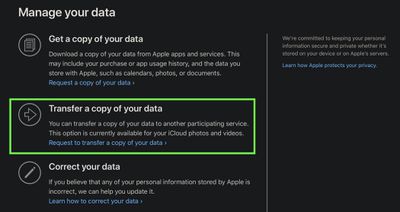
- Open a web browser and navigate to privacy.apple.com, then sign in using your Apple ID credentials.
- Select Transfer a copy of your data.

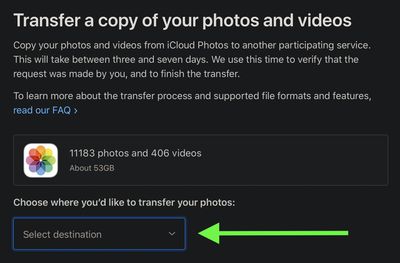
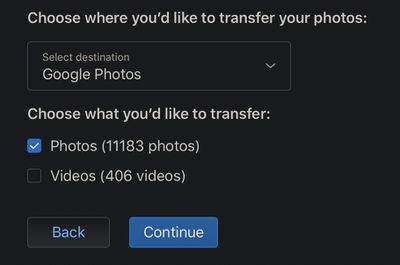
- The next page will tell you how many pictures and videos will be copied from iCloud Photos and how much storage they require. Click Under "Choose where you'd like to transfer your photos," click the dropdown menu, then select Google Photos.
- Use the checkboxes to indicate whether you want to transfer your photos or your videos, or both, then click Continue.
- On the next page, confirm that your Google account has the required storage to transfer the selected media by clicking Continue.
- Lastly, sign in to your Google account and select the location where you want the files to go.
You'll receive an email from Apple to notify you when the transfer is complete.


















