

How to Take a Slow-mo Selfie or 'Slofie' on iPhone 11, iPhone 11 Pro, and iPhone 11 Pro Max - MacRumorsOpen MenuShow RoundupsShow Forums menuVisit ForumsOpen Sidebar
Skip to Content

How to Take a Slow-mo Selfie or 'Slofie' on iPhone 11, iPhone 11 Pro, and iPhone 11 Pro Max

by

Apple's iPhone 11, iPhone 11 Pro, and iPhone 11 Pro Max all feature an updated 12-megapixel front-facing camera, along with a couple of notable additional shooting options that selfie fans should love.
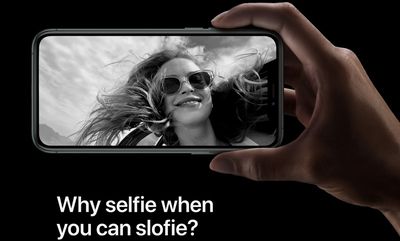
appleslofies
The first addition is that you can now turn your iPhone to landscape mode to capture a wider shot, which is great for group selfies. The second is a new option that lets you take slow motion videos at 120 frames per second.

To market the latter feature exclusive to its 2019 iPhones, Apple invented a new word for it, combining slo-mo (the name long used for the 120fps function on the rear-facing camera) and selfie to form the word "Slofie."

Don't worry, though – "Slofie" isn't used to describe the feature in the iPhone 11's redesigned Camera app, where it's still referred to using the more sober term "Slo-mo." Follow the steps below to create your first Slofie.

  1. Launch the Camera app on your iPhone.
  2. Tap the perspective flip button below the viewfinder to activate the front-facing camera.
    camera app

  3. Swipe rightwards along the shooting mode options directly below the viewfinder until Slo-mo is highlighted in yellow.
  4. Take your slo-mo recording by tapping the red shutter button, then tap again to end it.
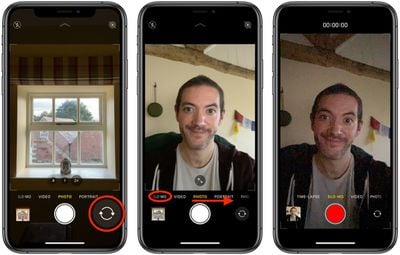
To view your Slofie, simply select it in the Photos app and it will play automatically. If you want, you can share it straight away using the Share button (the square with an arrow pointing out) and selecting one of several options from the Share Sheet.


Related Forum: iPhone

Popular Stories

iPhone 18 Pro Burgundy

New Texture and Grain Controls Coming to Photographic Styles With iPhone 18 Pro

Wednesday September 9, 2026 12:45 pm PDT by
Apple today announced new texture and grain controls for Photographic Styles with the iPhone 18 Pro and iPhone 18 Pro Max. Photographic Styles are tone presets that adjust the color and warmth of a photo as it is captured, rather than as a filter applied afterward, while preserving skin tones. The iPhone 18 Pro and iPhone 18 Pro Max gain a redesigned computational imaging pipeline for the ...

iOS 27 Next to iPhone

Here's When iOS 27 Rolls Out Today in Every Time Zone [Update: It's Out]

Sunday September 13, 2026 3:00 am PDT by
Update 10:04 a.m.: iOS 27 is rolling out now, though it may take a bit for all users to see it, so keep checking! Apple is about to release iOS 27, which will finally deliver more advanced Siri AI capabilities as well as a variety of other refinements, improvements, and new features to iPhones. It's Apple's biggest software update of the year, and Apple announced at Wednesday's iPhone event...
iOS 27 Icon iPhone

iOS 27 Available Now With These 8 New Features

Monday September 14, 2026 9:00 am PDT by
Update — 10 a.m. Pacific Time: Apple has released iOS 27. During its iPhone 18 Pro and iPhone Duo event last week, Apple announced that iOS 27 will be released widely on Monday, September 14. iOS 27 should be available around 10 a.m. Pacific Time / 1 p.m. Eastern Time today via the Settings app, under General → Software Update. Below, we have highlighted eight new features and...

🔗 Related Apple News & Rumors

Stay updated with the latest Apple ecosystem news and verified rumors











































