

Apple's iPhone 13 Pro and iPhone 14 Pro models exclusively support a video recording feature called ProRes, which allows you to capture, edit, and share professional quality video. Here's how to enable it on your iPhone in iOS 16.
Aimed at professionals, the ProRes codec offers higher color fidelity and less compression, and it is often used for commercials, feature films, and TV broadcasts, which is testament to the high quality results that it can achieve.
A one-minute 10-bit HDR ProRes video takes up 1.7GB in HD mode. For that reason, recording ProRes video at 4K at 30 frames per second requires 256, 512, or 1TB of iPhone storage capacity.
In other words, if you have an iPhone 13 Pro or iPhone 14 Pro with the base 128GB of storage, you'll be limited to shooting 1080p ProRes video at 30 frames per second.
With that in mind, you can follow these steps to turn it on.
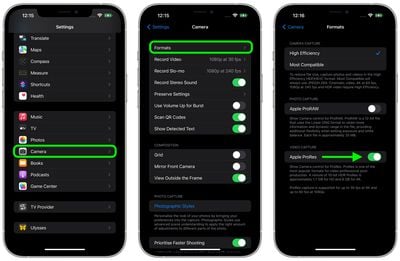
- Launch the Settings app on your iPhone 13 Pro or iPhone 14 Pro.
- Scroll down and tap Camera.
- Tap Formats.
- Under "Video Capture," toggle the switch next to Apple ProRes to the green ON position.
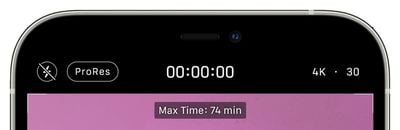
With ProRes enabled, the next time you choose the Video mode in the Camera app, you'll see the ProRes indicator in the top-left corner above the viewfinder. If it's crossed out, tap it to enable the feature. The "Max Time" at the top of the viewfinder also tells you the maximum duration that you can record in ProRes, based on your iPhone's storage capacity.
Along with ProRes, the iPhone 13 Pro and iPhone 14 Pro feature improved Wide, Ultra Wide, and Telephoto lenses with better low light performance, macro capabilities, Night Mode, Cinematic video recording for depth-of-field transitions, Photographic Styles for enhancing images, and (exclusive to the iPhone 14 Pro) a new Action mode for stabilizing video.






















Top Rated Comments
Awesome feature, but IMHO, much less useful than ProRAW due to the amount of space and the limitations of transferring via lightning. Airdrop may work depending how long the video is. I absolutely love my 13 Pro and would never use ProRes any way, but the fact Apple continued to make a device they market as Pro for professional videographers with lightning port and not USB-C/TB4 like the iPad Pros is beyond me.
I’m not a glutton for the punishment I’d go through trying to get a huge movie file off of the iPhone. I went through that a couple of times getting my recording of a 90 minute school play off of the iPhone 8 Plus a few years ago. I still can’t get that video up on Google Photos for some reason.
My MacBook is from 2011. My gaming PC is now about 4 years old and doesn’t have large enough storage either. Someday I’ll invest in a nice Mac again. But we know how storage options are priced for their computers.
It’s not worth it to me to use anything above the now standard 4K 60 when it’s such a pain to get the huge files off the phone and too expensive to store it all. Someone said there’s an adapter that can be used. That would be something to look into I guess.