

iOS 17: How to Switch Measurement Units in the Weather App - MacRumorsOpen MenuShow RoundupsShow Forums menuVisit ForumsOpen Sidebar
Skip to Content

iOS 17: How to Switch Measurement Units in the Weather App

by

In iOS 17, Apple has made some improvements to its stock Weather app, such as the ability to view the previous day's weather, and a new moon module that talls you the phases of the moon.
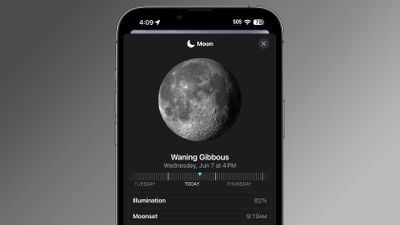
ios 17 weather app moon
In addition to the ability to view temperature in Celsius and Fahrenheit, you can also now change the unit measurements for wind speed, precipitation, pressure, and distance.

The following steps show you how it's done on iPhones running iOS 17.

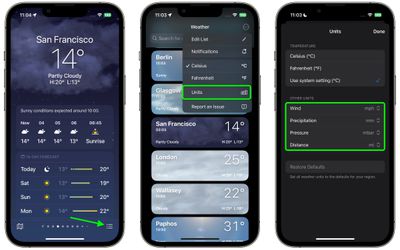
  1. In the Weather forecast view, tap the three-lined icon in the bottom-right corner of the screen.
  2. On the forecast locations screen, tap the circular icon containing three dots in the top-right corner of the screen.
  3. Select Units in the dropdown menu.
  4. Under the "Other Units" section, use the options to choose your unit preferences for Wind, Precipitation, Pressure, and Distance.
weather

That's all there is to it. Your unit preferences will be set for all locations stored in Apple's Weather app, and will be reflected in any Weather widgets you use on your iPhone's Home Screen.


Popular Stories

iOS 27 Weather App Forecast Feature 1

iOS 27's Weather App Has a New Way to View Forecasts

Thursday June 11, 2026 1:10 pm PDT by
Starting with iOS 27, Apple's Weather app offers new hourly and 10-day overviews for precipitation and wind that you can quickly view at a glance. While this sort of information was already accessible elsewhere in the app, you can now quickly tap between conditions, precipitation, and wind overviews. You can view the percentage chance of rain or snow each hour and day, as well as...

American Express Gold Apple Pay Feature

American Express Announces New Apple Pay Feature

Tuesday June 30, 2026 10:27 am PDT by
American Express today announced that you can now redeem Membership Rewards points when checking out with Apple Pay on the web and in apps on the iPhone and iPad. When checking out with Apple Pay on iOS 18 or iPadOS 18 or later, tap on your eligible American Express card (Platinum, Gold, Green, and others) and select the Membership Rewards points option. You can use points to cover all or...

Apple Acquires Award Winning App Play Feature

Apple Acquires Award-Winning App 'Play'

Monday June 29, 2026 7:39 am PDT by
In February, Apple notified the European Commission that it would be acquiring certain assets from and have the right to hire certain employees from Rabbit 3 Times, the company behind the award-winning app design tool Play. The notification was published on the European Commission's website this week, following a four-month waiting period. Play was a Mac and iPhone app that allowed designers ...

🔗 Related Apple News & Rumors

Stay updated with the latest Apple ecosystem news and verified rumors





































