


Stop WhatsApp Auto-Saving Media to iPhone Photos App - MacRumorsOpen MenuShow RoundupsShow Forums menuVisit ForumsOpen Sidebar
Skip to Content

Stop WhatsApp Auto-Saving Media to iPhone Photos App

by

whatsappBillions of messages are sent over the WhatsApp chat platform every day. One of the reasons for the service's massive popularity is that it lets users send and receive as many media-rich messages as they want, which – as long as they've limited WhatsApp's use of their cellular data plan – costs them next to nothing.

That's great news for senders, but one of the drawbacks of receiving multiple images and video clips from your WhatsApp contacts is that they're automatically saved to your iPhone's Photos app. Apart from being an unwelcome sight in your personal photos, they can start to take up valuable storage space. Fortunately, you can easily prevent this default behavior by following the steps below.

How to Stop WhatsApp Saving to Photos

  1. Launch the WhatsApp app on your iPhone.

  2. Tap the Settings icon (the small cog wheel) at the bottom right of the screen.

  3. Tap Chats.
  4. Toggle off the Save to Photos option so that it no longer shows as green.
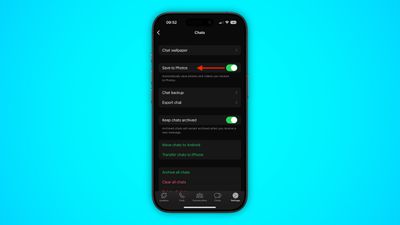
whatsapp

Once you've turned off the above setting in WhatsApp, you can still manually opt to save individual media files that you receive in a chat thread. Simply long press on the photo or video clip in question and choose the Save option.

How to Limit WhatsApp Media Downloads to Wi-Fi

If receiving images or video over WhatsApp is sapping your cellular data when you're out and about, you can prevent them from downloading to your iPhone until you're safely back in range of a Wi-Fi connection.
whatsapp
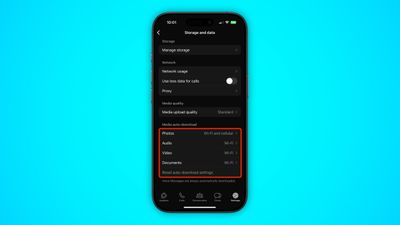
To do so, return to WhatsApp's Settings tab and tap Storage and data. The options under the "Media Auto-Download" section let you dictate which types of media can be downloaded and under what circumstances. Make sure that the media types you're happy to wait for are set to Wi-Fi.


Top Rated Comments

Infinite Vortex Avatar
106 months ago
And use what?
Signal.

If you read the Terms of Use WhatsApp, and Facebook, can grab the full contents of your Contacts app any time they want to. And they want to quite a bit. Not just names and phone numbers, the whole damn lot! WhatsApp won't work without access to Contacts either to ensure they get that data from you… Signal will work with or without your contact data.
Score: 4 Votes (Like | Disagree)
106 months ago
Whatsapp should let send and receive pics at full resolution, without compressing them.
Score: 3 Votes (Like | Disagree)
RightMACatU Avatar
106 months ago
How to Stop WhatsApp Auto-Saving Images and Video to Your iPhone's Camera Roll
By not installing the app? :p
Score: 3 Votes (Like | Disagree)
arkitect Avatar
106 months ago
iMessage of course remember you are on apples turf
I'll be sure to tell my Android using family and friends I want them all to switch to Apple. For my convenience, of course. ;)
Score: 2 Votes (Like | Disagree)
106 months ago
Signal.

If you read the Terms of Use WhatsApp, and Facebook, can grab the full contents of your Contacts app any time they want to. And they want to quite a bit. Not just names and phone numbers, the whole damn lot! WhatsApp won't work without access to Contacts either to ensure they get that data from you… Signal will work with or without your contact data.
Any alternative IM service sounds good, until you realize where all your friends are. And at this point, everybody is too lazy to install/set up yet another messaging service after Whatsapp, Line, Wechat, Telegram, Facebook messenger, etc. Even Google couldn't penetrate the messaging market. Add on the region complexity if you have international friends. Telling your friends of yet another app to install (just to communicate with you) will be greeted with an eye-roll.
Score: 2 Votes (Like | Disagree)
n-evo Avatar
106 months ago
Thank god 99% of my family and friends are on iOS so this isn’t necessary. But my question is...why wouldn’t you just SMS your Android friends? Most plans have unlimited texting these days.
SMS doesn't allow for sending video's, photos, voice memo's, location (with map), live location for a set time, group chat among other things. Also not all plans allow for free unlimited MMS, while SMS is unlimited without extra charges.
Score: 1 Votes (Like | Disagree)

Popular Stories

Whatsapp Feature

WhatsApp Beta Adds Green Dot to Show Who's Online

Monday July 6, 2026 3:56 am PDT by
WhatsApp appears to be introducing a new visual indicator that shows when a contact is online, according to WaBetaInfo. The feature adds a small green circle to a contact's profile photo when they're active in the app, and which disappears the moment they leave, all updated in real time. The indicator is now being tested for the WhatsApp iPhone app in TestFlight after it debuted on Android...
Whatsapp Feature

WhatsApp Beta Reveals iCloud Backup Alternative for iPhone

Tuesday July 14, 2026 3:06 am PDT by
WhatsApp is developing a first-party cloud storage option for chat backups on iPhone, providing users with an alternative to iCloud for the first time, according to app tinkerer WABetaInfo. Code found in the WhatsApp beta for iOS (version 26.28.10.16), available through TestFlight, suggests that users will eventually be able to pick their preferred backup destination directly from the app's...
Whatsapp Feature

WhatsApp Begins Rolling Out New Username Feature

Friday July 17, 2026 5:32 am PDT by
WhatsApp has started rolling out its new username feature, reports WABetaInfo. Some users who reserved their username have started receiving a notification that their username is active, and that they can now use it to send and receive messages to other users without revealing their phone number. When someone creates a username, WhatsApp will notify people who already have an active chat with...

🔗 Related Apple News & Rumors

Stay updated with the latest Apple ecosystem news and verified rumors










































