How to Stop Your Apple Watch From Launching the 'Now Playing' App When Audio Plays on Your iPhone - MacRumorsOpen MenuShow RoundupsShow Forums menuVisit ForumsOpen Sidebar
Skip to Content

How to Stop Your Apple Watch From Launching the 'Now Playing' App When Audio Plays on Your iPhone

by

Most Apple Watch owners will recognize the "Now Playing" app – it automatically launches by default whenever you play audio through the Music or Podcasts app on your iPhone. A similar screen shows when you play audio through any third-party iPhone app that also has an Apple Watch extension, like Overcast, for example.

The Now Playing app provides quick access to playback controls on your wrist, as well as track options like Love/Dislike and Delete From Library. You can also turn the Crown on your Apple Watch to adjust volume, which is handy when you're listening on AirPods or other headphones that don't have built-in volume controls.
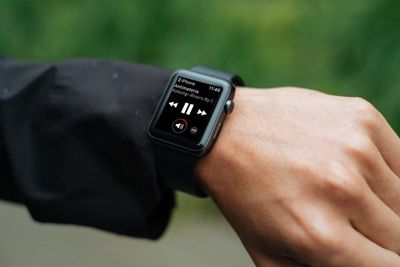
apple watch now playing screen
You might not like the way the Now Playing app automatically appears when you play audio on your iPhone. If you just want to see your watch face when you raise your wrist during audio playback, you can turn off the default behavior by following the first set of steps below.

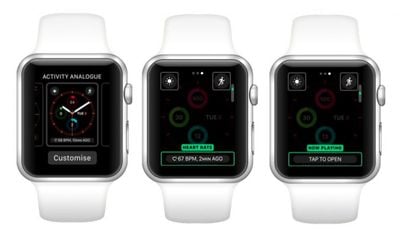
You can still make it easy to access the Now Playing app without it automatically taking over the screen whenever you play audio. One solution is to add the Now Playing app to your Apple Watch's Dock, accessed with a press of the Side button. Another option is to enable the Now Playing watch face complication. Click the links to find out how.

How to Disable Auto-Launch Audio Apps on Apple Watch

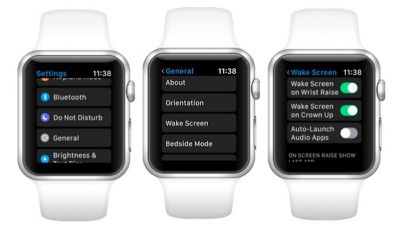
  1. Press the Crown on your Apple Watch to invoke the app launcher.

  2. Launch the Settings app.
    apple watch auto launch audio apps

  3. Tap General.

  4. Tap Wake Screen.

  5. Toggle off Auto-Launch Audio Apps.

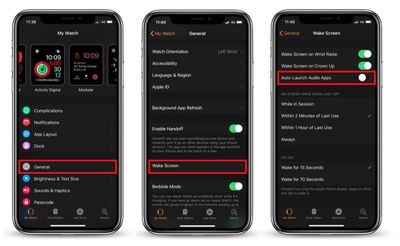
How to Disable Auto-Launch Audio Apps via iPhone

  1. Launch the Watch app on your iPhone.

  2. Tap General.
    auto launch audio watch app

  3. Scroll down and tap Wake Screen.

  4. Toggle off Auto-Launch Audio Apps.

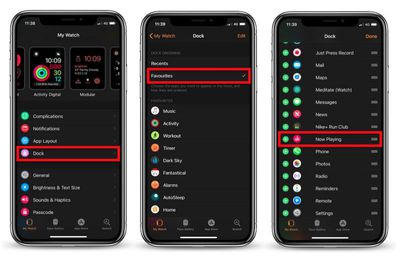
How to Add 'Now Playing' to Your Apple Watch's Dock

  1. Launch the Watch app on your iPhone.

  2. Tap Dock.

  3. Tap Favorites in the Dock Ordering section if it isn't already selected.
    apple watch now playing add to dock

  4. Tap Edit in the upper right corner of the screen.

  5. Scroll down to the Do Not Include section and tap the plus (+) symbol next to Now Playing to add it to the list of docked apps. Alternatively, drag the app into the Favorites list via the three-line button at the far right of the entry. (Note you can also use these buttons to control the arrangement of apps in the Dock.)

  6. Tap Done in the upper right of the screen.
How to Enable the 'Now Playing' Complication

Before following these steps, make sure you're using a watch face that accepts text-based complications (Modular and Activity Digital are two such examples.)

  1. Hard press the watch face on your Apple Watch.

  2. Tap Customize.
    apple watch now playing complication

  3. Swipe left until the large text-based complication space is highlighted.

  4. Turn the Crown to scroll through the options until you get to the Now Playing complication (also shown as 'Tap to Open' in the text space).

  5. Press the Crown twice to set the complication and exit Customize mode.
Related Roundups: AirPods 4, Apple Watch 11
Related Forum: AirPods

Top Rated Comments

107 months ago
Thank you, thank you, thank you! I might actually like my Apple Watch again. Whoever thought this was a good idea is clueless.
I love this feature.

Score: 4 Votes (Like | Disagree)
Ted13 Avatar
107 months ago
Thank you, thank you, thank you! I might actually like my Apple Watch again. Whoever thought this was a good idea is clueless.

Well it is my favorite app on the Apple Watch, I am immensely grateful it works the way it does by default. I listen to podcasts via Overcast every morning on the long dog walk with Air Pods, and the ability to instantly adjust volume via the crown, skip back/forward 30 secs, pause or play is things I do constantly - talking to people, load street noise, etc. etc. My phone never comes out of my pocket. Far and away the most useful feature on the Apple Watch
Score: 4 Votes (Like | Disagree)
107 months ago
Awesome thanks!

Now. How do I stop the ‘keep it up today’ activity notification I get every morning without disabling all activity notifications...
Watch app, Activity, turn off ‘Daily Coaching’
Score: 4 Votes (Like | Disagree)
steve217 Avatar
107 months ago
It would be nice to be able to enable 'Now Playing' based upon the paired device. For example, when the phone is streaming to the car, I don't need 'Now Playing' from the watch - I can use the car controls.

When the phone is streaming to my AirPods, then auto-'Now Playing' would be my preference.
Score: 4 Votes (Like | Disagree)
Wanted797 Avatar
107 months ago
Awesome thanks!

Now. How do I stop the ‘keep it up today’ activity notification I get every morning without disabling all activity notifications...
Score: 3 Votes (Like | Disagree)
goneeuro02 Avatar
63 months ago
Can we revisit this now that watchos8 is out? Wake Screen is no longer a setting.
Score: 1 Votes (Like | Disagree)

Popular Stories

3 4 24 Sport Band Refresh Feature

Sketchy Rumor Claims Apple Watch Series 12 Could Introduce Sensor in Band

Friday July 3, 2026 8:54 am PDT by
The Apple Watch Series 12 could ship with a new health sensor built directly into one of its bands, according to a sketchy rumor from a known leaker. The leaker known as "Kosutami" says the sensor will be injection-molded into a silicone band, and only a silicone band, apparently because Apple has not yet solved how to embed similar hardware in bands made from other materials. No detail was...
watchos 27

Siri AI Comes to Apple Watch in watchOS 27 Beta 3

Monday July 6, 2026 1:24 pm PDT by
With watchOS 27 beta 3, Apple added support for Siri AI and the Siri app, so Apple Watch users can now use the features right from their wrist. Apple said Siri AI would be coming to the watch back when watchOS 27 was first introduced, but the feature wasn't live until now. The Dynamic App Grid that pops up when the Digital Crown is pressed displays the Siri app in the center, and the...
Apple Watch Series 10 Jet Black

Apple Watch Series 13 Rumored to Mark the End of an Era

Wednesday July 8, 2026 1:29 pm PDT by
While the Apple Watch Series 12 is still a few months away, a new rumor suggests that next year's Apple Watch Series 13 will mark the end of an era. According to a recent post from a known leaker on the Chinese social media platform Weibo, the Apple Watch will be receiving a major redesign next year, and this will apparently include a new way of attaching bands to the watch. As a result, the ...

🔗 Related Apple News & Rumors

Stay updated with the latest Apple ecosystem news and verified rumors