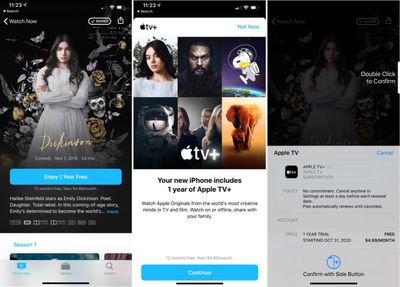
How to Sign Up for Apple TV+ - MacRumorsOpen MenuShow RoundupsShow Forums menuVisit ForumsOpen Sidebar
Skip to Content

How to Sign Up for Apple TV+

by

Apple on November 1, 2019, launched its new streaming television service, which offers up original movies and TV shows for $4.99 per month or $49.99 per year, plus there's a free year of service for those who have recently purchased an Apple device.

You can use Apple TV+ on the iPhone, iPad, Mac, ‌Apple TV‌, and iPod touch in the ‌Apple TV‌ app, or visit tv.apple.com on the web, and all of these devices can also be used to sign up for a new subscription. You can also access ‌Apple TV‌ on the Roku, Amazon Fire TV, and some smart TVs from Samsung.

appletvplus 1
To sign up for an ‌Apple TV‌+ subscription, you're going to need an Apple ID, which you can sign up for right when creating a subscription or on Apple's Apple ID website. Make sure you're signed in to the ‌Apple TV‌ app on all of your devices with your ‌Apple ID‌.

You'll also want to make sure that whatever device you're signing up on is running the latest version of iOS, iPadOS, tvOS, or macOS, as ‌Apple TV‌+ requires iOS 13, iPadOS 13, tvOS 13, or macOS Catalina or later to work.

How to Sign Up for an Apple TV+ Subscription on the Web

appletvsignupweb

  1. Visit tv.apple.com in Safari, Chrome, or Firefox.
  2. Sign in with your ‌Apple ID‌.
  3. Click on "Start Your Free Trial."
  4. Follow the steps and enter your credit card information if required, then confirm your subscription.

Once you've activated your account on the web, you can watch ‌Apple TV‌+ on any of your Apple devices that are signed in to the same ‌Apple ID‌ account where the subscription is activated.

How to Sign Up for an Apple TV+ Subscription on iPhone or iPad
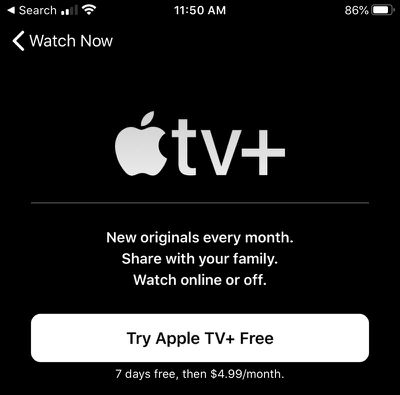
appletviphone

  1. Make sure you're signed in to your ‌Apple ID‌ on your iPhone or ‌iPad‌. You can do so in the Settings app or by tapping on your profile in the ‌Apple TV‌ app.
  2. Open up the ‌Apple TV‌ app.
  3. Swipe down to ‌Apple TV‌+ channel.
  4. Tap on "Try ‌Apple TV‌+ Free."
  5. Follow the steps to sign up for and confirm your subscription and activate a free trial.

How to Sign Up for an Apple TV+ Subscription on Mac
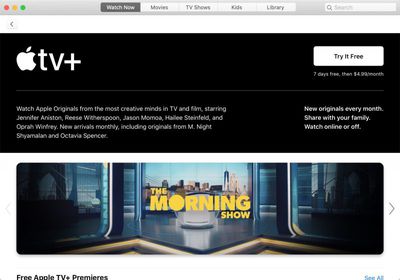
appletvmac

  1. Make sure you're signed in to your ‌Apple ID‌ on your Mac. You can do so through System Preferences or right in the TV app.
  2. Open the ‌Apple TV‌ app.
  3. Scroll down to ‌Apple TV‌+ channel.
  4. Click on "Try It Free."
  5. Follow the steps to sign up for and confirm your subscription and activate a free trial.

How to Sign Up for an Apple TV+ Subscription on Apple TV

  1. Make sure you're signed in to your ‌Apple ID‌ on your ‌Apple TV‌. You can do so in the Settings app.
  2. Open the ‌Apple TV‌ app.
  3. Use the remote to navigate down to the ‌Apple TV‌+ channel.
  4. Select "Try ‌Apple TV‌+ Free."
  5. Follow the steps to sign up for and confirm your subscription and activate a free trial.

How to Get Your Free Year of Apple TV+ With Device Purchase

If you have an ‌Apple ID‌ that's associated with a purchase of an iPhone, ‌iPad‌, ‌Apple TV‌, iPod touch, or Mac after September 10, 2019, you can get a free one-year subscription to ‌Apple TV‌+.

appletvfreetrial
This should show up automatically when you go to sign up for an ‌Apple TV‌+ subscription following the steps above on your device of choice. Here are the steps to confirm a subscription:

  1. Open the ‌Apple TV‌ app on an iPhone, ‌iPad‌, or Mac, or visit the tv.apple.com website.
  2. Choose the "Enjoy 1 Year Free" option that pops up.
  3. Tap "Continue" on the screen that lists which device came with a free year of service.
  4. Confirm the purchase with ‌Apple ID‌ password, Face ID, or Touch ID depending on which device you're using.

These steps activate your free one year trial of ‌Apple TV‌+ for all family members that participate in Family Sharing. Multiple device purchases do not stack -- it's one free year per family.

Your subscription will automatically renew at the end of one year for $4.99 per month, and the subscription can be canceled at any time ahead of when you're charged. Make sure not to cancel an ‌Apple TV‌+ subscription early, however, as the free access ends immediately when you do so even if you still have time left.

You can use your subscription on any compatible Apple device where you're signed in to your ‌Apple ID‌, as can any family members who participate in Family Sharing.

What to Do If Your Free One-Year Trial Isn't Showing Up

If you recently purchased a new device but aren't seeing the above options to activate your free trial on an iPhone, here's what to do.
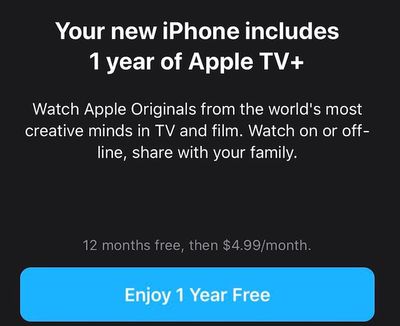
1 year free apple tv plus sub

  1. In Chrome, Safari, or Firefox, visit tv.apple.com.

  2. Sign in with your ‌Apple ID‌.
  3. Your free one-year trial offer should show up through the web interface.
  4. Click on Enjoy 1 Year Free and follow the steps.

After activating the free year option, you can access ‌Apple TV‌+ on any compatible device where you're signed in with your associated ‌Apple ID‌.

Popular Stories

Apple exclusive F1 partner

F1 on Apple TV Now Available in Dolby Atmos

Thursday October 22, 2026 6:35 am PDT by
Apple today announced that F1 races on the Apple TV streaming service will now be broadcast with Dolby Atmos spatial sound, starting with the 2026 U.S. Grand Prix in Austin, Texas on October 23 to October 25. Apple's press release outlines everything F1 fans need to know about the U.S. Grand Prix and ways to follow along. Apple TV has been the exclusive home of F1 in the U.S. since March, as...
servant tv show

Apple's 'Servant' Copyright Lawsuit Win Upheld on Appeal

Saturday October 24, 2026 9:05 pm PDT by
Apple and M. Night Shyamalan have won an appeal in the copyright dispute over Apple TV series "Servant," with a federal appeals court upholding last year's jury verdict in their favor (via Reuters). In its October 22 decision, the Ninth Circuit rejected filmmaker Francesca Gregorini's arguments that problems with the jury instructions and an unanswered question from jurors warranted...
Pluribus Poster 0101

'Pluribus' Season 2 Reportedly Starts Production Today

Friday October 30, 2026 11:41 pm PDT by
Filming for the second season of Apple TV's "Pluribus" is expected to start today in Albuquerque, New Mexico, according to a report from Production List. The acclaimed sci-fi drama stars Rhea Seehorn and was created by Vince Gilligan. Its first season debuted on November 7, 2025, with a second season already commissioned. Apple has yet to announce when season two will...
Latest Stories
Apple Watch Ultra 4 Hits All-Time Low Price With Amazon's $99 Discount
2 hours ago
Reminder: Apple's Big Discount on Beats 360 Ear Cushions Ends Today
2 hours ago
Here's a New Tour of Apple's HomeView Software
2 hours ago
Apple Reveals New iPad Mini's Battery Capacity
3 hours ago
Top Stories: Apple's Big MacBook Pro, iPad mini and iMac Updates
4 hours ago
'Pluribus' Season 2 Reportedly Starts Production Today
11 hours ago
iPhone 18 Pro Sales Surge in China, Offsetting Decline in U.S. and Japan
12 hours ago
HomeView Software 27.2: Wallpapers, Control Center, and More
18 hours ago
Apple Alerts Stores to iPhone Duo's Display Cracking Issue
19 hours ago
iOS 27.3 Will Enable These Apple Intelligence Features in China
20 hours ago
Apple Says iOS 27.3 Beta Coming Next Week
20 hours ago
Apple's Flash Storage Suppliers Are Finally 'Getting Their Revenge'
21 hours ago
14 New Things Your iPhone Can Do in iOS 27.2
22 hours ago
iPhone Duo Review: One Week Later
23 hours ago
Samsung Mocks iPhone Duo Display Cracks in New Ad Campaign
1 day ago
The MacRumors Show: OLED MacBook Pro, iPad Mini 8, and More
1 day ago
MacBook Pro With Touch Display: 15 More Details Revealed
1 day ago
Russia Places Apple on State Surveillance Registry
1 day ago
Halloween Weekend Brings Discounts on Apple Accessories and Pre-Orders
1 day ago
Apple Has Released More Than 25 New Products in the Past Two Months
1 day ago
Local Code Launches as Free, Private AI Assistant Tool for Mac
1 day ago
Apple Acquires Ascend.io
1 day ago
HomePod Mini 2 Launches Today: All the New Features
1 day ago
AirTag 2 4-Pack Drops to New Low Price of $69.99
1 day ago
Rian Johnson's iPhone Camera App Goes Viral
1 day ago
Where Did All the iPhone Duos Go? Mostly to Apple's Stores
1 day ago
Apple's Touchscreen MacBook Pro Could Ship 1.5M Units in 2027
1 day ago
New Apple TV 4K and iPad Mini: RAM Amounts Revealed
2 days ago
Apple Executive Comments on New iPad Mini Lacking 120Hz Display
2 days ago
Here's a Hands-On Look at HomePod Mini 2's New Two-Tone Colors
2 days ago

🔗 Related Apple News & Rumors

Stay updated with the latest Apple ecosystem news and verified rumors