How to Sign Up For an Apple News+ Subscription - MacRumorsOpen MenuShow RoundupsShow Forums menuVisit ForumsOpen Sidebar
Skip to Content

How to Sign Up For an Apple News+ Subscription

by

Apple today unveiled its rumored premium Apple News subscription service, ‌Apple News‌+. ‌Apple News‌+ provides access to more than 300 magazines and a handful of paywalled news articles from sites like The Wall Street Journal all for $9.99 per month.
applenewsplus
Signing up for an ‌Apple News‌ subscription can be done in the U.S. or Canada on an iPhone or iPad running iOS 12.2. Here's how:

  1. Open up the ‌Apple News‌ App.
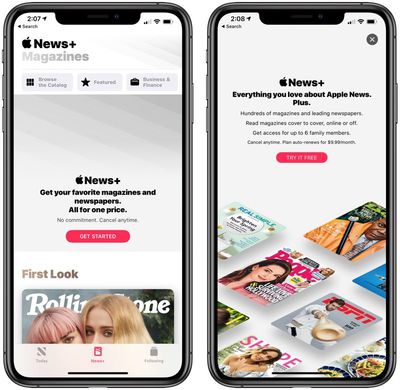
  2. Tap on the "News+" tab at the bottom of the screen.
  3. Tap on "Get Started."
  4. Choose "Try It Free" to initiate a trial subscription. You'll be charged $9.99 per month when the 30-day trial period ends. applenewsplussubscribe
  5. Confirm your payment with Face ID or Touch ID.
From there, you'll have access to a new "My Magazines" section of the app where you can see featured magazines, browse the entire collection, or select from various categories like Cars, Entertainment, Food, Health, Hobbies, Lifestyle, Outdoors, and more.
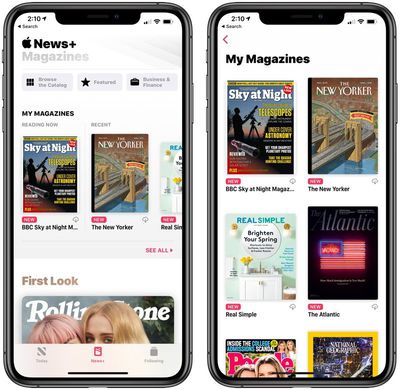
applenewsplusmymagazines
There are a selection of stories that are curated by Apple's editors and organized to highlight specific articles.
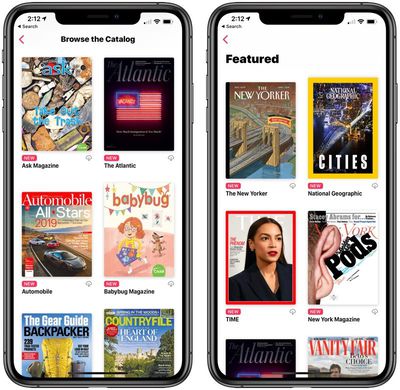
applenewsplusbrowsefeatured
‌Apple News‌+ magazines provide animated covers and a table of contents right up top so you can select the articles that are most interesting to you.
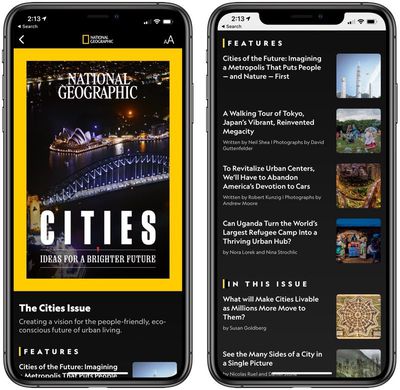
aplenewspluscover
The rest of the ‌Apple News‌ interface features rich, full-screen imagery and a digital-optimized reading experience for key stories.
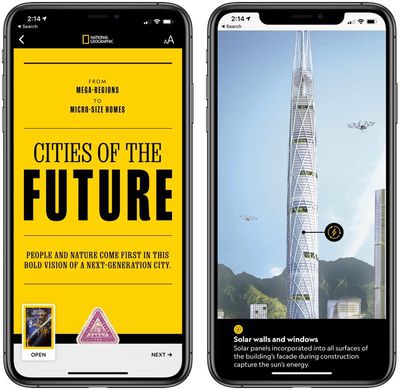
nationalgeographicapplenewsplus

Cancelling your Apple News+ Subscription

If you want to cancel your ‌Apple News‌+ subscription so you don't get charged $9.99 per month after your trial period ends, here's how:

  1. Tap on the "Following" tab in the ‌Apple News‌ app.
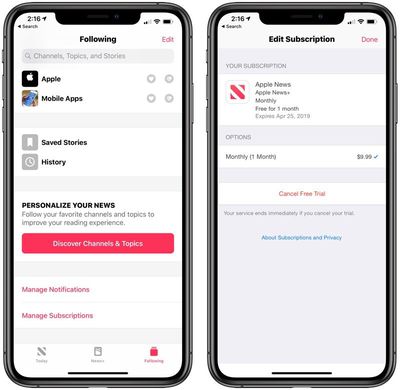
  2. Tap on "Manage Subscriptions."
  3. Tap on "Cancel Free Trial."applenewscancel

Make sure you don't cancel your ‌Apple News‌+ subscription until you've finished giving the service a try because Apple says that your service ends immediately if you hit the cancel button. We recommend setting a calendar reminder to cancel before 30 days is up if you want the full trial experience.

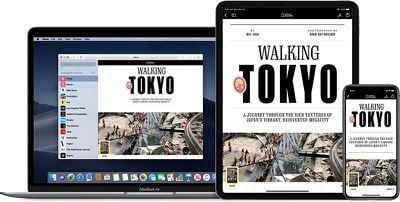
‌Apple News‌+ content can be read on iPhone, ‌iPad‌, and Mac, with iOS 12.2 or macOS 10.14.4 required. You can also sign up for an ‌Apple News‌+ subscription using these same steps in the Apple New+ tab in the macOS Mojave app.

Top Rated Comments

95 months ago
Came here because I am having a difficult time actually getting the trial to work. It keeps failing....

Of course another thread of people bashing the service? Get a grip folks, the world doesn't revolve around you. Will someone start a thread "Comment if you Hate News+" so you all can be in misery together and leave these other threads for their intended purpose.
Score: 8 Votes (Like | Disagree)
WordsmithMR Avatar
95 months ago
The people on here are so edgy and cool. They don't read magazines...
Guess what, that means the service isn't for you. Some people don't want movies enough to warrant Netflix. Other's don't need Spotify. Do we have to hear about it? Nope.
Score: 3 Votes (Like | Disagree)
95 months ago
Yeah. No. I’m not participating in subscriptions any longer.
Score: 3 Votes (Like | Disagree)
newyorksole Avatar
94 months ago
Oh come off it. This has nothing to do with babysitting anybody, and a whole lot to do with keeping users who unwittingly forget to unsubscribe.

We're not all stupid enough to believe everything Apple does is "so amazing" and "for the people": they're a company wanting our cash. That's fine of course, it's just how they choose to go about doing business that shouldn't be so obviously against the typical sign-up process, as to be deliberately worse of an experience than before.
Sure it is about babysitting: if you don’t think you’re going to remember to cancel your subscription, despite the myriad ways provided via the phone itself to remind you, then don’t sign up in the first place. Don’t blame Apple for your own forgetfulness. They’re not your mommy.
I’m going to have to agree with jimthing. How is it that with every other subscription you’re able to cancel it immediately and still have access until the billing period is over. That’s even the case with Apple Music.

But all of a sudden Apple wants you to set a reminder to cancel the subscription. They don’t even have a “turn off auto-renew” option.

This is all about them banking on people forgetting to cancel and still being charged and being like “eh why not”.
Score: 1 Votes (Like | Disagree)
gwhizkids Avatar
95 months ago
Oh come off it. This has nothing to do with babysitting anybody, and a whole lot to do with keeping users who unwittingly forget to unsubscribe.

We're not all stupid enough to believe everything Apple does is "so amazing" and "for the people": they're a company wanting our cash. That's fine of course, it's just how they choose to go about doing business that shouldn't be so obviously against the typical sign-up process, as to be deliberately worse of an experience than before.
Sure it is about babysitting: if you don’t think you’re going to remember to cancel your subscription, despite the myriad ways provided via the phone itself to remind you, then don’t sign up in the first place. Don’t blame Apple for your own forgetfulness. They’re not your mommy.
Score: 1 Votes (Like | Disagree)
rtdunham Avatar
95 months ago
Anyone figure out how to share with family members?
It looks to me like if you go to settings and choose family sharing, you're sharing with those family members EVERYTHING you subscribe to/buy: magazines, newspapers music, movies, etc. Am I wrong? Is there a way to selectively share ONLY news, for example? Or any other medium, on a selective basis?
Score: 1 Votes (Like | Disagree)

Popular Stories

American Express Gold Apple Pay Feature

American Express Announces New Apple Pay Feature

Tuesday June 30, 2026 10:27 am PDT by
American Express today announced that you can now redeem Membership Rewards points when checking out with Apple Pay on the web and in apps on the iPhone and iPad. When checking out with Apple Pay on iOS 18 or iPadOS 18 or later, tap on your eligible American Express card (Platinum, Gold, Green, and others) and select the Membership Rewards points option. You can use points to cover all or...
Apple Acquires Award Winning App Play Feature

Apple Acquires Award-Winning App 'Play'

Monday June 29, 2026 7:39 am PDT by
In February, Apple notified the European Commission that it would be acquiring certain assets from and have the right to hire certain employees from Rabbit 3 Times, the company behind the award-winning app design tool Play. The notification was published on the European Commission's website this week, following a four-month waiting period. Play was a Mac and iPhone app that allowed designers ...
series 10 apple watch titanium digital crown

Report: Apple Watch Redesign Coming Next Year With New Band System

Tuesday June 30, 2026 8:45 am PDT by
A "major overhaul" of the Apple Watch's design is due to arrive next year with a new system for connecting bands, according to a known Weibo leaker. In a set of recent posts, the leaker known as "Instant Digital" linked the new claim to older rumors about an "Apple Watch X" model, which was said to introduce a fresh design and break compatibility with the existing watch band system. Citing...

🔗 Related Apple News & Rumors

Stay updated with the latest Apple ecosystem news and verified rumors