How to Shuffle Your iPhone's Lock Screen Wallpaper - MacRumorsOpen MenuShow RoundupsShow Forums menuVisit ForumsOpen Sidebar
Skip to Content

How to Shuffle Your iPhone's Lock Screen Wallpaper

by

In iOS 16 and later, Apple includes several Lock Screen personalization features for iPhone. Keep reading to learn how to make your Lock Screen wallpaper shuffle through photos at custom intervals.
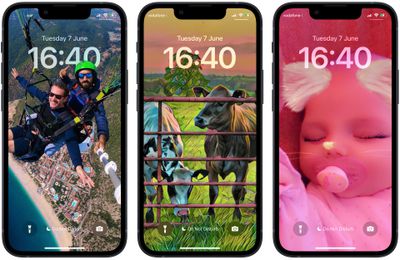
shuffle photos lock screen
Apple has made it possible for users to customize the Lock Screen in ways that were simply not possible in earlier versions of its mobile software. In iOS 16 and later, there are options to apply unique fonts, colors, and filters, and even add widgets to your Lock Screen.

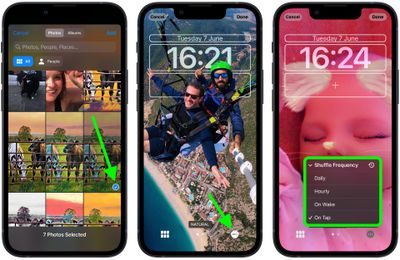
One feature in particular that is sure to prove popular is the ability to shuffle your Lock Screen wallpaper. You can either select multiple pictures from your photo library or a specific album, and using the Shuffle option, you can opt to have the wallpaper shuffle between them on a set hourly or daily schedule, or every time you wake or tap your iPhone screen.

The following steps show you how it's done.

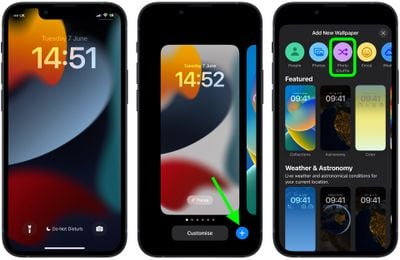
  1. Wake your iPhone and use Face ID or Touch ID to unlock it.
  2. Press and hold on the Lock Screen until the wallpaper gallery appears.
  3. Tap the blue + button in the bottom-right corner of the screen.
  4. Select Photo Shuffle from the wallpaper menu.
    Lock Screen

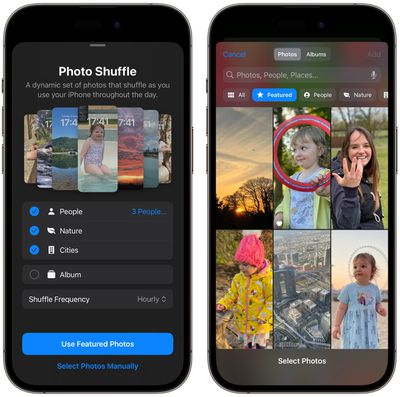
  5. Using the options (People, Nature, Cities) choose the kind of photos from your library that you'd like to include in the shuffle. Alternatively, choose an album of photos that you want to use.
  6. Tap Add.
    photo shuffle

  7. Tap the ellipsis button (the three encircled dots) in the bottom-right corner of the screen.
  8. Tap Shuffle Frequency, then choose from Daily, Hourly, On Lock, and On Tap.
    Lock Screen

  9. Tap Done in the top-right corner to finish, then tap your new Photo Shuffle wallpaper to select it from the gallery.
Your new shuffle wallpaper will now be live. Tap or wake your iPhone's screen to change the photo, or wait for it to change automatically, depending on your chosen option.


Related Forum: iOS 16

Popular Stories

Apple Acquires Award Winning App Play Feature

Apple Acquires Award-Winning App 'Play'

Monday June 29, 2026 7:39 am PDT by
In February, Apple notified the European Commission that it would be acquiring certain assets from and have the right to hire certain employees from Rabbit 3 Times, the company behind the award-winning app design tool Play. The notification was published on the European Commission's website this week, following a four-month waiting period. Play was a Mac and iPhone app that allowed designers ...

iPhone 18 Pro Deep Red Feature

Apple 'Concerned' Over iPhone 18 Pro Data Leak From Supplier Tata

Monday June 29, 2026 11:46 am PDT by
Apple is "concerned" about a recent data leak from Tata Electronics, one of its manufacturing partners in India, reports Reuters. Tata Electronics was the target of a cyberattack, with confidential Apple documents stolen and shared on the dark web. Hackers were able to steal information about the iPhone 18 Pro and iPhone 18 Pro Max, including a list of suppliers, parts, and images of the...
iphone 17 ceramic shield

2027 iPhone 18 and iPhone 18e to Get 9GB RAM and A20 Chip

Friday June 26, 2026 9:57 am PDT by
The lower-end iPhone 18 models set to launch in spring 2027 will feature 9GB DRAM, up from 8GB, according to Apple analyst Ming-Chi Kuo. Kuo says the A20 chip Apple plans to use for the devices will have 1.5GB x 6 dies for a total of 9GB RAM, instead of 2GB x 4 dies as the current lower-end iPhone 17 models use. By lower-end iPhones, Kuo is likely referencing the iPhone 18 and the iPhone...

🔗 Related Apple News & Rumors

Stay updated with the latest Apple ecosystem news and verified rumors