

 You can share files you've synced to iCloud with friends and colleagues who have an Apple ID using the step-by-step guide below. Whether you're sharing from a Mac or an iPhone, you'll be able to give people one-way access to the file, or allow them to modify the document if you're collaborating on a piece of work.
The sharing options you choose automatically sync across your devices, so you could, for example, share a file on Mac and change access permissions on your iPhone or on iCloud.com at a later time. The following steps assume Mac users are running macOS High Sierra or later and that iPhone or iPad owners are on iOS 11 or later.
How to Share iCloud Files From Your Mac
- Open a Finder window and locate the file in iCloud that you want to share. It could be in iCloud Drive or another folder that you sync to iCloud, such as Desktop or Documents.
- Click the file to highlight it.
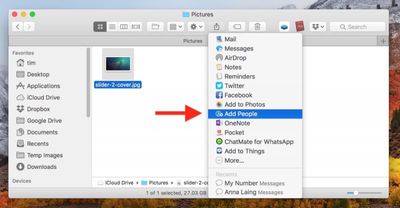
- Click the Share button and select Add People from the dropdown menu. Alternatively, right-click (or Ctrl-click) the file and select Share -> Add People.

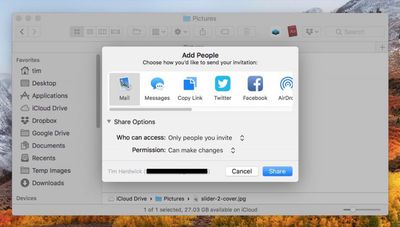
- Choose how you'd like to send your invitation to access the file. In our example, we're sharing a link via email. You can also click the chevron next to Share Options to control who can access the file (Only people you invite / Anyone with the link) and their permissions (Can make changes / View only).
- Click Share.
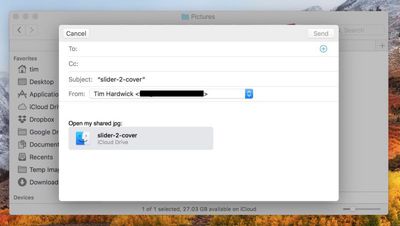
- Depending on how you chose to share the invitation, the relevant app will open containing a link to access the file. In our example, an email compose window appears, ready to add recipients and click Send.
How to Share iCloud files on iPhone and iPad
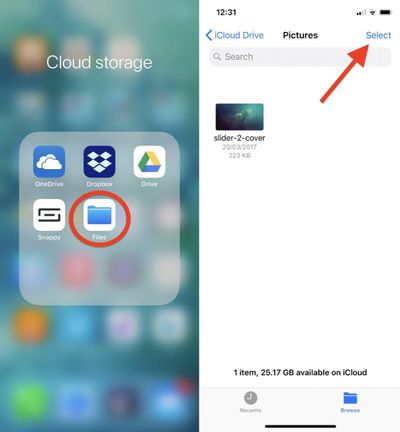
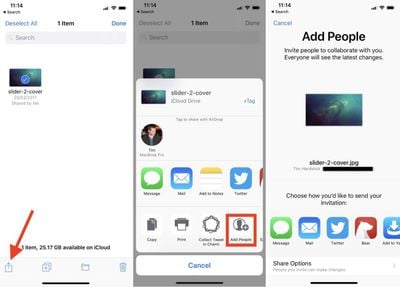
- Launch the Files app on your iPhone or iPad.
- Locate the file in iCloud Drive that you want to share.
- Tap Select in the upper right of the screen.
- Tap the file to check it in the selection.
- Tap the Share icon in the lower left of the screen.
- Tap Add People in the second row of the Share Sheet.
- Tap the method you'd like to use to send your invitation. You can also optionally tap Share Options to control who can access the file (Only people you invite / Anyone with the link) and their permissions (Can make changes / View only).
- Depending on how you chose to share the invitation, the relevant app will open containing a link to access the file, ready for you to share.
How to Change Access Rights to a Shared iCloud File
Changing file sharing permissions via Mac or iOS is easy. Once you've shared an iCloud file, the Add People option you used in the above steps is replaced with a Show People option. Selecting this will display who has access to the file, including an option to Stop Sharing the file completely.
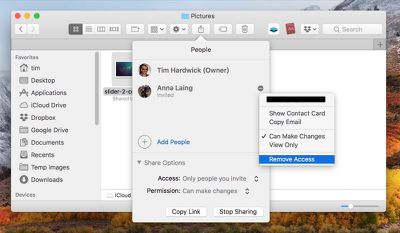
If you're on Mac, click the dotted icon next to a person's name to reveal options to change their permissions or Remove Access. If you're on iPhone or iPad, simply tap a person in the People list to access the same options.

















































Top Rated Comments
On top of this, Apple did not offer personalized email hosting, domain services etc like Google and Microsoft do. Needless to say, I ended up choosing Google. Apple still doesn't offer solutions for small businesses.
If you still want to use iCloud, you could try sharing a compressed zip containing several files, or creating a sparseimage file using Disk Utility and put files in that for sharing over icloud. If that doesn't work for you, I'd recommend another service.