How to Share an iCloud Photo Link in iOS 12 - MacRumorsOpen MenuShow RoundupsShow Forums menuVisit ForumsOpen Sidebar
Skip to Content

How to Share an iCloud Photo Link in iOS 12

by

photos iconIn iOS 12, Apple has added the ability to share pictures or video in your Photo Library using an iCloud.com link that lasts for 30 days.

Not only is sharing a link quicker and less burdensome on your data allowance than sending several images or gigabytes of video, you can also share the same link as many times as you want within the expiry limit.

For the new photo link option to appear, you'll need to ensure iCloud Photos is enabled on your iOS device. To do so, launch the Settings app, tap your Apple ID at the top, select iCloud -> Photos, and make sure the toggle next to iCloud Photos is on.

How to Share an iCloud Photo Link in iOS 12

  1. Launch the Photos app on your iPhone or iPad
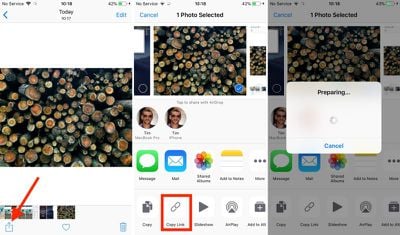
  2. Tap the photo you want to link to. If you want to share a link to several photos, tap Select in the upper right corner of the screen and tap the photos you want to include.
  3. Next, tap the Share Sheet button at the lower left corner of the screen.
    how to share an icloud photo link in ios 12 01

  4. Tap the Copy Link button in the third row of the Share Sheet.
  5. Wait a moment while iCloud prepares your link.
  6. Launch the app or service you want to use to share the link. We're using Messages in our example.
    how to share an icloud photo link in ios 12 02

  7. In the message text field, tap and hold your finger.
  8. Tap Paste.
  9. Send the message to share the link.

If you share the link over Messages and the recipient is using an iOS device, they'll see a tappable thumbnail of the shared photo(s). If they're on an Android device, they'll just see the URL.

how to share an icloud photo link in ios 12 04
Tapping the thumbnail/URL link will take them to an iCloud.com web page similar to the one above, with a preview image, the author's name, the photo's title, an expiry date, and an option to download the photo or add it to an existing Apple ‌Photos‌ library. If several photos have been shared, the recipient can select which ones they'd like to add or download.

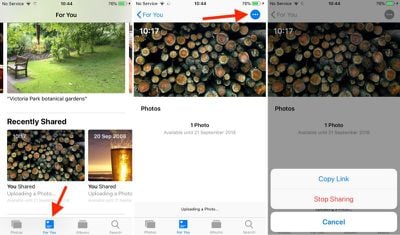
To share the same link again within the 30-day time limit, or simply stop sharing the photo altogether, launch the ‌Photos‌ app and navigate to the For You tab, where you'll find a Recently Shared section.
how to share an icloud photo link in ios 12 03
Tap the photo you shared and then tap the blue dotted button in the upper right corner of the screen, and you should see two options: Copy Link and Stop Sharing.


Top Rated Comments

105 months ago
Does anyone know if this can be done with multiple selected photos? Ie share 5 photos at once from a single link?
Yes, you can share a group of photos the same way.

Score: 3 Votes (Like | Disagree)
Mac 128 Avatar
105 months ago
How many years has it been since we could share links via Mobile Me?

I wish this didn't attach my real name to photos I share. I sometimes share photos to communities (like this one!) where I don't share my real info, and that pretty much makes this feature useless for that.
Agreed, this is pretty much useless to me. Not sure how this is going to work in message forums where a link is entered into an image box.

Has the expiring link always been a part of this? I thought that, in the past, iCloud albums had a persistent link I could share. Is that not (or no longer) the case? Is it different for albums than for a (or a handful of) picture(s)?
I like that the link can be set to expire, and easily managed, but the 30 day expiration is a problem. My biggest pet peeve is searching for an old thread on a forum, and finding all the picture images I would have greatly benefitted from have broken links from photo services that are defunct.
Score: 2 Votes (Like | Disagree)
RightMACatU Avatar
105 months ago
This is useful and almost seamless, though it is easy to accidentally upload a temporary copy. It would be useful to see all currently shared photos, with an option to “Stop Sharing” all.
+1
I think it's all part of a grand scheme to free users from an ability to know where their stuff is and who has access. What individual files and photos have I shared? with who? is there an easy way to know? where are my files, local or Cloud or Dropbox? etc. And I won't go there as this implies trust in every parts of the ecosystem that you use.
Score: 2 Votes (Like | Disagree)
NotSafeForWork Avatar
103 months ago
I found a way to work around this. Instead of using the Photo button in iMessage go directly to the Photos app and select and Copy the images from there from the share sheet. It then pastes them in the old way and doesn’t do the iCloud link.
Score: 1 Votes (Like | Disagree)
103 months ago
The biggest problem I find with this otherwise excellent new feature is that the recipients appear to have to download the photos and videos in order to see anything more than an thumbnail.
What do you mean? If you tap on a photo or video, it downloads it to your device temporarily just like it would for your own iCloud Photo Library items... just like it would if it were an image on a web page.
Score: 1 Votes (Like | Disagree)
NotSafeForWork Avatar
104 months ago
This has enabled itself automatically when I want to send more than three images at once via iMessage. But I don’t want this, I just want to send them via iMessage directly. Can’t find out how to disable this function.
Score: 1 Votes (Like | Disagree)

Popular Stories

foldable iphone boards

Alleged Foldable iPhone Motherboard Photos Surface Online

Wednesday August 26, 2026 4:33 am PDT by
Images and video claiming to show circuitry from Apple's upcoming foldable iPhone are circulating on X and Chinese social media platforms. For example, on X, the user "LusiRoy7" posted a short video alongside an image, as well as a labeled composite image identifying components, purportedly depicting the motherboard of Apple's foldable iPhone. The image appears to show the CPU, a hinge...
iCloud General Feature Redux

Apple Won't Change Hide My Email Domain After Backlash

Monday August 24, 2026 1:17 pm PDT by
Apple today said it is reversing its decision and will not change the email domain used for the iCloud+ Hide My Email feature. Emails sent using Hide My Email will continue to use the same icloud.com domain that Apple uses for standard iCloud emails. In June, Apple said it would unify the email domains used by Sign in with Apple and Hide My Email under a single private.icloud.com domain....
General iCloud App Feature

iOS 27 Shared Albums Go Full Res at the Cost of Your iCloud Storage

Thursday August 20, 2026 5:48 am PDT by
In iOS 27, new Shared Albums you create in the Photos app retain full-resolution quality for the first time, but they now eat into your iCloud storage – and that includes any items added by other people invited to contribute. Currently, photos in a Shared Album are automatically reduced to 2,048 pixels on the long edge (except for panoramic photos, which can be up to 5,400 pixels wide)....

🔗 Related Apple News & Rumors

Stay updated with the latest Apple ecosystem news and verified rumors