

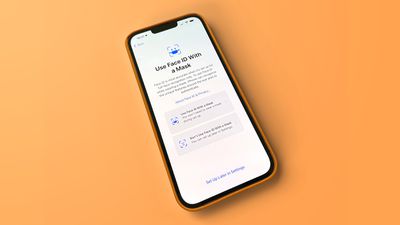
In iOS 15.4, currently in beta, Apple has added a handy new feature that allows you to unlock your iPhone with Face ID and authenticate Apple Pay payments even when you're wearing a mask.
In previous versions of iOS going back to iOS 14.5, it is possible to unlock your iPhone while wearing a mask, but only if you're also wearing an Apple Watch as an extra layer of security. The new option removes the need for an Apple Watch.
Another limitation of the earlier "Unlock with Apple Watch" feature is that it doesn't let you authenticate Apple Pay transactions and app purchases, whereas the new "Face ID With a Mask" feature does.
To enable Face ID while wearing a mask, an iPhone "can recognize the unique features around the eye area to authenticate," according to Apple. However, Apple cautions that using Face ID with a mask is less secure, and that the biometric authentication system remains "most accurate" when used with full-face recognition.
Sadly, Face ID With a Mask is limited to some of Apple's newest iPhones, despite Face ID having been available since 2017 with the launch of the iPhone X. Face ID With a Mask is only an option on the iPhone 12 and later, so you'll need an iPhone 12, 12 mini, 12 Pro, 12 Pro Max or an iPhone 13, 13 mini, 13 Pro, or 13 Pro Max.
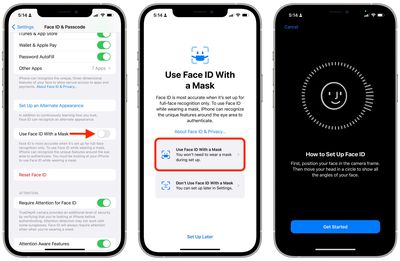
When you update your device to iOS 15.4, you'll see a setup process that walks you through set-up of Face ID With a Mask. To set up the feature manually at a later time, follow these steps. Note that you'll need iOS 15.4 installed on your iPhone, and these options won't show up if you have an iPhone 11 or earlier.
- Open the Settings app on your iPhone.
- Scroll down and tap Face ID & Passcode.
- Enter your passcode.
- Toggle on the switch next to Use Face ID With a Mask, then follow the onscreen instructions.
Note that Face ID With a Mask doesn't support sunglasses, although Apple has also added the ability to configure Face ID while wearing glasses separately (Settings -> Face ID & Passcode -> Add Glasses).

















































