Express Transit is an Apple Pay feature that lets you make a payment without unlocking your Apple Watch using Face ID or Touch ID. Thanks to Express Transit, you can now make a transaction at a transit gate just by tapping your iPhone or Apple Watch. But first you have to set it up. This article shows you how.

Where Can I Use Express Transit?
Apple has a web page that it updates with the countries and regions that support the feature. As of writing, Express Transit works in the following places:
- In mainland China with Beijing Transit cards and Shanghai Transit cards.
- In Japan with all forms of transit that accept Suica.
- In London with Transport for London (TfL).
- In New York City with Metropolitan Transportation Authority (MTA) terminals at select stations.
- In the San Francisco Bay Area with the Clipper card.
- In Chicago with the Ventra card.
- In Portland, Oregon, with all forms of transit that accept Hop Fastpass.
How to Set Up Express Transit on iPhone
To set up Express Transit, you need to be using an iPhone 6s or later with iOS 12.3 or later installed. You can check what software version your device is running by going to Settings -> General -> Software Update.
Obviously, you also need to have a registered at least one debit or credit card with Apple Pay. That said, it's worth mentioning that not all banks support Express Transit, but you can find out if your bank does by following these steps.
- Launch the Settings app on your iPhone.
- Tap Wallet & Apple Pay.
- Tap Express Travel Card.
- Tap one of your cards in the list to use it with Express Transit. A tick will appear next to the card you select. The default option is None.
- Authenticate your device using Touch ID or Face ID.
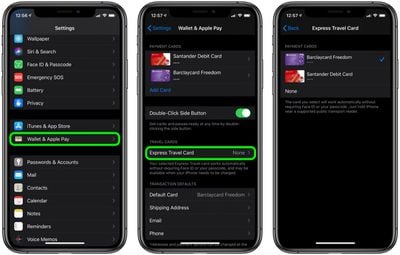
If your bank card doesn't support Express Transit, you'll get an error message telling you that the card is incompatible. If no error message appears, you're good to tap-and-go.
How to Set Up Express Transit on Apple Watch
You can also set up Express Transit to work on your watch, so long as it's running watchOS 5.2.1 or later. You can check what version you're running by going to General -> Software Update in the Watch app on your iPhone.
- Launch the Watch app on your iPhone.
- Tap Wallet & Apple Pay.
- Tap Express Travel Card.
- Tap one of your cards in the list to use it with Express Transit. A tick will appear next to the card you select. The default option is None.
- Authenticate by entering your passcode on your Apple Watch.
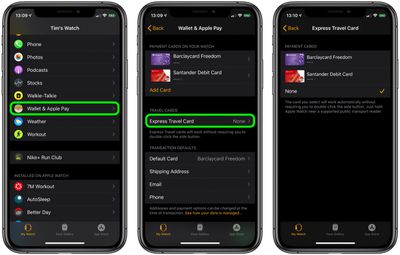
If your bank card doesn't support Express Transit, you'll get an error message telling you that the card is incompatible. If no message appears, you're all set.