

With the release of iOS 15.4, Apple has added the ability for users with paid iCloud+ plans to create custom email domains directly on their iPhone. This article explains how it's done.
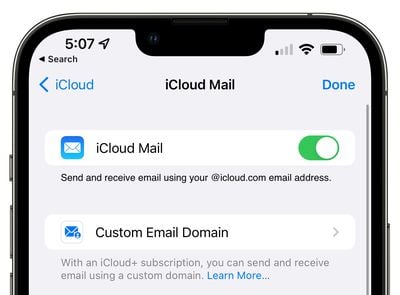
When you subscribe to iCloud+ (prices start at $0.99) you can use custom domains to send and receive email with iCloud Mail. That means if you own a personal domain name, you can set up iCloud Mail to use it when sending or receiving mail so your recipients see mail coming from your personalized email address.
For example, if you run a business, you could use a custom email address like "john@yourcompany.com" for sending and receiving emails using iCloud Mail, and the emails would be addressed to and sent from the custom domain, giving them a more professional feel than an address ending with "iCloud.com."
You can use iCloud Mail to send and receive email with up to five personal domains, with up to three email addresses per domain. If you share iCloud+ with your Family Sharing group, you can also share your email domain with them. Anyone in your Family Sharing group can add a custom domain, choose whether or not to share it, and manage the email addresses that they use with that domain.
Here's how to add a custom email domain on an iPhone running iOS 15.4.
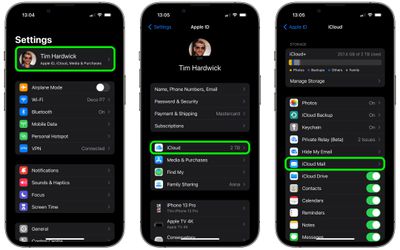
- Launch the Settings app on your iPhone.
- Tap your Apple ID banner at the top of the menu.
- Tap iCloud.
- Tap iCloud Mail.

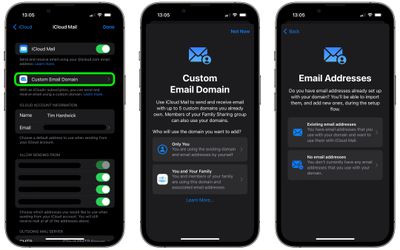
- Tap Custom Email Domain.
- Under "Add a Custom Email Domain," tap Add Domain.
- A screen will appear asking who will use the domain you want to add. Select either Only You or You and Your Family.
- On the next screen, if you have existing email addresses set up with the domain, select Existing email addresses. Otherwise, select No email addresses.
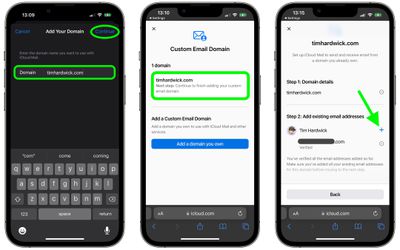
- Enter the domain name you want to use with iCloud Mail.
- Tap Continue at the prompt to sign in to iCloud.com and set up your domain.
- Under the name of your domain, tap Next step.
- If you have any existing email addresses that you currently use with the domain, tap the plus button next to your name and input the address, then tap Add email address. An email will be sent to this address – look for the email and follow the instructions to verify.
After following these steps, you'll receive an email to your iCloud Mail with the information you need to update the records on your domain registrar's website. After you've changed the records on your registrar, you'll be invited on iCloud.com to confirm that this is done and then iCloud will test that the verification was successful. Note that you can manage your custom email domains from the iCloud.com website once they are set up.
















































