

With online account hacking becoming increasingly widespread, all users should make sure they're taking every security measure available to them. If you use Apple devices, consider using Apple verification codes to protect your accounts. Keep reading to learn how it works.
One of the best ways to protect any online account is by using two-factor authentication (2FA). 2FA offers hardened security during login attempts by requesting that the user provides an extra piece of information only they would know, such as a randomly generated code from a third-party.
In iOS 15, iPadOS 15, macOS Monterey, and later versions of its operating system software, Apple includes a built-in two-factor authenticator that lets iOS devices be used to generate verification codes for additional sign-in security.
This means if a site offers 2FA, you can set up verification codes for it without downloading a third-party app. Verification codes are backed up via iCloud, and once set up, the codes will autofill when you sign into the site using any Apple device linked to your Apple ID. This makes using 2FA on iPhone and iPad much more streamlined.
Enable 2FA on the Account or Service
Here we'll explain how to set up and use verification codes on iPhone and iPad. You'll first need to enable the use of a 2FA app on whichever website or service you are trying to secure. (It's easier to complete this initial step on a desktop computer, as it may well involve scanning a QR code displayed on the screen using your iPhone or iPad's camera.)
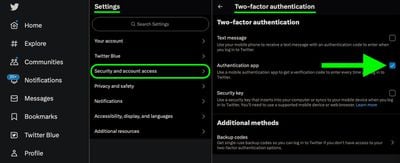
Some sites have text message 2FA enabled by default, so you'll likely need to explore the security or privacy settings to enable the use of an authenticator app instead. On Twitter accounts, for example, the option is found in the Settings and Support dropdown menu, under Settings and privacy -> security and account access -> Security.
Using Setup Keys
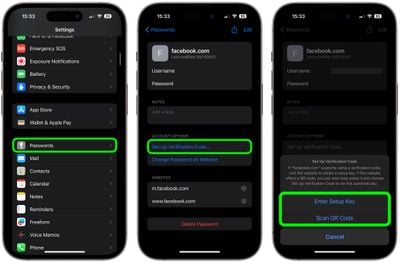
Once you've enabled 2FA on the account or service in question, you'll be asked to either enter a setup key on your device or scan a QR code using your device's camera. If it's a setup key you're given, go to Settings -> Passwords, select the account from the list, then tap Set Up Verification Code.... Finally, tap Enter Setup Key in the pop-up menu and enter the key.
Using QR Codes
If the account you're trying to secure gives you a QR code, open your iPhone or iPad's camera app and point the viewfinder at your computer's monitor screen showing the QR code.
When the viewfinder locks onto the code, tap Add Verification Code in Passwords. You'll be taken to Settings -> Passwords, where you may need to manually select the correct account to add the verification code. Once you've done that, your device will automatically generate verification codes on the password screen that are valid for 30 seconds.
In future, when you come to log in to the site or service and you're prompted for a verification code, iOS will automatically display the latest code above the virtual keyboard – all you need to do is tap the code to enter it into the input field, and away you go.

















































