iOS 16: How to Set a Unique Lock Screen for Your Focus Mode - MacRumorsOpen MenuShow RoundupsShow Forums menuVisit ForumsOpen Sidebar
Skip to Content

iOS 16: How to Set a Unique Lock Screen for Your Focus Mode

by

Apple has introduced several improvements to Focus modes in iOS 16, and one of them is the ability to link a custom Lock Screen to a particular Focus mode. With the wealth of personalization options that can now be applied to Lock Screens, this means you can customize them specifically to better reflect your focus.
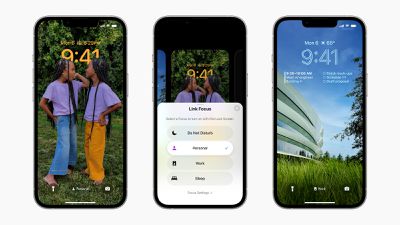
ios 16 focus lock screens
One of the great things about iOS 16 is that it allows you to make Lock Screens more informative or functional, and then switch to your preferred one when you need to. For example, when you're at the office you might have a Lock Screen featuring work-focused widgets and a family photo. Or in the evening when you're winding down before bed, you might prefer a minimal Lock Screen with fewer widgets and a soothing sunset wallpaper.

The great thing is that by linking a Lock Screen to a Focus mode, you can make the switch to your custom Lock Screen happen automatically. As the image above shows, you can link Lock Screens to existing Focus modes by tapping the Focus button that appears in the Lock Screen gallery, which is accessed from your iPhone's currently active Lock Screen with a long press.

You can also select a Lock Screen in the course of creating a new Focus mode in Settings. Here's how it works in iOS 16.

Setting a Lock Screen for Your Focus Mode

In this example, we've already customized a Lock Screen that we want to become active when the work day is done, and now we're going to create a Focus mode to link it to by following the steps below.

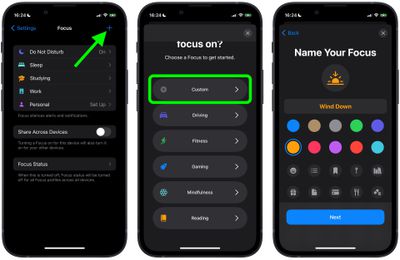
  1. On iPhone, go to Settings -> Focus, and tap the + icon in the top-right corner of the screen to create a new Focus.
  2. Tap Custom in the next screen, proceed to give your Focus a name and related icon, then tap Next.
    1link lock screen focus mode ios

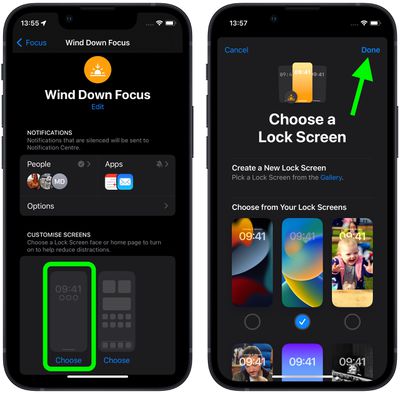
  3. Set any notification silence options for people and apps when your Focus is active, then under "Customize Screens," choose the Lock Screen option.
  4. Create a New Lock Screen from the gallery, or Choose From Existing Lock Screens.
  5. Tap Done in the top-right corner.
    focus

With your Lock Screen now linked to your Focus Mode, it will be activated automatically whenever you enable your Focus.


Popular Stories

Apple HomeView lineup feature1

Apple Announces 'HomeView' Smart Home Hub

Tuesday October 13, 2026 6:00 am PDT by
Apple today announced the "HomeView," an all-new kind of smart home hub featuring a 7-inch Liquid Retina display and Siri AI. Apple's senior vice president of Worldwide Marketing Greg Joswiak said: Apple HomeView is designed to be shared by everyone in the home yet feel completely personal to each user. It recognizes your face to shift from a household screen to your own experience,...
Apple TV 4K 4th Generation feature4

New Apple TV 4K Announced With A19 Chip, Updated Siri Remote, More

Tuesday October 13, 2026 6:08 am PDT by
Apple today announced the fourth-generation Apple TV 4K, with key features including an A19 chip, Siri AI support, an updated Siri Remote that has Find My support with Precision Finding, built in far-field microphones, support for surround sound with four HomePods in front and rear pairs, and more. The A19 chip in the new Apple TV 4K delivers up to 50% faster CPU performance and up to twice...
iOS 26 Home Feature

RIP, homeOS

Tuesday October 13, 2026 9:39 am PDT by
MacRumors was first to reveal the name "HomeView" last week, after discovering a trademark filing from a secretive shell company that we correctly suspected was linked to Apple. Apple was likely behind a "homeOS" trademark filing as well, but the company ultimately decided to stick with generic "HomeView software" naming, just like it refers to the HomePod's operating system as "HomePod...
Latest Stories
Apple TV 4K and HomePod Mini Price Increases 'Much More Striking' Than New Features
36 minutes ago
The MacRumors Show: Was HomeView Worth the Wait?
2 hours ago
Apple Refers to HomeView as 'HomePodDevice' in Legal Document
2 hours ago
Apple Pre-Orders Kick Off With First Discounts on HomeView and Apple TV 4K
4 hours ago
Developers Question Scope of Potential Apple Antitrust Settlement
4 hours ago
iPhone Duo Resold for $5,000 on eBay After Selling Out
4 hours ago
Massive Discounts Hit 2026 MacBook Pro With Up to $800 Off
5 hours ago
iPhone Duo is Sold Out for Christmas as Shipping Estimates Slip to 2027
5 hours ago
Didn't Pre-Order an iPhone Duo Yet? Wait Times Are Significant Now
6 hours ago
First Apple TV 4K Pre-Order Discount Arrives at Amazon
6 hours ago
iPhone Duo Pre-Order Deals: The Best Carrier Offers From AT&T and T-Mobile
6 hours ago
iPhone Duo Now Available to Pre-Order From Apple
6 hours ago
iPhone 18 Pro vs. iPhone Duo Buyer's Guide: Which Should You Choose?


8 hours ago
Apple Store Down Ahead of iPhone Duo Pre-Orders
9 hours ago
Oops, Apple's Website Just Hinted at iPad Mini 8
18 hours ago
OLED MacBook Pro Won't Get M7 Chips Until Late 2027
20 hours ago
Apple Pledged $25 Million to Trump's White House Ballroom
21 hours ago
Touchscreen MacBook Pro Could Launch on November 6
23 hours ago
New Withings Users Must Pay $99/Year for Apple Health Syncing
23 hours ago
Meta and Apple Bring Muse Spark Open AI Model to Mac Studio
1 day ago
iPad Mini 8: Apple Has Tested Both 60Hz and 120Hz ProMotion Displays
1 day ago
Apple TV 4K 2022 vs. 2026 Buyer's Guide: All Differences Compared
1 day ago
Apple CEO John Ternus on Early Foldables: 'Kind of Cheap and Crappy'
1 day ago
Greg Joswiak Says Apple Isn't Focused on Making AI for 'Lunatic Fringe'
1 day ago
Amazon Offers $120 Discount on AirPods Max 2, $50 Off AirPods Pro 3
1 day ago
Apple CEO John Ternus Featured on Cover of TIME Magazine: 'New Era'
1 day ago
Apple Announces Deadline to 'Get Ready' to Pre-Order the iPhone Duo
1 day ago
MKBHD is 'Not Convinced' About Apple's New HomeView, Here's Why
1 day ago
Apple's Wall-Mounted HomeView Ships Without a Power Adapter
1 day ago
Rare Apple-1 With Steve Jobs Letter Sells for $1.15 Million
1 day ago

🔗 Related Apple News & Rumors

Stay updated with the latest Apple ecosystem news and verified rumors