How to Set Communication Limits on Your Child's Allowed Screen Time and Downtime on iPhone and iPad - MacRumorsOpen MenuShow RoundupsShow Forums menuVisit ForumsOpen Sidebar
Skip to Content

How to Set Communication Limits on Your Child's Allowed Screen Time and Downtime on iPhone and iPad

by

screen timeIn iOS 13.3, Apple added new Communication Limits to its Screen Time options, which let parents control who their children are able to contact.

If you're not familiar with Apple's Screen Time functions, they enable users to keep track of their device usage and place self-imposed limits on the time they spend using their iPhone or iPad. Screen Time also serves as a parental control system for parents.

The latest feature addition, Communication Limits, lets parents manage who their children are able to contact through FaceTime, Phone, Messages, and iCloud Contacts.

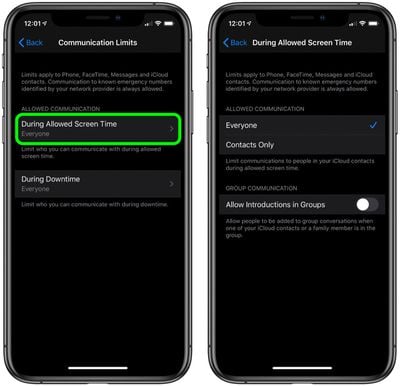
The new options allow contacts only or everyone to be contacted during a child's allotted Screen Time, and there's a toggle that either allows or prevents people from being added to a group chat when a contact or family member is in the group.

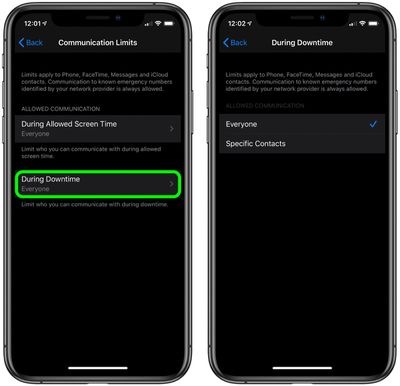
There's also a separate setting for communication limits during downtime, which can be set to allow everyone or just specific contacts. Follow the steps below to set your preferences for your child's Screen Time and Downtime.

How to Set Communication Limits During Allowed Screen Time in iOS

  1. Launch the Settings app on your iPhone or ‌iPad‌.
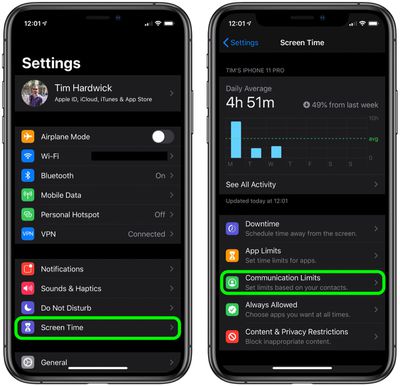
  2. Tap Screen Time.
  3. Tap Communication Limits.
    settings

  4. Tap During Allowed Screen Time.
  5. Under Allowed Communication, select Everyone or Contacts Only.
  6. To allow people to be added to group conversations when an ‌iCloud‌ contact or a family member is in the same group, tap the toggle next to Allow Introductions in Groups so that it's in the green ON position.
    settings

How to Set Communication Limits During Downtime in iOS

  1. Launch the Settings app on your iPhone or ‌iPad‌.
  2. Tap Screen Time.
  3. Tap Communication Limits.
    settings

  4. Tap During Downtime.
  5. Tap Specific Contacts.
  6. Tap Choose From My Contacts and select the people that can be contacted during downtime, then tap Done. If the person you want to allow to be contacted isn't in your contacts, tap Add New Contact and enter their details in a new contact card, then tap Done.
    settings

Note that calls to emergency numbers are always allowed and when placed, will turn off communication limits for 24 hours to make sure children are safe and not prevented from communicating with people in the event of an emergency.


Related Forum: iOS 13

Top Rated Comments

85 months ago
This works pretty well, i've got it set up on my 2 kids devices. One went great, the other didn't want to activate remote contact management no matter what I did...ended up having to log the child out of iCloud on their device, then back in...then request remote contact management again, approved and then it finally took.

I'd just like to see 2 things from screen time to get it closer to perfect - LONGER parental lock codes and a single button "kill switch" that would put a device into downtime with one touch.
Score: 4 Votes (Like | Disagree)
85 months ago
Setting the people your kid is allowed to receive calls from seems dangerous: if I don't have my phone, my phone dies, and I need to contact them from another number, I'm SOL.
Score: 1 Votes (Like | Disagree)
85 months ago
That’s all well and good. BUT if the kids can still change the time or date on their devices at will, it renders a big part of Screentime IE downtime useless.
Score: 1 Votes (Like | Disagree)

Popular Stories

HomePod mini and Apple TV Sage

New Apple TV and HomePod Mini Are 'Nearly Ready' to Launch, New Siri Remote Also Rumored

Sunday May 31, 2026 8:47 am PDT by
New models of the Apple TV 4K and HomePod mini are "nearly ready to go," according to the latest word from Bloomberg's Mark Gurman. Subscribe to the MacRumors YouTube channel for more videos. Both devices have been ready "for months," but Apple is holding off on launching them until the more personalized version of Siri is available, he said. "I am told the hardware for the next Apple TV...
Apple Foldable Thumb

First 'Confirmed' iPhone Ultra Color Allegedly Revealed in Leaked Image

Monday June 1, 2026 4:39 am PDT by
Apple is expected to launch its first foldable iPhone later this year. Rumors suggest the "iPhone Ultra" will come in two color options, and a leaker shared an image today that allegedly shows one of them. Posted on Weibo by the Chinese leaker known as Ice Universe, the image purportedly offers a first glimpse of Apple's foldable in white. The device is believed to have entered early mass...
Meta Ray Ban Glasses

Apple Glasses Reportedly Launching in 'Late 2027' With These Features

Sunday May 31, 2026 9:21 am PDT by
Apple is now aiming to release its first smart glasses in "late 2027," according to the latest word from Bloomberg's Mark Gurman. Meta Ray-Bans He previously said that Apple planned to begin shipping the glasses by early 2027, but he said the product has faced development delays. The glasses will feature "oval-shaped cameras, unique colors, and multiple frame styles," according to Gurman....

🔗 Related Apple News & Rumors

Stay updated with the latest Apple ecosystem news and verified rumors