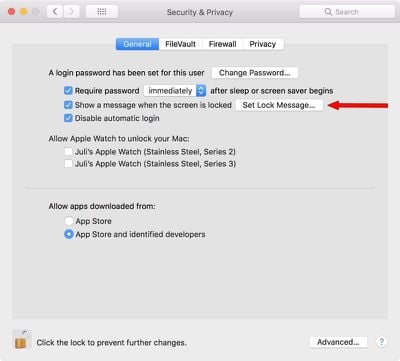
You can set a custom message to appear on the lock screen of your Mac, which is super useful if you ever misplace or lose your Mac. It lets people see who the Mac belongs to as soon as it's opened up, and there's no question about ownership.

You will need an administrator account to create a lock screen message on your Mac, but it's super easy to do.

  1. Click on the "" icon in the menu bar.
  2. Select System Preferences.
  3. Choose Security & Privacy.
  4. Select the "General" tab.
  5. Click on the lock icon at the bottom of the window.
  6. Enter your admin name and password. setlockscreenmessage
  7. Choose "Set Lock Message..."
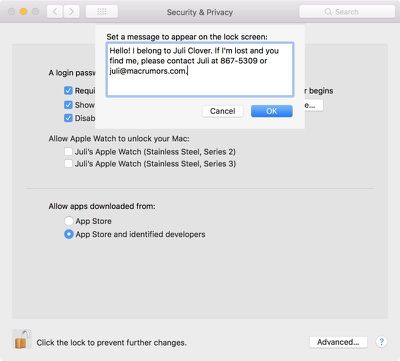
  8. Enter your desired message. lockscreenmessageinput

It's useful to add contact details here, like your email address and phone number or the email address and phone number of someone who can easily get in touch with you in an emergency situation.
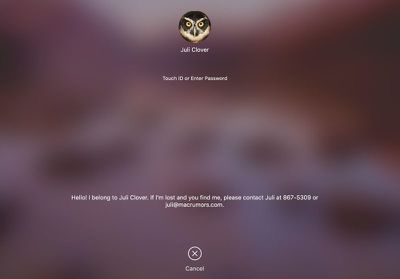
lockscreenmessage

What the lock screen message looks like when your Mac is locked.

If you misplace or Mac or have it stolen, this puts your contact information front and center as soon as your Mac is opened up, so whoever has it can see who it belongs to even before you activate Lost Mode using iCloud. It's also potentially useful in an emergency if someone needs to know who you are and how to get in contact with a loved one.

I'm personally always paranoid about losing my MacBook or having it taken at some location like an airport security lane, so this is a nice way to have instantly identifiable info readily available.


Top Rated Comments

Peapod Avatar
103 months ago
Juli, you stole Jenny's number!
Score: 11 Votes (Like | Disagree)
tigres Avatar
103 months ago
I don't know who you are. I don't know what you want. If you're looking for ransom, I can tell you I don't have money... but what I do have are a very particular set of skills. Skills I have acquired over a very long career. Skills that make me a nightmare for people like you. If you let my MacBook Pro 15" go now, that will be the end of it - I will not look for you, I will not pursue you... but if you don't, I will look for you, I will find you... and I will kill you
Score: 9 Votes (Like | Disagree)
PBG4 Dude Avatar
103 months ago
You know times are lean when rumor sites start making their own content!

Just kidding, I’ve been loving the new tips and tricks articles you’ve been releasing. :-)
Score: 5 Votes (Like | Disagree)
keysofanxiety Avatar
103 months ago
I don't know who you are. I don't know what you want. If you're looking for ransom, I can tell you I don't have money... but what I do have are a very particular set of skills. Skills I have acquired over a very long career. Skills that make me a nightmare for people like you. If you let my MacBook Pro 15" go now, that will be the end of it - I will not look for you, I will not pursue you... but if you don't, I will look for you, I will find you... and I will kill you
Wouldn't work I'm afraid. There's a character limit.


Attachment Image
Score: 5 Votes (Like | Disagree)
jclo Avatar
103 months ago
Yea, she was bragging with her watches. :D

My point was, don't give people too much information, especially thieves. What I spoke of earlier happens a lot more than people realize.

I know Juli meant well but, it is a bad idea, in my opinion.
I personally started using this feature after I was in an airport security line and a woman grabbed my laptop. I saw her and got it back without proving ownership, but if I'd needed to, this would have been an easy way since my name is right there.

This is a valid criticism, though, and some people may not want to use the lock screen message for this reason, but I do think people should know the option is there.

You can also use a Google Voice number and an email with non-identifying info, which will provide reasonable security. I just used a standard phone number and my own email address as an example here. Less identifying contact information is absolutely a valid way to implement this without giving anything away.
Score: 4 Votes (Like | Disagree)
Kabeyun Avatar
103 months ago
Juli, you stole Jenny's number!
The second I saw that I knew I’d be beaten to the punch. Well done!

For those under 40, here’s a dose of 80s goodness:

Score: 4 Votes (Like | Disagree)

Popular Stories

Aston Martin CarPlay Ultra Screen

Apple's CarPlay Ultra to Expand to These Vehicle Brands Later This Year

Sunday February 1, 2026 10:08 am PST by
Last year, Apple launched CarPlay Ultra, the long-awaited next-generation version of its CarPlay software system for vehicles. Nearly nine months later, CarPlay Ultra is still limited to Aston Martin's latest luxury vehicles, but that should change fairly soon. In May 2025, Apple said many other vehicle brands planned to offer CarPlay Ultra, including Hyundai, Kia, and Genesis. In his Powe...
Apple Logo Black

Apple Just Made Its Second-Biggest Acquisition Ever After Beats

Thursday January 29, 2026 10:07 am PST by
Apple today confirmed to Reuters that it has acquired Q.ai, an Israeli startup that is working on artificial intelligence technology for audio. Apple paid close to $2 billion for Q.ai, according to sources cited by the Financial Times. That would make this Apple's second-biggest acquisition ever, after it paid $3 billion for the popular headphone and audio brand Beats in 2014. Q.ai has...
Apple Logo Black

Apple's Next Launch is 'Imminent'

Sunday February 1, 2026 12:31 pm PST by
The calendar has turned to February, and a new report indicates that Apple's next product launch is "imminent," in the form of new MacBook Pro models. "All signs point to an imminent launch of next-generation MacBook Pros that retain the current form factor but deliver faster chips," Bloomberg's Mark Gurman said on Sunday. "I'm told the new models — code-named J714 and J716 — are slated...
14 inch MacBook Pro Keyboard

Apple Changes How You Order a Mac

Saturday January 31, 2026 10:51 am PST by
Apple recently updated its online store with a new ordering process for Macs, including the MacBook Air, MacBook Pro, iMac, Mac mini, Mac Studio, and Mac Pro. There used to be a handful of standard configurations available for each Mac, but now you must configure a Mac entirely from scratch on a feature-by-feature basis. In other words, ordering a new Mac now works much like ordering an...
Apple MacBook Pro M4 hero

New MacBook Pros Reportedly Launching Alongside macOS 26.3

Sunday February 1, 2026 5:42 am PST by
Apple is planning to launch new MacBook Pro models with M5 Pro and M5 Max chips alongside macOS 26.3, according to Bloomberg's Mark Gurman. "Apple's faster MacBook Pros are planned for the macOS 26.3 release cycle," wrote Gurman, in his Power On newsletter today. "I'm told the new models — code-named J714 and J716 — are slated for the macOS 26.3 software cycle, which runs from...