In iOS 17, Safari has gained a new feature called Profiles, which is designed to help separate your browsing sessions into things like Work, School, or Personal. Here's how to use it in the beta and when iOS 17 is released to the general public later this month.
iOS 17 General Safari Feature
In ‌iOS 17‌, Apple expands on Tab Groups with a Profile feature that is designed to let you separate your browsing for different use cases. You can create a "Work" profile and a "Personal" profile, for example, so all of your work-related browsing is kept separate from your personal browsing.

Each profile gets its own icon and silos your history, Tab Groups, Favorites, Private Browsing tabs, and cookies. You can even assign specific extensions to different profiles to optimize your browsing experience based on the task at hand.

How to Create a Safari Profile

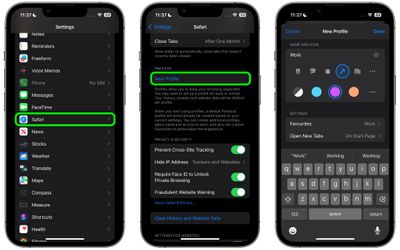
To set up profiles on iPhones running iOS 17, simply follow these steps:

  1. Open the Settings app on you iPhone or iPad.
  2. Scroll down to Safari.
  3. Under the "Profiles" section, tap New Profile.
  4. Select an icon, name, and background color for the profile.

  5. Choose your settings for Favorites and New Tabs.
  6. Tap Done.

safari

When you create a new profile, your device will automatically generate a "Personal" profile to differentiate other browsing sessions conducted outside of the profile you created.

Both profiles and additional ones you create can be edited in the same section of the Settings app. When editing an existing profile, you can also opt to enable any Safari extensions you have installed on your device, as well as delete the profile if desired.

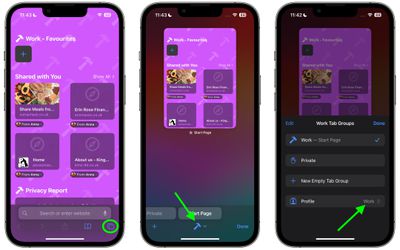
How to Switch Between Profiles in Safari

  1. In Safari, tap the Tabs icon with two overlapping squares.
  2. Tap the middle icon to bring up the active profile's menu.
  3. Tap the Profile option to change which profile is active.
safari

The Safari Profiles feature is available in iOS 17, iPadOS 17 and macOS Sonoma, as well as being part of Safari 17 for macOS Monterey and macOS Ventura. Any profiles you create will be synced across devices logged into the same Apple ID.


Tag: Safari
Related Forums: iOS 17, iPadOS 17

Top Rated Comments

Rygaard Avatar
31 months ago
how about Google maps 5 hours of driving with GPS dont count towards SCREENTIME ??
Score: 7 Votes (Like | Disagree)
Agent OrangeZ Avatar
31 months ago
Why not just give us user profiles for the WHOLE DEVICE? (because that would just make too much sense)
Score: 7 Votes (Like | Disagree)
fwmireault Avatar
31 months ago
I am on the beta, the feature is nicely implemented! You can tie a profile to your focus mode, which is quite useful
Score: 6 Votes (Like | Disagree)
WarmWinterHat Avatar
31 months ago

how about Google maps 5 hours of driving with GPS dont count towards SCREENTIME ??
Yes! Let us exempt certain apps from Screentime. Waze for me.
Score: 6 Votes (Like | Disagree)
TheMacDaddy1 Avatar
31 months ago
I wish they would bring back Safari for Windows. I have to use Windows at work sometimes and because I do I use Chrome across Mac and Windows.
Score: 6 Votes (Like | Disagree)
fatTribble Avatar
31 months ago
This looks like a really cool new feature!
I’m just not sure yet how I’ll use it. ?
Score: 4 Votes (Like | Disagree)

Popular Stories

Aston Martin CarPlay Ultra Screen

Apple's CarPlay Ultra to Expand to These Vehicle Brands Later This Year

Sunday February 1, 2026 10:08 am PST by
Last year, Apple launched CarPlay Ultra, the long-awaited next-generation version of its CarPlay software system for vehicles. Nearly nine months later, CarPlay Ultra is still limited to Aston Martin's latest luxury vehicles, but that should change fairly soon. In May 2025, Apple said many other vehicle brands planned to offer CarPlay Ultra, including Hyundai, Kia, and Genesis. In his Powe...
Apple Logo Black

Apple's Next Launch is 'Imminent'

Sunday February 1, 2026 12:31 pm PST by
The calendar has turned to February, and a new report indicates that Apple's next product launch is "imminent," in the form of new MacBook Pro models. "All signs point to an imminent launch of next-generation MacBook Pros that retain the current form factor but deliver faster chips," Bloomberg's Mark Gurman said on Sunday. "I'm told the new models — code-named J714 and J716 — are slated...
iOS 26

iOS 26.3 and iOS 26.4 Will Add These New Features to Your iPhone

Tuesday February 3, 2026 7:47 am PST by
We are still waiting for the iOS 26.3 Release Candidate to come out, so the first iOS 26.4 beta is likely still at least a week or two away. Following beta testing, iOS 26.4 will likely be released to the general public in March or April. Below, we have recapped known or rumored iOS 26.3 and iOS 26.4 features so far. iOS 26.3 iPhone to Android Transfer Tool iOS 26.3 makes it easier...
Apple MacBook Pro M4 hero

New MacBook Pros Reportedly Launching Alongside macOS 26.3

Sunday February 1, 2026 5:42 am PST by
Apple is planning to launch new MacBook Pro models with M5 Pro and M5 Max chips alongside macOS 26.3, according to Bloomberg's Mark Gurman. "Apple's faster MacBook Pros are planned for the macOS 26.3 release cycle," wrote Gurman, in his Power On newsletter today. "I'm told the new models — code-named J714 and J716 — are slated for the macOS 26.3 software cycle, which runs from...
iOS 26 Home Feature

Apple Gives Final Warning to Home App Users

Tuesday February 3, 2026 8:55 am PST by
In 2022, Apple introduced a new Apple Home architecture that is "more reliable and efficient," and the deadline to upgrade and avoid issues is fast approaching. In an email this week, Apple gave customers a final reminder to upgrade their Home app by February 10, 2026. Apple says users who do not upgrade may experience issues with accessories and automations, or lose access to their smart...