

Unlike Apple Mail, Gmail for iPhone and iPad offers users the facility to send emails that are passcode protected and expire after a specified time. This article explains how it's done.
If you need to send private information to someone over email, it's best to do it securely, which is why Gmail includes an optional "confidential mode" for sending messages of a sensitive nature.
By using Gmail's confidential mode, you can better help protect sensitive information from unauthorized or accidental sharing. That's because Confidential mode messages don't have options to forward, copy, print, or download messages or attachments.
Confidential mode also enhances the privacy and security of your information by allowing you to set a message expiration date, revoke message access at any time, and require a verification code by text to open messages.
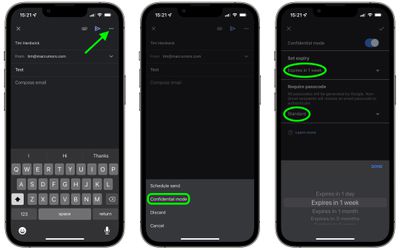
- Launch the Gmail app, and with your mailbox selected, tap the Compose button in the bottom-right corner of the screen.
- Compose your new email by entering the email address that you want to send it to, followed by the subject and message body.
- Tap the More (three dots) button in the top-right of the screen.
- Tap Confidential mode.
- Under "Set expiry," tap Expires in 1 week to choose from the following options: Expires in 1 day, Expires in 1 month, Expires in 3 months, Expires in 5 years. Alternatively, leave the 1-week default option selected.
- Under "Require passcode," tap Standard to choose between SMS passcode and Standard. If you choose Standard, recipients using the Gmail app will be able to open the email directly, while recipients who don't use Gmail will get emailed a passcode. If you choose SMS passcode, you'll need to enter the recipients' phone number and they will receive a passcode by text message.
- Tap the tick in the top-right corner of the screen to finish, then you can finish and send your email.
Once you've set up Confidential mode for your email, you'll see a notice in the email body saying when the content expires. Bear in mind that Confidential emails can't be scheduled.
Note also that while Confidential mode helps prevent recipients from accidentally sharing messages, it can't prevent recipients from taking screenshots or photos of your messages or attachments. Recipients could also use malicious software applications to copy or download messages and attachments. In short, Confidential mode isn't an infallible method of sending emails securely, but it does make them more secure than standard emails.

















































