Apple in iOS 17 has added support for saving screenshots of entire webpage articles and other long-form app content to the Photos app. Keep reading to learn how it's done.

Previously in iOS 16, Apple included an option in the system's screenshot interface to capture scrollable content in apps like Safari and Notes and save it as a multi-page PDF document.
In iOS 17, Apple has extended the facility by adding a "Save to Photos" option to the Full Page screenshot interface, so now you can save scrollable content in one long vertically scrolling image as well.
Note that if the scrollable content is excessively long, the "Save to Photos" option won't appear, but most long-form web articles and notes should not pose a problem. Also, bear in mind that the option to save content as a scrollable image is only available in Apple's own stock apps such as Safari, Notes, and Maps. The following steps show you how to make use of it, using Safari as an example.
- Launch the Safari app on your iPhone or iPad.
- Navigate to the web page that you wish to save as a scrollable image file.
- Press the Home button and the Sleep/Wake button simultaneously to capture a screenshot. If your device doesn't have a Home button – if it's a 2018 iPad Pro or later, for example – press the power button and the volume up button at the same time.
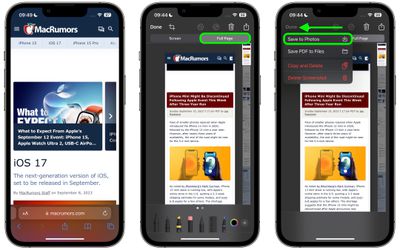
- A preview of the screenshot will pop up in the lower left of the display. Tap it to open up the Instant Markup interface. You'll have about five seconds before it disappears.
- Tap the Full Page tab in the upper right corner of the Markup interface.
- To save the scrolling content as a single image, tap Done, then tap Save to Photos. <(Note that you can also use Markup to edit your image before saving it to the Photos app.)
That's all there is to it. The captured scrollable content will be available as the last image saved in the Photos library.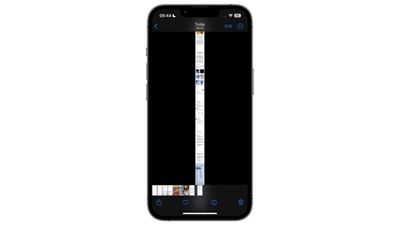
If you want to read the content, simply zoom into it with a double-tap and scroll through it as you would do for a standard webpage.