

How to Save a Full Page or 'Scrolling Screenshot' as a PDF on iPhone and iPad - MacRumorsOpen MenuShow RoundupsShow Forums menuVisit ForumsOpen Sidebar
Skip to Content

How to Save a Full Page or 'Scrolling Screenshot' as a PDF on iPhone and iPad

by

In iOS, Apple has extended the system's built-in screenshot feature to include the ability to save a full web page or "scrolling screenshot" as a multi-page PDF.
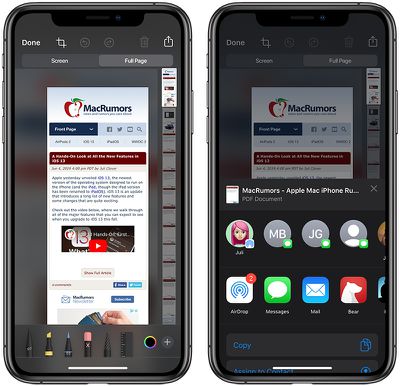
ios13safarisavefullpage
Don't expect this option to appear when using a third-party apps, as it's only available in Apple apps including Safari, Notes, and Maps. With that said, here's how it works, using Safari as an example.

  1. Launch the Safari app on your iPhone or iPad.
  2. Navigate to the web page that you wish to save as a multi-page PDF.
  3. Press the Home button and the Sleep/Wake button simultaneously to capture a screenshot. If your device doesn't have a Home button – if it's a 2018 iPad Pro, for example – press the power button located at the top of the device and the volume up button located on the right of the device at the same time.
    how to save web page as a pdf

  4. A preview of the screenshot will pop up in the lower left of the display. Tap it to open up the Instant Markup interface. You'll have about five seconds before it disappears.
  5. Tap the Full Page tab in the upper right corner of the Markup interface.
  6. To save the PDF, tap Done and then tap Save PDF to Files. To share the PDF, tap the Share button (the square with an arrow pointing out) and select how or who to share it with from the Share screen.
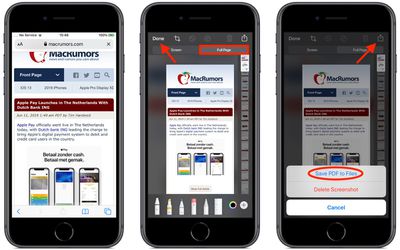
Note that you can also use Markup to edit your PDF before saving or sending it.


Top Rated Comments

94 months ago
okay so let me give you a nice advice how "Creating a PDF" works in almost every situation:

Webpage for example: tap on the share-button and tap on "print". Now pinch out with two fingers the preview... tadaaaa there is your PDF and you can do whatever you want.

If you do it from a clean webpage links will be adopted. If you do it from the PDF Reader mode, links will disappear...

This works everywhere where you can print... enjoy

bernds.blog :)
Score: 7 Votes (Like | Disagree)
e-coli Avatar
94 months ago
I will never, ever understand why PDFs continue to be based on outdated notions of printing and outputting. I do not want a multi-page PDF of a web page. I want a single PDF page. I’m not going to print the thing, and I want it to crop it at my choosing.
Score: 4 Votes (Like | Disagree)
94 months ago
Seems a bit long winded when there’s a Create PDF button on the share menu in Safari


Attachment Image
Score: 4 Votes (Like | Disagree)
Robert.Walter Avatar
94 months ago
I tell you what...we needed iOS 13 a long time ago...nice features we should have had back in iOS 11 but Apple rested on its laurels for far too long.
Dude, IIRC, this feature has been around for more than 2 years, since iOS 11 or so.
Score: 4 Votes (Like | Disagree)
Robert.Walter Avatar
94 months ago
I used this feature more than once since it debuted in iOS 12 (or 11?), and more than once I was disappointed when it cut off the ends of longer articles (and for those was useless.). I don’t know if this was a limitation in the s/w or memory on my iPhone 6S.

Hope this shortcoming (pun not intended) has been overcome in 13 as it’s a useful feature.

I didn’t read article but if it is missing my pro-tip, here it is: to get a cleaner article w/o the embedded ads, put Safari in reader mode (that’s the 3+1/2) horizontal lines at the left of the address window) before you make that pdf.
Score: 3 Votes (Like | Disagree)
furbzv1 Avatar
94 months ago
really like this feature ...l just don't like having the contact row there
Score: 2 Votes (Like | Disagree)

Popular Stories

Apple Watch Ultra 2 Black Titanium

New Apple Watch Series 12 and Apple Watch Ultra 4 Features Revealed

Sunday August 30, 2026 7:54 am PDT by
Bloomberg's Mark Gurman today further outlined what to expect from the Apple Watch Series 12 and Apple Watch Ultra 4 set to be unveiled on September 9. While it was initially rumored that Touch ID may be coming to the Apple Watch this year, Gurman reiterated that he does not expect the Series 12 or Ultra 4 to have any major design changes compared to the current Series 11 and Ultra 3 models. ...
Mac mini vs Studio Feature Sans Text 1

Apple Caught Off Guard by AI Demand for Mac Mini and Mac Studio

Sunday August 30, 2026 8:52 am PDT by
Apple's unusually timed announcement of new Mac mini and Mac Studio models this week was driven by unexpectedly strong enterprise appetite for AI hardware, according to The Information. Apple normally releases new Mac models in the autumn, closer to October or November, making this week's announcement unusually early, falling just before the anticipated arrival of new iPhone models. The...
Mac Studio Feature

Apple Seemingly Made a Mistake When Announcing the New Mac Studio

Monday August 31, 2026 11:19 am PDT by
Apple's press release for the new Mac Studio with M5 Max and M5 Ultra chips last week initially stated that the computer had "next-generation SSD architecture built on PCIe Gen 6." However, as spotted by the French blog MacGeneration, Apple removed the PCIe 6.0 mention from the announcement shortly after it was published. The press release still mentions that the new Mac Studio has a...

🔗 Related Apple News & Rumors

Stay updated with the latest Apple ecosystem news and verified rumors










































