How to Make Web Pages in Safari for Mac Easier to Read - MacRumorsOpen MenuShow RoundupsShow Forums menuVisit ForumsOpen Sidebar
Skip to Content

How to Make Web Pages in Safari for Mac Easier to Read

by

safari iconIn Apple's Safari web browser, there are several ways to make viewing web pages easier on the eyes. All of them involve adjusting the font size or the zoom level that Safari applies when it loads web page content, which can be helpful if you're using a small screen or a large display set at a high resolution.

To increase or decrease the zoom level of both text and images when viewing web pages in Safari, press Command and the + (plus) or - (minus) keys. You can also click on View in Safari's menu bar and select Zoom In or Zoom Out.

Alternatively, you can add zoom buttons to Safari's interface: Right-click (or Ctrl-click) on a space in the Safari toolbar and click Customize Toolbar.... Then drag the Zoom buttons in the dropdown to the space you just clicked on the toolbar. Click Done to finish.
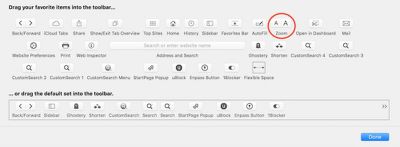
safari zoom buttons
If you want to keep images at the same size and only adjust web page font size on the fly, press Option-Command and the + or - keys. You can also hold down the Option key and click on View in the Safari menu bar, which changes the Zoom options to Make Text Bigger and Make Text Smaller.

Safari will remember your zoom and font size settings until you clear your History. To do so, click Safari in the menu bar, select Clear History..., then click the Clear History button.

Set the Zoom Level for a Specific Website

Once the zoom level is set up for a particular site, Safari applies it automatically whenever you visit it. Here's how it's done.

  1. Navigate to the site that you want to adjust the zoom level for.

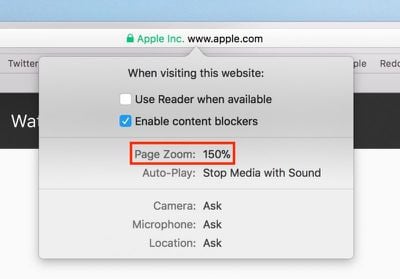
  2. Right-click on the URL or website name that appears in the address bar, and select Settings for This Website. Alternatively, click Safari in the menu bar and you'll see the same option just below Preferences.

  3. Click the Zoom Level percentage and select a new level from the dropdown menu. (Anything greater than 100 zooms in; anything less than 100 zooms out.)
    safari web page zoom

Set the Zoom Level for All Web Pages

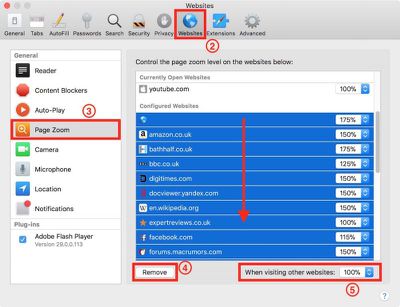
  1. In Safari's menu bar, select Safari -> Preferences....

  2. Click the Websites tab.

  3. Click Page Zoom in the General column.

  4. Clear any Configured Websites in the list by highlighting them all with your mouse button and then selecting Remove.

  5. Click the When visiting other websites pop-up menu and choose a percentage to suit.safari zoom all websites

Set Your Own Zoom Level With a Style Sheet

If none of Safari's zoom level increments sit right with your eyes, here's a way to set your own percentage.

  1. Open the TextEdit application.

  2. Click New Document.

  3. In TextEdit's menu bar, select Format -> Make Plain Text.

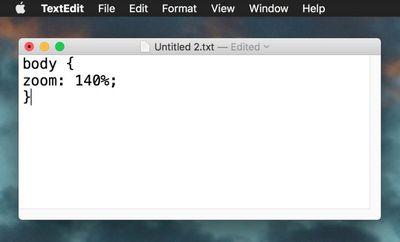
  4. Copy and paste the following CSS code into the file, changing the zoom number to your preferred percentage level:
    body {
    zoom: 140%;
    }

    safari zoom style sheet css

  5. In TextEdit's menu bar, select File -> Save....

  6. Name the file safari zoom.css or whatever you like, just make sure it retains a .css suffix.

  7. Choose a location for the file and click Save.

  8. Back in Safari, select Safari -> Preferences... in the menu bar.

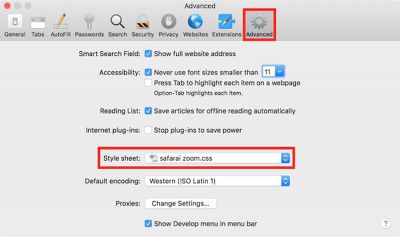
  9. Select the Advanced tab.

  10. Click the Style sheet dropdown menu and select Other....

  11. Navigate to the location of your saved CSS file, select it, and click Choose.safari style sheet

From now on, Safari will default to the zoom level specified in your style sheet file, which you can edit at any time.

Force Websites to Use Bigger Font Sizes

Finally, there's an option in Safari that lets you force websites to display text using a minimum font size, without affecting the zoom level.

  1. In Safari's menu bar, select Safari -> Preferences....

  2. Select the Advanced tab.

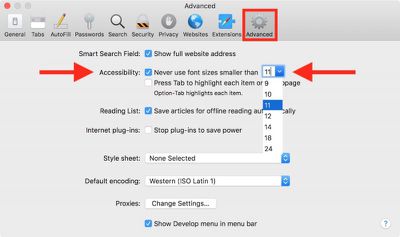
  3. In the Accessibility section, check the box next to Never use font sizes smaller than: and select a font size in the dropdown.safari font size limiter
Tag: Safari

Top Rated Comments

CarlJ Avatar
113 months ago
@MacRumors : There's also the feature (originally from Safari on iOS?) where you can two-finger double-tap on a column of text and Safari will zoom in on that column. I use that All. The. Time. It gets the part I want to look at right then, it's crazy easy to do, and you can switch back with the same gesture.

I also use the Cmd-Opt-+ sometimes, with Cmd-0 to reset to normal size (regardless of how many '+' or '-' you've done).
Score: 2 Votes (Like | Disagree)

Popular Stories

Switch to Safari

Apple Explains Why Chrome Users Should 'Switch to Safari'

Tuesday October 13, 2026 5:29 am PDT by
Apple has launched a new "Switch to Safari" marketing campaign that encourages Chrome users to switch to Safari as their web browser of choice on the Mac. "Safari is a more powerful and private browser than Chrome," says Apple. Apple has a new "Switch to Safari" page on its website that outlines more than 10 reasons that Chrome users should switch to Safari, including faster performance...
safari iphone duo webkit

Apple Wants to Fix Safari's Cramped Layout on iPhone Duo

Saturday October 24, 2026 9:58 pm PDT by
Apple is considering changes to Safari on the iPhone Duo that would give websites access to more of the outer display, although the company has yet to settle on an approach. The challenge is allowing pages to occupy the area beneath Safari's side-mounted controls without making parts of a website inaccessible. In an Friday, October 23 WebKit post, Apple's Jen Simmons explained that an...
Switch to Safari

Apple Addresses Web Security Threat, Working on macOS Update With Additional Fix

Sunday October 25, 2026 4:07 pm PDT by
Earlier this month, a security researcher discovered that private cryptographic keys associated with eight of Indian company eMudhra's intermediate certificate authority (CA) certificates were weak. The compromised keys could have allowed attackers to impersonate legitimate websites, potentially putting users' sensitive information at risk. However, there is currently no evidence that the keys...
Latest Stories
Apple Watch Ultra 4 Hits All-Time Low Price With Amazon's $99 Discount
16 hours ago
Reminder: Apple's Big Discount on Beats 360 Ear Cushions Ends Today
17 hours ago
Here's a New Tour of Apple's HomeView Software
17 hours ago
Apple Reveals New iPad Mini's Battery Capacity
18 hours ago
Top Stories: Apple's Big MacBook Pro, iPad mini and iMac Updates
19 hours ago
'Pluribus' Season 2 Reportedly Starts Production Today
1 day ago
iPhone 18 Pro Sales Surge in China, Offsetting Decline in U.S. and Japan
1 day ago
HomeView Software 27.2: Wallpapers, Control Center, and More
1 day ago
Apple Alerts Stores to iPhone Duo's Display Cracking Issue
1 day ago
iOS 27.3 Will Enable These Apple Intelligence Features in China
1 day ago
Apple Says iOS 27.3 Beta Coming Next Week
1 day ago
Apple's Flash Storage Suppliers Are Finally 'Getting Their Revenge'
2 days ago
14 New Things Your iPhone Can Do in iOS 27.2
2 days ago
iPhone Duo Review: One Week Later
2 days ago
Samsung Mocks iPhone Duo Display Cracks in New Ad Campaign
2 days ago
The MacRumors Show: OLED MacBook Pro, iPad Mini 8, and More
2 days ago
MacBook Pro With Touch Display: 15 More Details Revealed
2 days ago
Russia Places Apple on State Surveillance Registry
2 days ago
Halloween Weekend Brings Discounts on Apple Accessories and Pre-Orders
2 days ago
Apple Has Released More Than 25 New Products in the Past Two Months
2 days ago
Local Code Launches as Free, Private AI Assistant Tool for Mac
2 days ago
Apple Acquires Ascend.io
2 days ago
HomePod Mini 2 Launches Today: All the New Features
2 days ago
AirTag 2 4-Pack Drops to New Low Price of $69.99
2 days ago
Rian Johnson's iPhone Camera App Goes Viral
2 days ago
Where Did All the iPhone Duos Go? Mostly to Apple's Stores
2 days ago
Apple's Touchscreen MacBook Pro Could Ship 1.5M Units in 2027
2 days ago
New Apple TV 4K and iPad Mini: RAM Amounts Revealed
2 days ago
Apple Executive Comments on New iPad Mini Lacking 120Hz Display
3 days ago
Here's a Hands-On Look at HomePod Mini 2's New Two-Tone Colors
3 days ago

🔗 Related Apple News & Rumors

Stay updated with the latest Apple ecosystem news and verified rumors