In iOS 15 as well as Safari 15 for macOS Big Sur and macOS Catalina, Apple introduced some Safari interface design changes that haven't been universally welcomed. Fortunately, Apple has made some of these changes optional, such as the ability to disable tab bar coloring.

safari 15 tinting

Tab bar coloring on (left) versus coloring off (right) in dark mode

Tab bar coloring, or website tinting, happens when the color of Safari's interface changes around the tabs, bookmark, and navigation button areas to match the color of the website you're viewing.

The idea behind tinting is that it allows the browser interface to fade into the background and create a more immersive experience. However, the effect doesn't always look great, especially if you have several windows arranged on your desktop. Happily, Apple chose to include an option to turn it off.

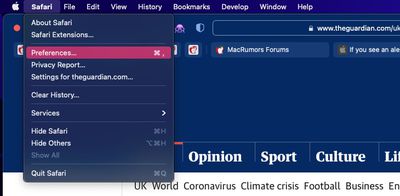
  1. Launch Safari, then select Safari -> Preferences... from the menu bar.
    safari preferences

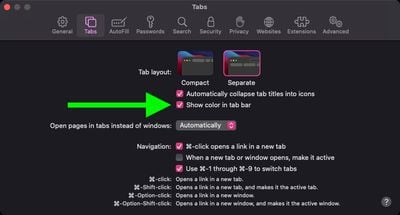
  2. Select the Tabs panel.
  3. Uncheck the box next to Show color in tab bar.
    safari

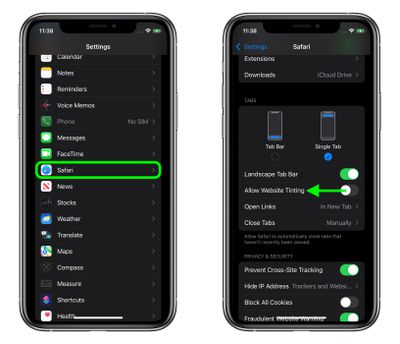
If you're using Safari in iOS 15, you can find the same option in Settings -> Safari. Under the "Tabs" section, turn off the switch next to Allow Website Tinting. On iPadOS 15, this option is called Show Color in Tab Bar, just like in Safari 15 for macOS.
settings
In previous versions of iOS, Apple included a "Show Color in Tab Bar" accessibility setting, which basically had the same effect as the new "Allow Website Tinting" toggle. The fact that Apple made the option more prominent suggests user aversion to tinting is more common than previously thought.


Tag: Safari

Top Rated Comments

007 Junior Avatar
57 months ago
I'm constantly confused whether a dark grey tab is active or not active. This is bad UI design.
Score: 37 Votes (Like | Disagree)
Woyzeck Avatar
57 months ago
Those were the times when widgets looked like widgets and not like artwork or content. Btw. for the newcomers: Apple was once great in user interface design.
Score: 16 Votes (Like | Disagree)
jb-net Avatar
57 months ago
Both look terrible. I can't decide turning it on or off.

Why did Apple ruin a once great user interface on Mac? I want the Safari 14 Taskbar und Tabbar back.
Score: 16 Votes (Like | Disagree)
Apple Knowledge Navigator Avatar
57 months ago
Disabling this was one of the first things that I did. Entirely form over function.
Score: 12 Votes (Like | Disagree)
project_2501 Avatar
57 months ago
The logic of colouring the current tab dark is so wrong!

Look at the following. Which tab is current?

Previously, and as per all good UI design, the lighter tab looks on top and current. Not the darker one.

Yet Apple made this idiotic change with apparently no consultation or input from design professionals. Bonkers.


By comparison look at Firefox. It is blooming clear which tab is the current one.


How does one revert / fix this Apple Safari behaviour?

Attachment Image

Attachment Image
Score: 11 Votes (Like | Disagree)
NewUsername Avatar
57 months ago
I think it looks good on iOS but awful on macOS.
Score: 10 Votes (Like | Disagree)

Popular Stories

Aston Martin CarPlay Ultra Screen

Apple's CarPlay Ultra to Expand to These Vehicle Brands Later This Year

Sunday February 1, 2026 10:08 am PST by
Last year, Apple launched CarPlay Ultra, the long-awaited next-generation version of its CarPlay software system for vehicles. Nearly nine months later, CarPlay Ultra is still limited to Aston Martin's latest luxury vehicles, but that should change fairly soon. In May 2025, Apple said many other vehicle brands planned to offer CarPlay Ultra, including Hyundai, Kia, and Genesis. In his Powe...
Apple Logo Black

Apple's Next Launch is 'Imminent'

Sunday February 1, 2026 12:31 pm PST by
The calendar has turned to February, and a new report indicates that Apple's next product launch is "imminent," in the form of new MacBook Pro models. "All signs point to an imminent launch of next-generation MacBook Pros that retain the current form factor but deliver faster chips," Bloomberg's Mark Gurman said on Sunday. "I'm told the new models — code-named J714 and J716 — are slated...
iOS 26

iOS 26.3 and iOS 26.4 Will Add These New Features to Your iPhone

Tuesday February 3, 2026 7:47 am PST by
We are still waiting for the iOS 26.3 Release Candidate to come out, so the first iOS 26.4 beta is likely still at least a week or two away. Following beta testing, iOS 26.4 will likely be released to the general public in March or April. Below, we have recapped known or rumored iOS 26.3 and iOS 26.4 features so far. iOS 26.3 iPhone to Android Transfer Tool iOS 26.3 makes it easier...
Apple MacBook Pro M4 hero

New MacBook Pros Reportedly Launching Alongside macOS 26.3

Sunday February 1, 2026 5:42 am PST by
Apple is planning to launch new MacBook Pro models with M5 Pro and M5 Max chips alongside macOS 26.3, according to Bloomberg's Mark Gurman. "Apple's faster MacBook Pros are planned for the macOS 26.3 release cycle," wrote Gurman, in his Power On newsletter today. "I'm told the new models — code-named J714 and J716 — are slated for the macOS 26.3 software cycle, which runs from...
iOS 26 Home Feature

Apple Gives Final Warning to Home App Users

Tuesday February 3, 2026 8:55 am PST by
In 2022, Apple introduced a new Apple Home architecture that is "more reliable and efficient," and the deadline to upgrade and avoid issues is fast approaching. In an email this week, Apple gave customers a final reminder to upgrade their Home app by February 10, 2026. Apple says users who do not upgrade may experience issues with accessories and automations, or lose access to their smart...