How to Remove Tracking Information From URLs in Safari - MacRumorsOpen MenuShow RoundupsShow Forums menuVisit ForumsOpen Sidebar
Skip to Content

How to Remove Tracking Information From URLs in Safari

by

Starting in iOS 17, iPadOS 17, and macOS Sonoma, Safari can remove tracking parameters from URLs in order to prevent cross-website tracking. Keep reading to learn how it works and how to control the setting for both Private and non-Private Browsing modes.
safari icon blue banner
Apple has updated Safari in its latest operating systems so that now it can remove tracking parameters in web addresses. When a tracking parameter is detected while browsing or copying a link, Safari strips the identifying components of the URL, while leaving the rest intact. The links still work as expected, but no longer have unique identifiers.
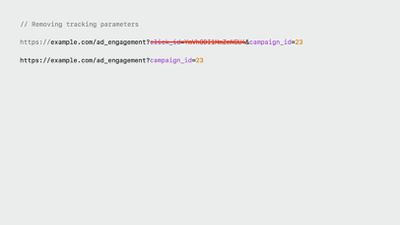
Safari Link Tracking Prevention

Example of a URL before and after the tracking parameters are removed

Apple calls this new feature Advanced Tracking and Fingerprinting Protection, and it also works for links shared in Apple's Messages and Mail apps. The following series of steps show you how to enable the feature for all browsing in Safari on iPhone, iPad, and macOS Sonoma. Turning it on will ensure that all URLs opened will strip the additional tracking information that's sometimes pasted on to the end of a URL.

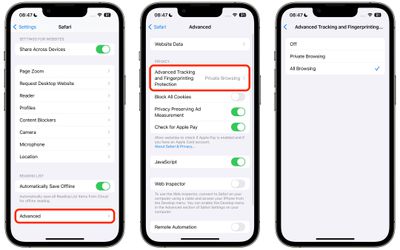
How to Remove All URL Tracking in Safari on iPhone and iPad

  1. Launch the Settings app on your device.
  2. Scroll down and tap Safari.
  3. Scroll all the way down and tap Advanced.
  4. Under "Privacy," tap Advanced Tracking and Fingerprint Protection.
  5. Tap All Browsing.

settings

How to Remove All URL Tracking in Safari on Mac

  1. Launch Safari on your Mac.
  2. Select Safari -> Settings... in the menu bar.
  3. Click the Advanced tab.
  4. Make sure the box is checked next to Use advanced tracking and fingerprint protection, then choose in all browsing from the dropdown menu.
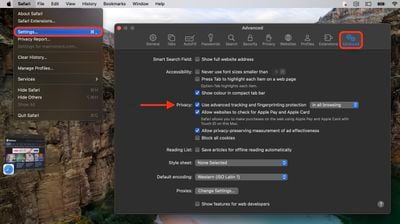
settings

In iOS 17, Apple also added a secondary authentication requirement to access Private Browsing tabs. Click the link to learn how it works.

Tag: Safari

Popular Stories

Apple Event Logo

Apple Working on All-New Operating System

Wednesday July 29, 2026 11:39 am PDT by
Apple is developing an all-new operating system that is essentially a mix of tvOS, watchOS, and iOS, according to Bloomberg's Mark Gurman. In a report this week, he said the operating system will feature a grid of icons, widgets, and apps, along with customizable clock faces. The new software platform is intended for Apple's long-rumored smart home hub. With built-in facial recognition,...
imac video apple feature

Apple Made Its Second-Biggest Acquisition Ever This Year

Wednesday July 29, 2026 12:03 pm PDT by
Apple this year acquired Israeli startup Q.ai for close to $2 billion, according to the Financial Times. That would make this Apple's second-biggest acquisition ever, after it paid $3 billion for the popular headphone maker Beats in 2014. This is also the largest known Apple acquisition since the company purchased Intel's smartphone modem business and patents for $1 billion in 2019. Q.ai...

Dynamic Island iPhone 18 Pro Feature

iPhone 18 Pro: Twelve Changes Coming to Apple's Next Flagship

Thursday July 30, 2026 3:43 am PDT by
We're less than two months out from the launch of Apple's premium next-generation smartphone lineup, and while we're not expecting a dramatic change in terms of functionality, there are still several enhancements rumored to be coming to the iPhone 18 Pro and iPhone 18 Pro Max. One thing worth noting is that Apple is reportedly planning a major change to its iPhone release cycle this year,...

🔗 Related Apple News & Rumors

Stay updated with the latest Apple ecosystem news and verified rumors