How to Remove Third-Party Accounts Like Facebook From Your Mac - MacRumorsOpen MenuShow RoundupsShow Forums menuVisit ForumsOpen Sidebar
Skip to Content

How to Remove Third-Party Accounts Like Facebook From Your Mac

by

With the release of iOS 11, Apple nixed its built-in integration with Twitter, Facebook, Flickr, and Vimeo, a feature that allowed iPhone and iPad users to store their third-party account information and access it within apps that needed to use those services.

facebook mac
The equivalent feature remains in macOS High Sierra, although Apple has removed it completely from macOS 10.14 Mojave, which many users are likely to welcome in light of the recent data scandal.. While we wait for macOS Mojave to be released in the fall, this article shows you how to manually remove third-party accounts like Facebook from Macs running macOS 10.13.

Note that the following guide only deletes associated third-party accounts at the system level of your Mac – you'll still be able to access your Facebook account and related data by logging into Facebook.com (where you can delete your account permanently) or via the official iOS app, for example.

How to Remove Third-Party Accounts From macOS

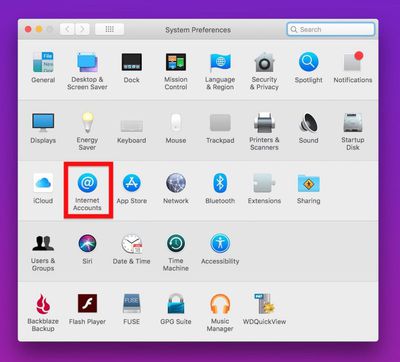
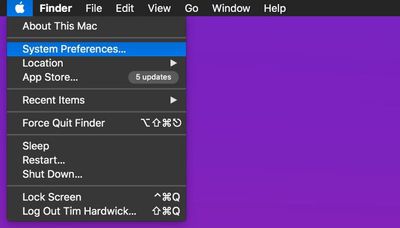
  1. Click the Apple symbol () in the menu bar on your Mac's desktop and select System Preferences....
    delete facebook from your mac

  2. Click the Internet Accounts preference pane.
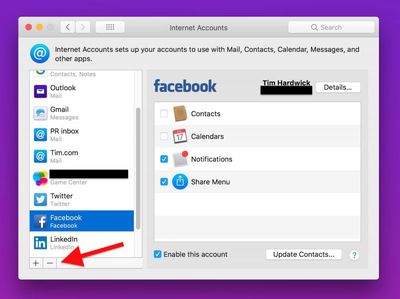
    delete facebook from your mac1

  3. Click an account in the left column that you want to remove.
    delete facebook from your mac2

  4. Click the minus (–) button at the bottom of the column.

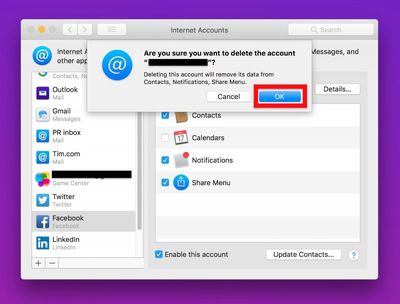
  5. Click OK in the "Are you sure..?" dialog.
    delete facebook from your mac3

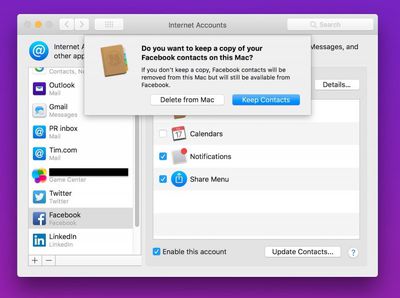
  6. You may be asked if you want to keep any contacts related to the account stored in your iCloud Contacts. To nuke those too, click Delete from Mac.
    delete facebook from your mac4

Top Rated Comments

109 months ago
I am very surprised that Apple even let them integrate in the first place. Common sense kicked in later and it was removed. If Steve Jobs was around he would not have allowed for it to be integrated.

How would we know what Steve Jobs would do?
Score: 2 Votes (Like | Disagree)
109 months ago
Delete account LOL - I never signed up!
Score: 1 Votes (Like | Disagree)
stylinexpat Avatar
109 months ago
Great move by Apple by getting rid of Facebook. Zuckerberg can not be trusted. Getting rid of spy apps integrated into IOS was a great move by Apple. Should never have been integrated in the first place. Those that want the are free to download the app on their own from the App Store.
Score: 1 Votes (Like | Disagree)
Morgenland Avatar
109 months ago
As TallGuyGT has said, try the new password method. Although, don''t be surprised to see them reappear randomly when they want... if they want, where they want...
whoever wants ;-)
Score: 1 Votes (Like | Disagree)
randomgeeza Avatar
109 months ago
As TallGuyGT has said, try the new password method. Although, don''t be surprised to see them reappear randomly when they want... if they want, where they want...
Score: 1 Votes (Like | Disagree)
109 months ago
I actually like having the Mac integration, primarily because it downloads profile pictures of my contacts from social media (LinkedIn preferred). Makes using Messages much easier.

The notifications are hit and miss. I think the sites intentionally make it hard to moderate the number of notifications. But easy to dismiss and often helpful.
[doublepost=1525434143][/doublepost]
That’s not permanent however. If you ever restore the OS, or buy a new Mac and setup as new, those accounts come back. So how do we delete them for real?
Delete them from System Prefernces, then go into Keychain Access to delete any references. It’s hit or miss - it can often be a challenge to delete system-type data from iCloud. I have old passwords reappear that I’ve deleted many times.

A brute force method is to clear the iCloud Keychain, sign out of all your iCloud devices, and then change your password. This has been more effective for me in clearing iCloud data that doesn’t have a direct way of deleting.
Score: 1 Votes (Like | Disagree)

Popular Stories

Meta

Meta Agrees to Limit Teens' Time on Facebook and Instagram, Calls on TikTok and YouTube to Match

Wednesday August 26, 2026 3:28 pm PDT by
Meta today said it will implement major changes to Facebook and Instagram's child safety features as part of a settlement agreement with almost all U.S. states. Here's what will change for users under 18 on Instagram and Facebook if the agreement is approved. Time Limit - Teens will have a two-hour daily time limit on Facebook and Instagram, though it can be overridden by a parent. The...
iOS 27 Next to iPhone

Here's When iOS 27 Rolls Out Today in Every Time Zone [Update: It's Out]

Sunday September 13, 2026 3:00 am PDT by
Update 10:04 a.m.: iOS 27 is rolling out now, though it may take a bit for all users to see it, so keep checking! Apple is about to release iOS 27, which will finally deliver more advanced Siri AI capabilities as well as a variety of other refinements, improvements, and new features to iPhones. It's Apple's biggest software update of the year, and Apple announced at Wednesday's iPhone event...
iOS 27 Icon iPhone

iOS 27 Available Now With These 8 New Features

Monday September 14, 2026 9:00 am PDT by
Update — 10 a.m. Pacific Time: Apple has released iOS 27. During its iPhone 18 Pro and iPhone Duo event last week, Apple announced that iOS 27 will be released widely on Monday, September 14. iOS 27 should be available around 10 a.m. Pacific Time / 1 p.m. Eastern Time today via the Settings app, under General → Software Update. Below, we have highlighted eight new features and...

🔗 Related Apple News & Rumors

Stay updated with the latest Apple ecosystem news and verified rumors