

How to Reinstall macOS on an M1 MacBook Air, M1 MacBook Pro, and M1 Mac Mini - MacRumorsOpen MenuShow RoundupsShow Forums menuVisit ForumsOpen Sidebar
Skip to Content

How to Reinstall macOS on an M1 MacBook Air, M1 MacBook Pro, and M1 Mac Mini

by

If you experience issues running macOS Big Sur on your M1 MacBook Air, ‌M1‌ MacBook Pro, or ‌M1‌ Mac mini, or you want to start afresh with a new installation of the operating system, you'll need to boot into macOS Recovery, which is done slightly differently on Apple Silicon Macs compared to Intel machines.

Keep reading to learn how to start up in macOS Recovery and reinstall macOS 11 Big Sur on your M1-powered machine.

How to Start Up in macOS Recovery and Reinstall macOS

  1. Turn on your Mac and continue to press and hold the power button until you see the startup options window.
  2. Select the gear icon labeled Options, then click Continue.
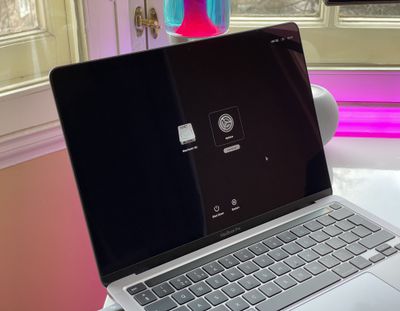
    m1 mac startup options

  3. If you're asked to select a user that you know the password for, select the one you want, click Next, then enter their admin password.
  4. When macOS Recovery has loaded, select Reinstall macOS from the utilities window.
    reinstall macos m1

  5. Click Continue and follow the installer's instructions.
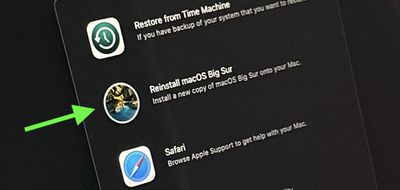
If the installer offers you a choice between installing on Macintosh HD or Macintosh HD Data, choose Macintosh HD.

Once the macOS installation process is underway, your Mac may restart a show a progress bar several times, and the screen might be empty for minutes at a time. These restart events can be expected and aren't anything to worry about. If the installer doesn't see your disk, or says it can't install on your Mac or volume, you may need to erase the disk first using Disk Utility.

Note that if you erased your ‌M1‌ Mac before updating to ‌macOS Big Sur‌ 11.0.1, you might be unable to reinstall macOS from macOS Recovery. A message might say "An error occurred while preparing the update. Failed to personalize the software update. Please try again." If this happens, Apple suggests creating a bootable installer using another Mac, otherwise you'll have to follow a more technical process involving Terminal to restore your Mac.


Popular Stories

m6 a20 pro chips

iPhone 18 Pro: Everything M6 Tells Us About the A20 Chip

Saturday September 5, 2026 9:00 am PDT by
Apple announced the M6 chip last week, just ahead of its September iPhone event, providing the clearest indication yet of what the A20 will bring to the iPhone 18 lineup. Apple silicon generations share much of their architecture across the A-series and the M-series, so a new A-series chip normally functions as a partial preview of the M-series chip that follows it. This year the order...

a20 pro chip

Apple Unveils A20 Pro as First 2nm Smartphone Chip

Wednesday September 9, 2026 10:22 am PDT by
Apple today revealed the A20 Pro chip in the iPhone 18 Pro and iPhone 18 Pro Max, built on a brand new architecture using 2nm process technology. Apple described the A20 Pro as "an exceptional chip that sets a new bar for mobile computing." The chip has a 6-core CPU design with two new super cores that Apple says are up to 20% faster, calling them "desktop class" and "the fastest in any...
apple silicon gray

Leaked Images Give First Look at Apple's AI Servers

Wednesday August 26, 2026 9:34 am PDT by
Images claiming to show the inside of an Apple-made AI server, believed to power Private Cloud Compute, surfaced online this week, offering a first look at how the hardware is laid out. The images were shared earlier this week by the X user @hsuchingpo, an account with a track record of Apple hardware and prototype leaks. Captioned simply "Apple M5 Server," the leaker said the hardware is "mo...

🔗 Related Apple News & Rumors

Stay updated with the latest Apple ecosystem news and verified rumors











































