How to Reduce Google Chrome's Memory and CPU Usage - MacRumorsOpen MenuShow RoundupsShow Forums menuVisit ForumsOpen Sidebar
Skip to Content

How to Reduce Google Chrome's Memory and CPU Usage

by

Google's Chrome browser has long been criticized for being a system resource hog, which is why Chromium developers have been busy working on ways to free up memory and keep things running smoothly when users have multiple windows and tabs open.
google chrome memory energy saver
The latest effort in that regard comes in the form of Memory Saver, a new feature that deactivates open tabs you haven't used in a while so that the tabs you are using offer the smoothest possible experience. With Memory Saver enabled, your inactive tabs remain open, and when you access an inactive tab, it reloads automatically.

Google claims the new Memory Saver feature means Chrome uses up to 40% and 10GB less memory. The company says the new performance setting is particularly good at keeping active video and gaming tabs running smoothly.

Google is rolling out Memory Saver mode over the next several weeks globally for Windows, macOS, and ChromeOS, but not everyone will see it yet. Fortunately, if the new Settings -> Performance menu is not visible for you, you can activate it manually by using the experimental features in Chrome Flags. The steps below show you how.

How to Enable Memory Saver Mode in Chrome

Before you proceed, be sure to bookmark any important tabs and save anything important that you're working on in Chrome, then update the browser to the latest version available (109.0.5414.119 as of writing).

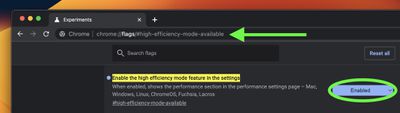
  1. Launch Chrome and paste the following into the address bar: chrome://flags/#high-efficiency-mode-available
  2. Next to "Enable the high efficiency mode feature in the settings", change the Default setting to Enabled, then restart Chrome.
    chrome

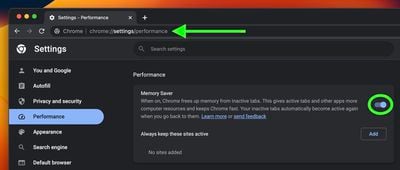
  3. Now paste the following into the address bar: chrome://settings/performance
  4. In the new "Performance" menu, toggle the switch next to Memory Saver to enable it.
    chrome

  5. Restart Chrome for the changes to take effect.
After you've done that, Memory Saver will be working in the background to free up memory for other tasks. You can can control the mode at any time by clicking Settings in the three-dot menu and selecting the "Performance" sub-menu. It's also here that you can stop Chrome from deactivating specific sites, using the Add button next to "Always keep these sites active."

Google cautions that there are a few settings and activities that may prevent tab deactivation. They include active audio calls or video playback, screen shares, page notifications, active downloads, partially filled forms, and connected devices via USB or Bluetooth.

How to Enable Energy Saver Mode in Chrome

Apart from Memory Saver, Google is also rolling out an Energy Saver mode that makes Chrome automatically limit battery draining tasks when the battery hits 20 percent. It does this by reducing its image capture rate and other background tasks, so you may notice changes in gaming and video performance. Google advises turning it on to extend your device's battery for a long road trip or plane ride.

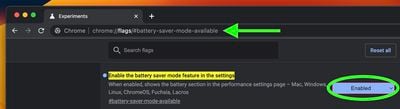
The mode can be toggled on or off in the same "Performance" page in Settings. If you don't see it and don't want to wait for it to roll out to you, simply follow the same steps as above, but replace the address in Step 1 with chrome://flags/#battery-saver-mode-available and select Enabled next to "Enable the battery saver mode feature in the settings," then restart the browser.
chrome
Have you had success with the new Memory Saver or Energy Saver modes in Chrome? Let us know in the comments.

Tags: Chrome, Google

Top Rated Comments

49 months ago
Step 1: uninstall Chrome
Score: 92 Votes (Like | Disagree)
jonnysods Avatar
49 months ago
Solution = MS Edge. It’s my main browser now, been using it for a year and a bit, very impressed.
Score: 43 Votes (Like | Disagree)
krspkbl Avatar
49 months ago
Another tip: You don't need to use Chrome. If you really need to use a Chromium browser for whatever reason then at least use Edge. If you care about the future of the internet and your privacy then you should not be using Chromium at all and that means using Safari (if you don't care about Privacy) or Firefox (If you do care about Privacy) . If anything happens to Firefox or Safari then Google will basically own the internet.
Score: 40 Votes (Like | Disagree)
49 months ago
I don’t really understand the logic behind having 10 (or 100) browser tabs active in the background. Seems unnecessary and sloppy to me.
A few tabs, OK, but a dozen or more?
Score: 30 Votes (Like | Disagree)
49 months ago
The fact that this statement exists is wild

“Google claims the new Memory Saver feature means Chrome uses up to 40% and 10GB less memory.”

My brother in Christ how do you consume up to 10GB of memory in the first place
Score: 22 Votes (Like | Disagree)
49 months ago
"How to Reduce Google Chrome's Memory and CPU Usage"

Step 1: Don't use Chrome

Done
Score: 17 Votes (Like | Disagree)

Popular Stories

Switch to Safari

Apple Explains Why Chrome Users Should 'Switch to Safari'

Tuesday October 13, 2026 5:29 am PDT by
Apple has launched a new "Switch to Safari" marketing campaign that encourages Chrome users to switch to Safari as their web browser of choice on the Mac. "Safari is a more powerful and private browser than Chrome," says Apple. Apple has a new "Switch to Safari" page on its website that outlines more than 10 reasons that Chrome users should switch to Safari, including faster performance...
google synthid

Google's SynthID AI Detector is Now Available to Everyone

Wednesday October 7, 2026 4:42 pm PDT by
Google today said it is making its SynthID Detector available to everyone for identifying content created using AI. SynthID Detector first rolled out to members of the media last year, and it is now available worldwide in English. SynthID Detector is a website that lets users upload a photo, video, or audio file to determine whether it has a SynthID watermark that identifies it as...
General App Store South Korea Feature Feature

South Korea Rules Against Apple Over App Store Payment Rules

Wednesday October 28, 2026 9:00 am PDT by
South Korea has fined Apple 20.8 billion won ($15.5 million) and ordered it to let developers link to external payment options from their apps, The Associated Press reports. The Korea Media and Communications Commission found that Apple and Google effectively require developers to use their payment systems, violating a 2021 law intended to allow alternatives. Google was fined 42.9 billion...



Latest Stories
Apple Watch Ultra 4 Hits All-Time Low Price With Amazon's $99 Discount
11 hours ago
Reminder: Apple's Big Discount on Beats 360 Ear Cushions Ends Today
11 hours ago
Here's a New Tour of Apple's HomeView Software
11 hours ago
Apple Reveals New iPad Mini's Battery Capacity
13 hours ago
Top Stories: Apple's Big MacBook Pro, iPad mini and iMac Updates
14 hours ago
'Pluribus' Season 2 Reportedly Starts Production Today
20 hours ago
iPhone 18 Pro Sales Surge in China, Offsetting Decline in U.S. and Japan
21 hours ago
HomeView Software 27.2: Wallpapers, Control Center, and More
1 day ago
Apple Alerts Stores to iPhone Duo's Display Cracking Issue
1 day ago
iOS 27.3 Will Enable These Apple Intelligence Features in China
1 day ago
Apple Says iOS 27.3 Beta Coming Next Week
1 day ago
Apple's Flash Storage Suppliers Are Finally 'Getting Their Revenge'
1 day ago
14 New Things Your iPhone Can Do in iOS 27.2
1 day ago
iPhone Duo Review: One Week Later
1 day ago
Samsung Mocks iPhone Duo Display Cracks in New Ad Campaign
1 day ago
The MacRumors Show: OLED MacBook Pro, iPad Mini 8, and More
1 day ago
MacBook Pro With Touch Display: 15 More Details Revealed
1 day ago
Russia Places Apple on State Surveillance Registry
2 days ago
Halloween Weekend Brings Discounts on Apple Accessories and Pre-Orders
2 days ago
Apple Has Released More Than 25 New Products in the Past Two Months
2 days ago
Local Code Launches as Free, Private AI Assistant Tool for Mac
2 days ago
Apple Acquires Ascend.io
2 days ago
HomePod Mini 2 Launches Today: All the New Features
2 days ago
AirTag 2 4-Pack Drops to New Low Price of $69.99
2 days ago
Rian Johnson's iPhone Camera App Goes Viral
2 days ago
Where Did All the iPhone Duos Go? Mostly to Apple's Stores
2 days ago
Apple's Touchscreen MacBook Pro Could Ship 1.5M Units in 2027
2 days ago
New Apple TV 4K and iPad Mini: RAM Amounts Revealed
2 days ago
Apple Executive Comments on New iPad Mini Lacking 120Hz Display
2 days ago
Here's a Hands-On Look at HomePod Mini 2's New Two-Tone Colors
2 days ago

🔗 Related Apple News & Rumors

Stay updated with the latest Apple ecosystem news and verified rumors