

If you have an iPhone 15 Pro or iPhone 15 Pro Max, you can record spatial video for viewing in the Photos app on Apple's Vision Pro headset. Here's how you can do it.
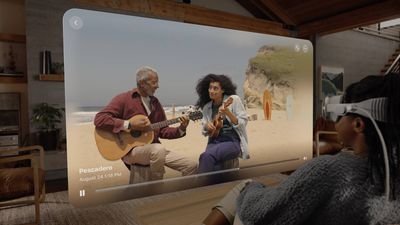
Apple's Vision Pro headset launched in February in the United States, and with the release of iOS 17.2 Apple brought a spatial video recording format to iPhone 15 Pro models that is made to be viewed on Apple's headset.
When viewed on iPhone, spatial video appear as normal videos, but they provide an immersive viewing experience on Vision Pro that is almost three-dimensional. Combined with advanced computational videography techniques and HEVC compression, spatial memories are saved in a relatively compact file size, recorded at 30 frames per second at 1080p, and taking up to 130MB of storage space for one minute of video.
Enabling Spatial Video
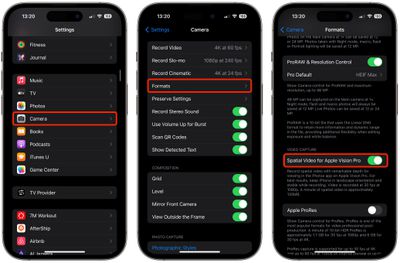
- Open the Settings app on your iPhone 15 Pro or iPhone 15 Pro Max.
- Select Camera ➝ Formats.
- Scroll down to "Video Capture" and toggle on the switch next to Spatial Video for Apple Vision Pro.
Recording Spatial Video
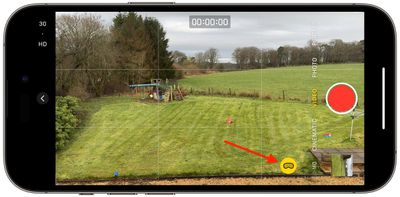
Apple says that spatial video is best recorded when your iPhone is stable and in landscape orientation. In the Camera app, switch to Video recording and then look for the Vision Pro headset icon in the viewfinder. Tap the icon to switch to spatial video mode. When you are ready to record, simply hit the red record button.
Remember that a spatial video will look like a normal video if you watch it in the Photos app on your iPhone. But there is nothing to stop you from recording special moments in spatial video so that you can experience them on Apple Vision Pro when the headset is released in early 2024.
You can find all of the spatial videos you capture within a new Spatial album in the Photos app, and all of your spatial videos will sync across their devices with iCloud.















Top Rated Comments
2. Buy a Nintendo 3DS
3. Record some video
4. Watch it back in 3D
The main lens and a crop of the wide lens are used for stereo vision. The image below show the lenses on the 14 Pro, with the arrows showing the swap between tele and wide on the 15 Pro.
Alternatively use Record3D ('https://record3d.app/') on any iPhone with a Truedepth or LiDAR camera and watch it back on the same device.
That layered look it how they would appear on the AVP because the camera cannot record behind an object in the foreground. What anyone is going to get is something closer to the 3D video scene in Minority Report ('//www.youtube.com/watch?v=OSDqZeI2WlA') than some sort of magical holodeck scene you can walk around.
(Or buy a 3DS!)
However, the 14 Pro will shoot horizontal video after some slight modification: